This chapter provides information about GL to Management Reporting tables in the Oracle Financial Services Data Foundation application.
Topics:
· Overview of the GL to Management Reporting Result Table
· Populating the GL to Management Reporting Result Table
· Overview of the Mapper for GL to Management Reporting Result Table
· Maintaining the Mappers for GL to Management Reporting Result Table
· Loading the Mapper Maintenance from Backend
· Executing the GL to Management Reporting T2T
· Checking the Execution Status for GL to Management Reporting Result Table
· Retrieving the GL to Management Reporting Result T2T Definitions
To load the GL to Management Reporting Result Table, which is the Fact Management Reporting table, from the respective Stage table, use the Table-to-Table (T2T) component and the Map Maintenance component of the Oracle Financial Services Analytical Applications Infrastructure (OFSAAI) framework. The Result table that stores GL to Management Reporting data is:
· FCT_MGMT_REPORTING
To load data into the target table, the Table-to-Table seeded definition is as follows.
Table 54: GL to Management Reporting Result T2T Definition
Source Table Name |
Mapper Table Name |
Target Table Name |
T2T Name |
STG_GL_DATA |
MAP_GL_CODE_REP_LINE |
FCT_MGMT_REPORTING |
T2T_FCT_MGMT_REPORTING_STG_GL_DATA |
The Fact Management Reporting table uses reporting line codes, which are OFSAA specific values that represent each line item of reporting requirements. On the other hand, the Stage GL Data table uses the General Ledger Codes. These General Ledger Codes are user specific values that represent each General Ledger Code of the user data records. Map GL Codes to Reporting Line Codes and then load the Fact Management Reporting target table. You can maintain these mappings through the Map Maintenance component of OFSAAI.
To maintain Mappers through the Map Maintenance component of OFSAAI:
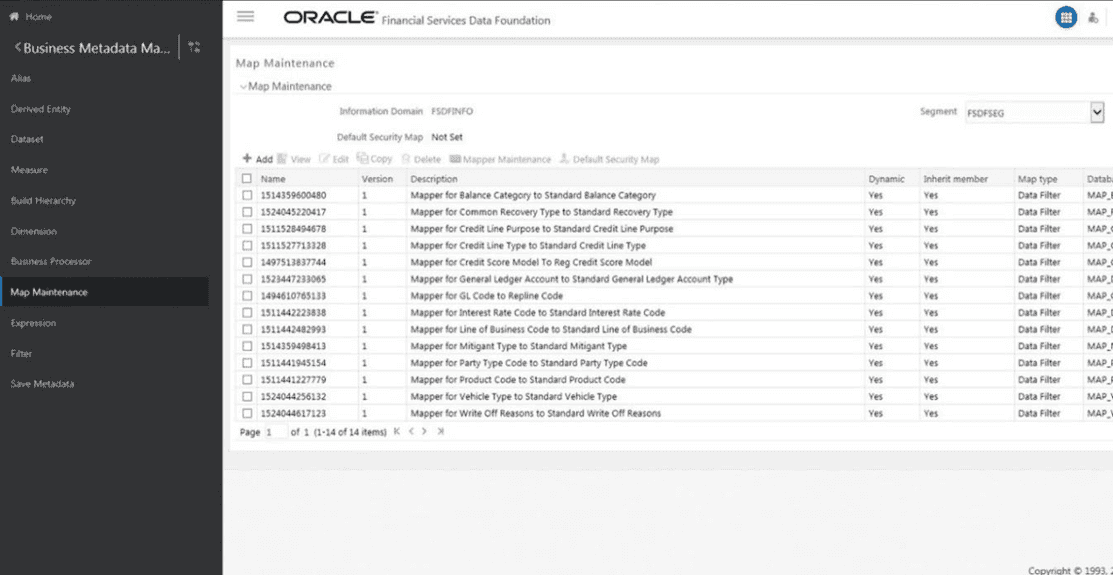
1. Navigate to OFSAAI, select Financial Services data Foundation, select Unified Analytical Metadata, select Business Metedata Management, select Map Maintenance. The Map Maintenance page is displayed.
Figure 66: Navigate to the Map Maintenance page
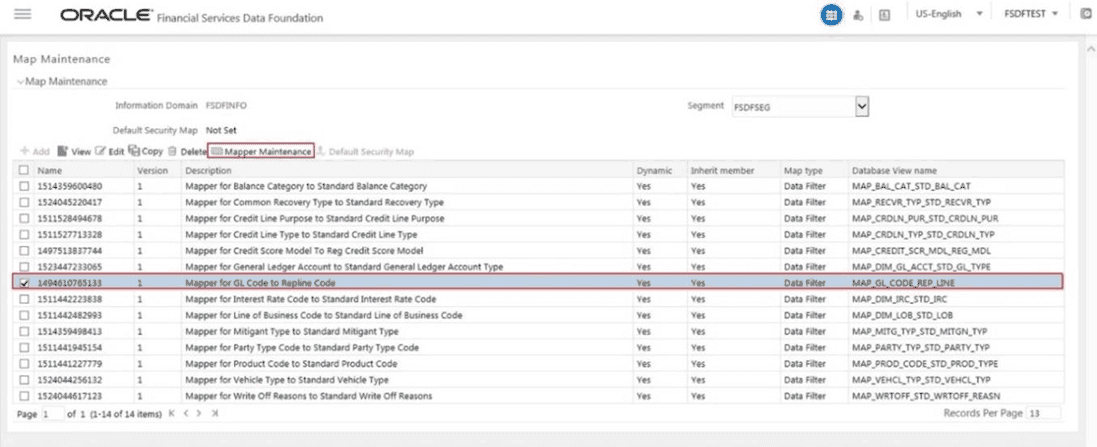
2. Select the mapper record Mapper for GL Code to Repline Code and then click the Mapper Maintenance icon.
Figure 67: Select the Mapper in the Map Maintenance page
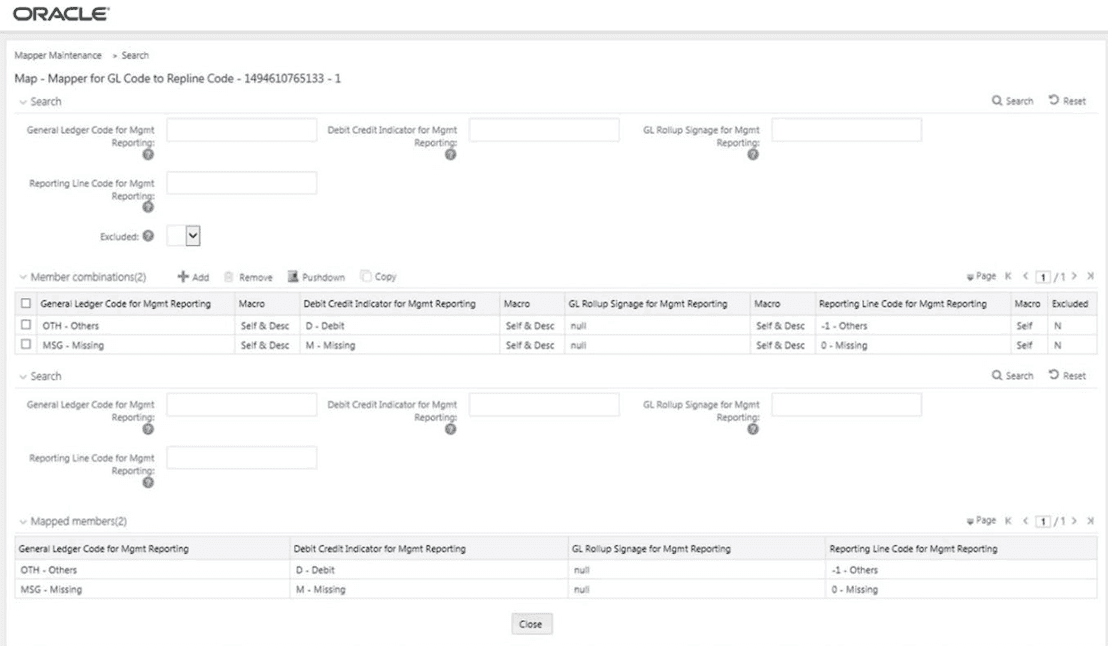
3. The Mapper Maintenance page is displayed. The GL codes OTH and MSG are out-of-the-box mappings. You can maintain the remaining mappings according to the user specific values.
Figure 68: Mapper Maintenance page
Perform these prerequisite steps for maintaining Mappers:
1. Through the SCD process, load the GL Dimension table.
2. In the Metadata Resave section, resave these hierarchies:
§ HMGMT001 - General Ledger Code for Mgmt Reporting
§ HMGMT002 - Debit Credit Indicator for Mgmt Reporting
§ HMGMT003 - GL Rollup Signage for Mgmt Reporting
§ HMGMT004 - Reporting Line Code for Mgmt Reporting
There are four types of mapping combinations. They are:
· Mapping combinations at child hierarchy level
· Mapping combinations at parent and child hierarchy level
· Mapping combinations at parent hierarchy level without Descendants
· Mapping combinations at parent hierarchy level by removing one or more Descendants
The mapping combinations for the General Ledger Code for Mgmt Reporting hierarchy at child member level (individual nodes) are as follows:
· One-to-One mapping with or without Debit Credit Indicator
· Many-to-One mapping with or without Debit Credit Indicator
· Many-to-Many mapping with or without Debit Credit Indicator
The procedures for mapping combinations are as follows.
To map one GL Code to one Reporting Line Code, use the Mapper Maintenance utility. In this utility, select one member in the General Ledger Code for Mgmt Reporting hierarchy, select one member in the Debit Credit Indicator hierarchy with the value Debit or Credit or Missing, and select one member in the Reporting Line Code hierarchy. As a result, during the T2T process, the corresponding data from the Stage GL Data table for the selected GL Code loads into the Fact Management Reporting table.
NOTE |
The conditions for the Debit Credit Indicator column values in the Stage GL Data table are: · The value must be M, when you map GL Code to the Missing (MSG) member. If nothing is mapped, the system automatically sets value to M. · The value must be D, when you map GL Code to the Debit member. · The value must be C, when you map GL Code to the Credit member. |
To perform One-to-One mapping with or without Debit Credit Indicator, follow these steps:
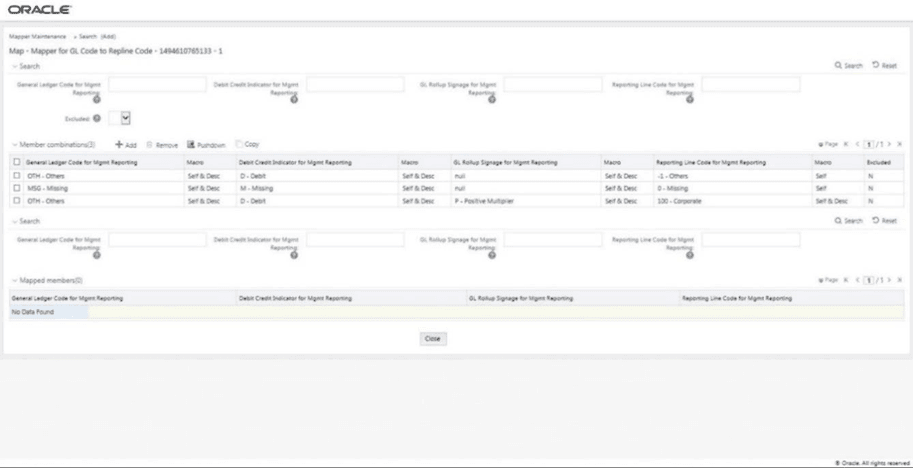
1. In the Mapper Maintenance page, in the Member combinations section, click Add.
Figure 69: Select Add in the Mapper Maintenance page for the One-to-One mapping at child hierarchy level

2. The Add Mappings page is displayed. For illustration, select the member of the General Ledger Code for Mgmt Reporting hierarchy OTH - Others, and the member of the Debit Credit Indicator for Mgmt Reporting hierarchy D - Debit to map to the member of the Reporting Line Code for Mgmt Reporting hierarchy 100 - Corporate with the member of the GL Rollup Signage for Mgmt Reporting hierarchy P - Positive Multiplier.
Figure 70: Add Mappings page for the One-to-One mapping at child hierarchy level

3. To map the members, click Go. The list of mapped members appear at the bottom. To save the mappings, click Save.
Figure 71: Map the members and save the mappings

4. An acknowledgement message is displayed. To confirm saving the mapping, click Yes.
5. The mapped member combinations are listed in the Mapper Maintenance page.
Figure 72: Added mappings listed in the Mapper Maintenance page
To map multiple GL Codes to one Reporting Line Code, use the Mapper Maintenance utility. In this utility, select two or more members in the General Ledger Code for Mgmt Reporting hierarchy, select one member in the Debit Credit Indicator hierarchy with the value Debit or Credit or Missing, and select one member in the Reporting Line Code hierarchy. As a result, during the T2T process, the corresponding data from the Stage GL Data table, for the selected GL Codes, are aggregated and then loaded into the Fact Management Reporting table.
NOTE |
In the T2T process, in the Stage GL Data table, the GL Code aggregation takes place in all the Measure columns that are associated with the Primary Keys. The conditions for the Debit Credit Indicator column values in the Stage GL Data table are: · The value must be M, when you map GL Code to the Missing (MSG) member. If nothing is mapped, the system automatically sets value to M. · The value must be D, when you map GL Code to the Debit member. · The value must be C, when you map GL Code to the Credit member. |
To perform Many-to-One mapping with or without Debit Credit Indicator, follow these steps:
1. In the Mapper Maintenance page, in the Member combinations section, click Add.
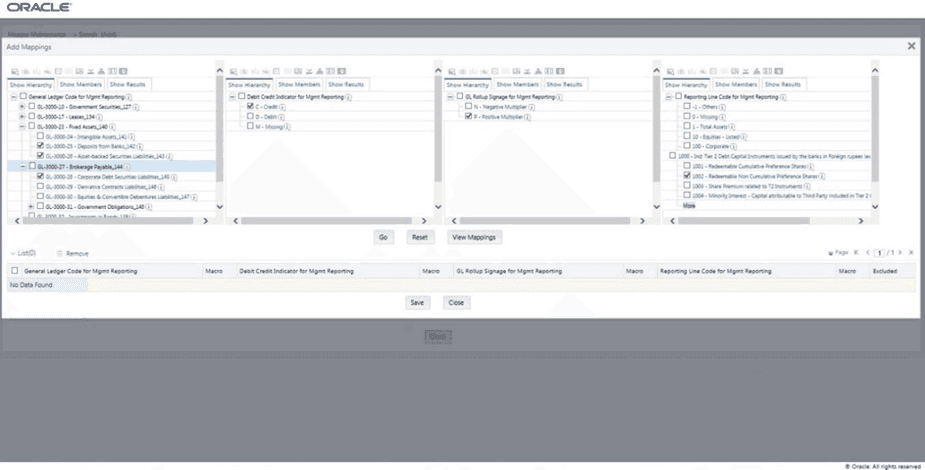
2. The Add Mappings page is displayed. For illustration, select the child members of the General Ledger Code for Mgmt Reporting hierarchy, GL-3000-25 - Deposits from Banks_142, GL-3000-26 – Asset-backed Securities Liabilities_143 and GL-3000-28 - Corporate Debt Securities Liabilities_145, and the member of the Debit Credit Indicator for Mgmt Reporting hierarchy, C - Credit to map to the Reporting Line Code hierarchy member 1002 - Redeemable Non Cumulative Preference Shares with the GL Rollup Signage hierarchy member P - Positive Multiplier.
Figure 73: Add Mappings page for the Many-to-One mapping at child hierarchy level
3. To map the members, click Go. The list of mapped members appear at the bottom. To save the mappings, click Save.
Figure 74: Map the members and save the mappings

4. An acknowledgement message is displayed. To confirm saving the mappings, click Yes.
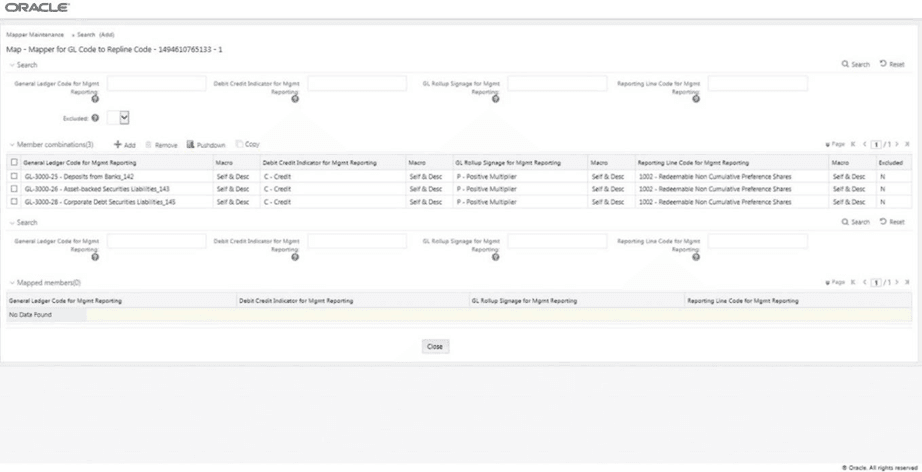
5. The mapped member combinations are listed in the Mapper Maintenance page.
Figure 75: Added mappings listed in the Mapper Maintenance page
To map multiple GL Codes to multiple Reporting Line Codes, use the Mapper Maintenance utility. In this utility, select two or more members in the General Ledger Code for Mgmt Reporting hierarchy, select one member in the Debit Credit Indicator hierarchy with the value Debit or Credit or Missing, and select two or more members in the Reporting Line Code hierarchy. As a result, during the T2T process, the corresponding data from the Stage GL Data table, for the selected GL Codes, are aggregated and then loaded into the Fact Management Reporting table.
NOTE |
In the T2T process, in the Stage GL Data table, the GL Code aggregation takes place in all the Measure columns that are associated with the Primary Keys. The conditions for the Debit Credit Indicator column values in the Stage GL Data table are: · The value must be M, when you map GL Code to the Missing (MSG) member. If nothing is mapped, the system automatically sets value to M. · The value must be D, when you map GL Code to the Debit member. · The value must be C, when you map GL Code to the Credit member. |
To perform Many-to-Many mapping with or without Debit Credit Indicator, follow these steps:
1. In the Mapper Maintenance page, in the Member combinations section, click Add.
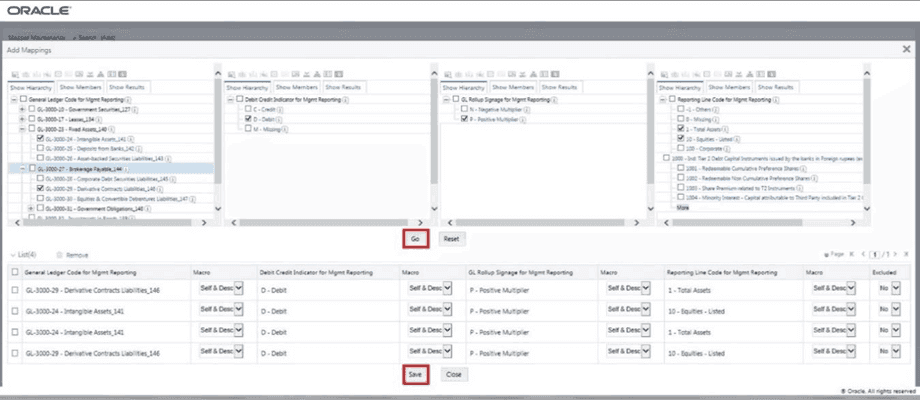
2. The Add Mappings page is displayed. For illustration, select the child members of the General Ledger Code for Mgmt Reporting hierarchy, GL-3000-24 – Intangible Assets_141 and GL-3000-29 – Derivative Contracts Liabilities_145, and the member of the Debit Credit Indicator for Mgmt Reporting hierarchy, D - Debit to map to the child members of the Reporting Line Code for Mgmt Reporting hierarchy, 1 - Total Assets and 10 - Equities Listed with the member of the GL Rollup Signage for Mgmt Reporting hierarchy, P - Positive Multiplier.
Figure 76: Add Mappings page for the Many-to-Many mapping at child hierarchy level

3. To map the members, click Go. The list of mapped members appear at the bottom. To save the mappings, click Save.
Figure 77: Map the members and save the mappings
4. An acknowledgement message is displayed. To confirm saving the mappings, click Yes.
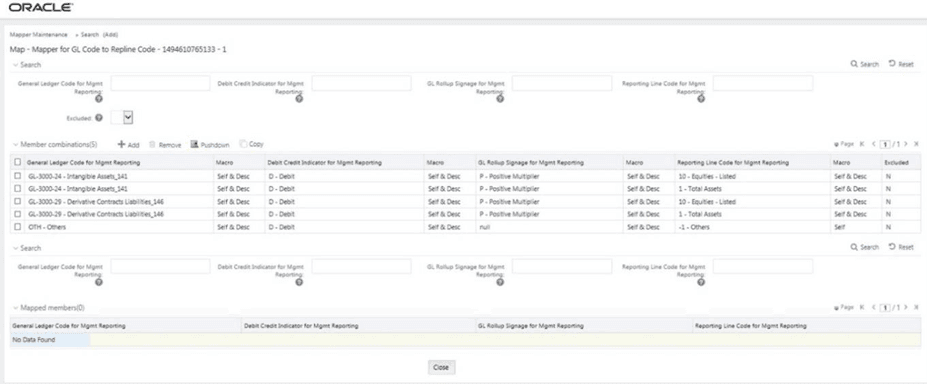
5. The mapped member combinations are listed in the Mapper Maintenance page.
Figure 78: Added mappings listed in the Mapper Maintenance page
The mapping combinations for the General Ledger Code for Mgmt Reporting hierarchy maintained as Parent-Child hierarchy are as follows:
· One Parent to One Reporting Line Code mapping with or without Debit Credit Indicator
· Many Parents to One Reporting Line Code mapping with or without Debit Credit Indicator
· Many Parents to Many Reporting Line Codes mapping with or without Debit Credit Indicator
The procedures for mapping combinations are as follows.
To map one parent GL Code to one Reporting Line Code, use the Mapper Maintenance utility. In this utility, select one parent GL Code, select one member in the Debit Credit Indicator hierarchy with the value Debit or Credit or Missing, and select one member in the Reporting Line Code hierarchy. As a result, during the T2T process, the corresponding data from the Stage GL Data table, for the selected parent GL Codes and their descendants, are aggregated and then loaded into the Fact Management Reporting table.
NOTE |
In the T2T process, in the Stage GL Data table, the aggregation of parent GL Codes and their descendants take place in all the Measure columns that are associated with the Primary Keys. The conditions for the Debit Credit Indicator column values in the Stage GL Data table are: · The value must be M, when you map GL Code to the Missing (MSG) member. If nothing is mapped, the system automatically sets value to M. · The value must be D, when you map GL Code to the Debit member. · The value must be C, when you map GL Code to the Credit member. |
To perform One Parent to One Reporting Line Code mapping with or without Debit Credit Indicator, follow these steps:
1. In the Mapper Maintenance page, in the Member combinations section, click Add.
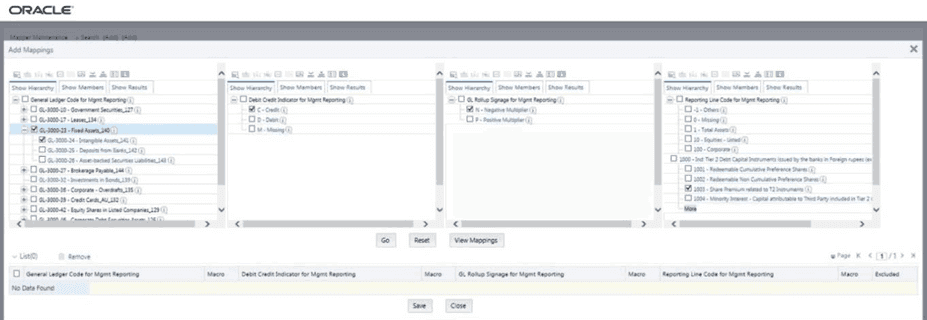
2. The Add Mappings page is displayed. For illustration, select one parent member of the General Ledger Code for Mgmt Reporting hierarchy, GL-3000-23 – Fixed Assets_140 and its child member GL-3000-24 – Intangible Assets_141, and the member of the Debit Credit Indicator for Mgmt Reporting hierarchy C - Credit to map to the member of the Reporting Line Code for Mgmt Reporting hierarchy 1003 – Share Premium related to T2 Instruments with the member of the GL Rollup Signage for Mgmt Reporting hierarchy N - Negative Multiplier.
Figure 79: Add Mappings page for the one parent to one Reporting Line Code mapping at parent and child hierarchy level
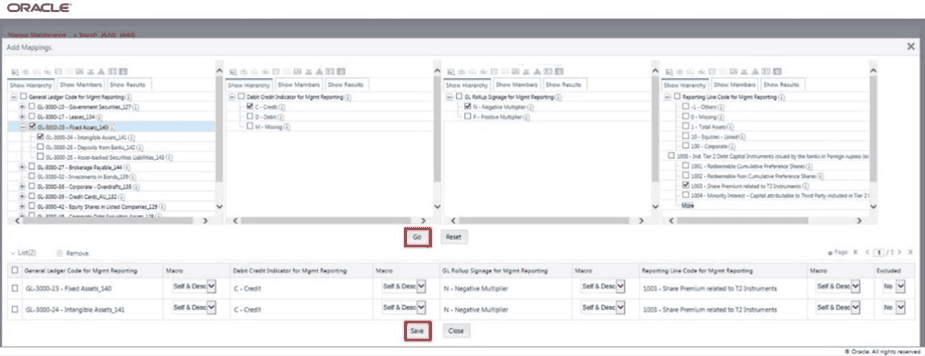
3. To map the members, click Go. The list of mapped members appear at the bottom. To save the mappings, click Save.
Figure 80: Map the members and save the mappings
4. An acknowledgement message is displayed. To confirm saving the mappings, click Yes.
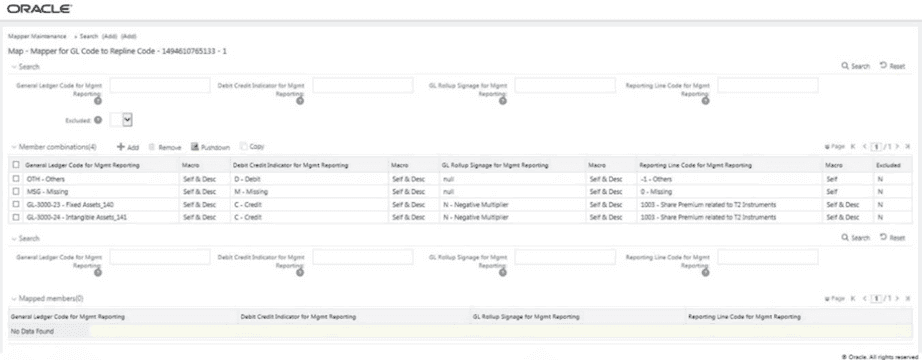
5. The mapped member combinations are listed in the Mapper Maintenance page.
Figure 81: Added mappings listed in the Mapper Maintenance page
To map multiple parent GL Codes to one Reporting Line Code, use the Mapper Maintenance utility. In this utility, select two or more parent GL Codes, select one member in the Debit Credit Indicator hierarchy with the value Debit or Credit or Missing, and select one member in the Reporting Line Code hierarchy. As a result, during the T2T process, the corresponding data from the Stage GL Data table, for the selected parent GL Codes and their descendants, are aggregated and then loaded into the Fact Management Reporting table.
NOTE |
In the T2T process, in the Stage GL Data table, the aggregation of parent GL Codes and their descendants take place in all the Measure columns that are associated with the Primary Keys. The conditions for the Debit Credit Indicator column values in the Stage GL Data table are: · The value must be M, when you map GL Code to the Missing (MSG) member. If nothing is mapped, the system automatically sets value to M. · The value must be D, when you map GL Code to the Debit member. · The value must be C, when you map GL Code to the Credit member. |
To perform Many Parents to One Reporting Line Code mapping with or without Debit Credit Indicator, follow these steps:
1. In the Mapper Maintenance page, in the Member combinations section, click Add.
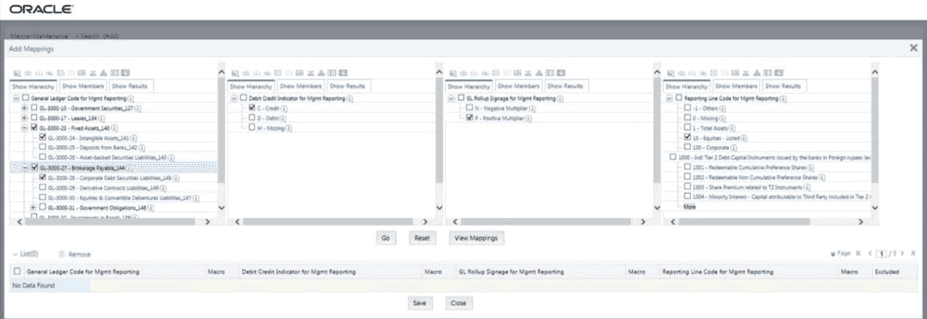
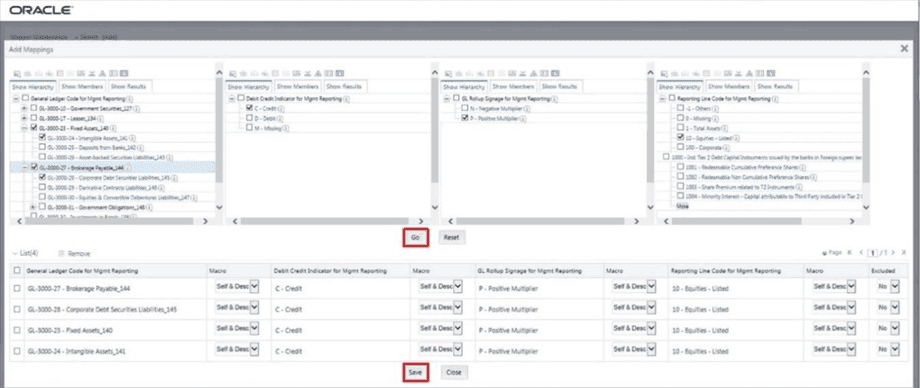
2. The Add Mappings pop-up page appears. For illustration, select parent members of the General Ledger Code for Mgmt Reporting hierarchy, GL-3000-23 – Fixed Assets_140 and GL-3000-27 – Brokerage Payable_144, and their child members GL-3000-24 – Intangible Assets_141 and GL- 3000-28 – Corporate Debt Securities Liabilities_145 respectively, and the member of the Debit Credit Indicator for Mgmt Reporting hierarchy C - Credit to map to the member of the Reporting Line Code for Mgmt Reporting hierarchy 10 – Equities - Listed with the member of the GL Rollup Signage for Mgmt Reporting hierarchy P - Positive Multiplier.
Figure 82: Add Mappings page for the many parents to one Reporting Line Code mapping at parent and child hierarchy level
3. To map the members, click Go. The list of mapped members appear at the bottom. To save the mappings, click Save.
Figure 83: Map the members and save the mappings
4. An acknowledgement message is displayed. To confirm saving the mappings, click Yes.
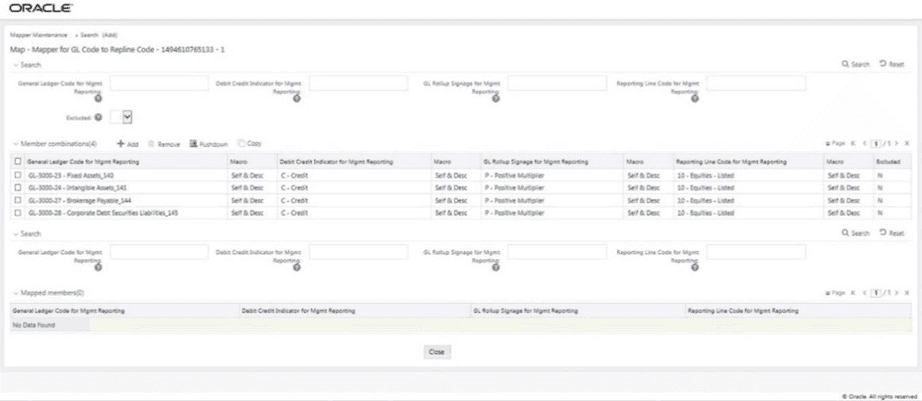
5. The mapped member combinations are listed in the Mapper Maintenance page.
Figure 84: Added mappings listed in the Mapper Maintenance page
To map multiple parent GL Codes to multiple Reporting Line Codes, use the Mapper Maintenance utility. In this utility, select two or more parent GL Codes, select one member in the Debit Credit Indicator hierarchy with the value Debit or Credit or Missing, and select two or more members in the Reporting Line Code hierarchy. As a result, during the T2T process, the corresponding data from the Stage GL Data table, for the selected parent GL Codes and their descendants, are aggregated and then loaded into the Fact Management Reporting table.
NOTE |
In the T2T process, in the Stage GL Data table, the aggregation of parent GL Codes and their descendants take place in all the Measure columns that are associated with the Primary Keys. The conditions for the Debit Credit Indicator column values in the Stage GL Data table are: · The value must be M, when you map GL Code to the Missing (MSG) member. If nothing is mapped, the system automatically sets value to M. · The value must be D, when you map GL Code to the Debit member. · The value must be C, when you map GL Code to the Credit member. |
To perform Many Parents to Many Reporting Line Codes mapping with or without Debit Credit Indicator, follow these steps:
1. In the Mapper Maintenance page, in the Member combinations section, click Add.
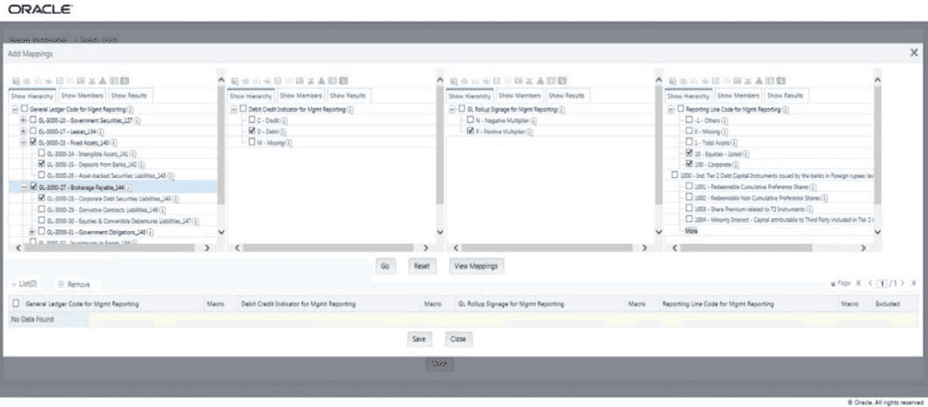
2. The Add Mappings page is displayed. For illustration, select parent members of the General Ledger Code for Mgmt Reporting hierarchy, GL-3000-23 – Fixed Assets_140 and GL-3000-27 – Brokerage Payable_144, and their child members GL-3000-24 – Intangible Assets_141 and GL- 3000-28 – Corporate Debt Securities Liabilities_145 respectively, and the member of the Debit Credit Indicator for Mgmt Reporting hierarchy C - Credit to map to the members of the
Reporting Line Code for Mgmt Reporting hierarchy 10 – Equities - Listed and 100 – Corporate with the member of the GL Rollup Signage for Mgmt Reporting hierarchy P - Positive Multiplier.
Figure 85: Add Mappings page for the many parents to many Reporting Line Codes mapping at parent and child hierarchy level
3. To map the members, click Go. The list of mapped members appear at the bottom. To save the mappings, click Save.
Figure 86: Map the members and save the mappings
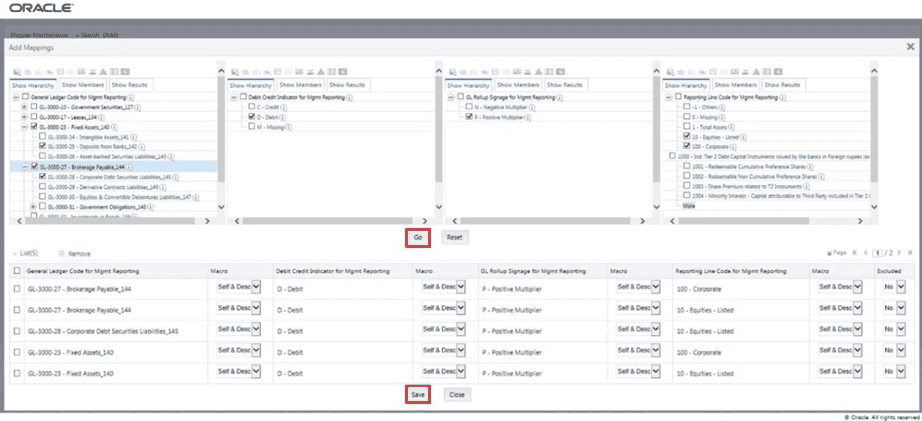
4. An acknowledgement message is displayed. To confirm saving the mappings, click Yes.
5. The mapped member combinations are listed in the Mapper Maintenance page.
Figure 87: Added mappings listed in the Mapper Maintenance page
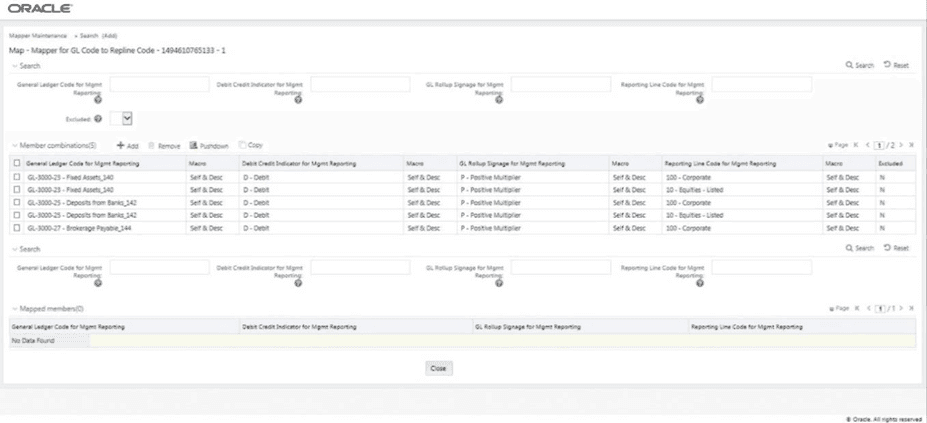
This section explains about the mapping combinations for the General Ledger Code for Mgmt Reporting hierarchy at Parent level hierarchy without Descendants (child members).
To map one parent GL Code without Descendants to one or more Reporting Line Codes, use the Mapper Maintenance utility. In this utility, select one parent GL Code, select one member in the Debit Credit Indicator hierarchy with the value Debit or Credit or Missing, and select one or more members in the Reporting Line Code hierarchy. Then for the GL hierarchy, select Self in the Macro column. As a result, during the T2T process, the corresponding data from the Stage GL Data table, for the selected parent GL Code, is aggregated and then loaded into the Fact Management Reporting table.
NOTE |
In the T2T process, in the Stage GL Data table, the aggregation of parent GL Code takes place in all the Measure columns that are associated with the Primary Keys. The conditions for the Debit Credit Indicator column values in the Stage GL Data table are: · The value must be M, when you map GL Code to the Missing (MSG) member. If nothing is mapped, the system automatically sets value to M. · The value must be D, when you map GL Code to the Debit member. · The value must be C, when you map GL Code to the Credit member. |
To perform One Parent to One or Many Reporting Line Codes mappings without Descendants, follow these steps:
1. In the Mapper Maintenance page, in the Member combinations section, click Add.
2. The Add Mappings page is displayed. For illustration, select one parent member of the General Ledger Code for Mgmt Reporting hierarchy GL-3000-23 – Fixed Assets_140, and the member of the Debit Credit Indicator for Mgmt Reporting hierarchy C - Credit to map to the member of the Reporting Line Code for Mgmt Reporting hierarchy 1 – Total Assets with the member of the GL Rollup Signage for Mgmt Reporting hierarchy P - Positive Multiplier.
Figure 88: Add Mappings page for the one parent to one or many Reporting Line Codes mapping without Descendants
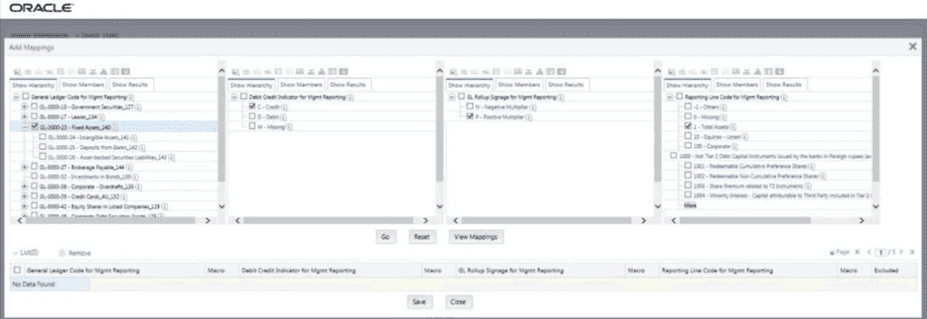
3. To map the members, click Go. The list of mapped member appears at the bottom. To exclude the Descendants of the GL Code from the mapping, in the Macro column, select Self. To save the mappings, click Save.
Figure 89: Map the members and save the mappings by excluding Descendants
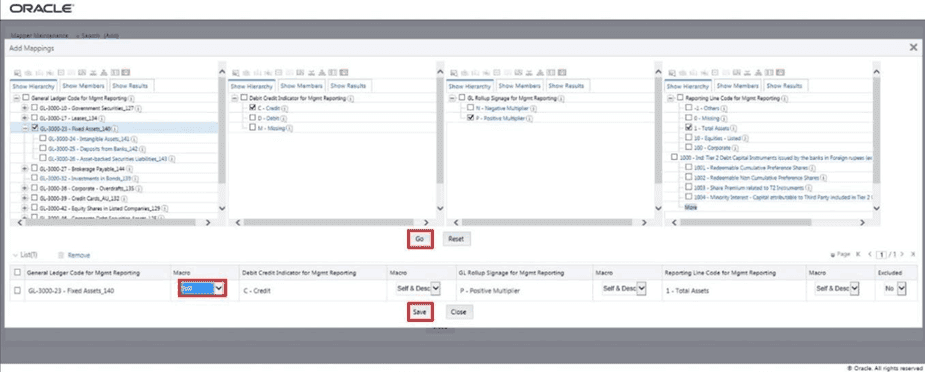
4. An acknowledgement message is displayed. To confirm saving the mappings, click Yes.
5. The mapped member combinations are listed in the Mapper Maintenance page with the Macro value of GL Code as Self.
Figure 90: Added mappings listed in the Mapper Maintenance page
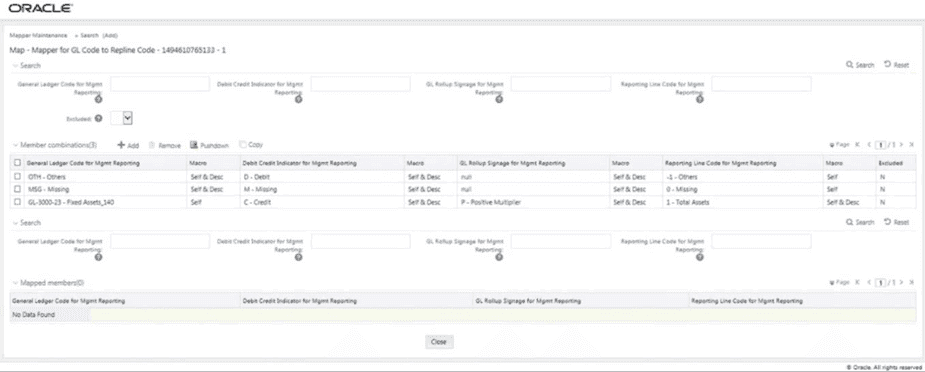
This section explains about the mapping combinations for the General Ledger Code for Mgmt Reporting hierarchy at Parent level hierarchy by removing one or more Descendants (child members).
To map one parent GL Code to one or more Reporting Line Codes by removing one or more Descendants, use the Mapper Maintenance utility. In this utility, select one parent GL Code with one or more Descendants, select one member in the Debit Credit Indicator hierarchy with the value Debit or Credit or Missing, and select one or more members in the Reporting Line Code hierarchy. Then for the GL hierarchy, in the Macro column, select Self & Descendants and in the Excluded column, select either Yes to exclude or No to include the Descendants from mapping. As a result, during the T2T process, the corresponding data from the Stage GL Data table, for the selected parent GL Code and its descendants, is aggregated and then loaded into the Fact Management Reporting table.
NOTE |
In the T2T process, in the Stage GL Data table, the aggregation of parent GL Code and its descendants take place in all the Measure columns that are associated with the Primary Keys. The conditions for the Debit Credit Indicator column values in the Stage GL Data table are: · The value must be M, when you map GL Code to the Missing (MSG) member. If nothing is mapped, the system automatically sets value to M. · The value must be D, when you map GL Code to the Debit member. · The value must be C, when you map GL Code to the Credit member. |
To perform One Parent to One or Many Reporting Line Codes mapping by removing one or more GL Code Descendants, follow these steps:
1. In the Mapper Maintenance page, in the Member combinations section, click Add.
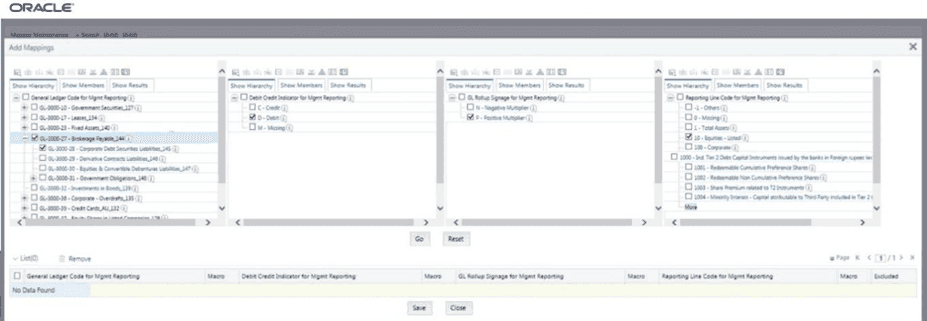
2. The Add Mappings page is displayed. For illustration, select one parent member of the General Ledger Code for Mgmt Reporting hierarchy GL-3000-27 – Brokerage Payable_144 and its child member (Descendant) GL-3000-28 – Corporate Debt Securities Liabilities_145, and the member of the Debit Credit Indicator for Mgmt Reporting hierarchy D - Debit to map to the member of the Reporting Line Code for Mgmt Reporting hierarchy 10 – Equities - Listed with the member of the GL Rollup Signage for Mgmt Reporting hierarchy P - Positive Multiplier.
Figure 91: Add Mappings page for the mapping combinations at parent hierarchy level by removing one or more Descendants
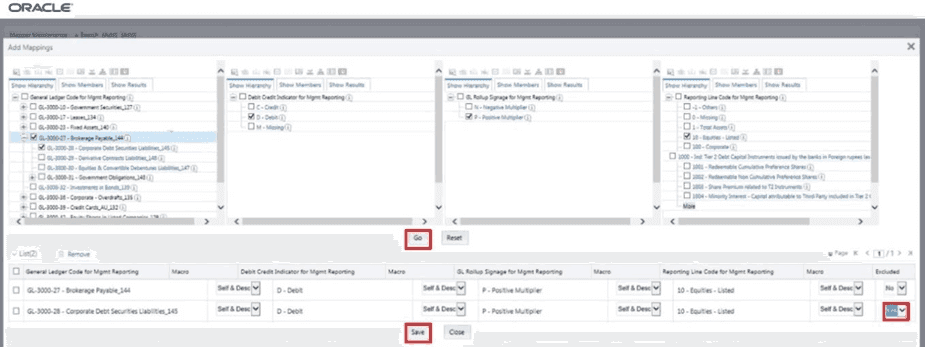
3. To map the members, click Go. The list of mapped members appear at the bottom. To exclude the Descendant of the GL Code from the mapping, in the Macro column, select Self & Descendants, and in the Excluded column, select Yes. To save the mappings, click Save.
Figure 92: Map the members and save the mappings by excluding Descendants
4. An acknowledgement message is displayed. To confirm saving the mappings, click Yes.
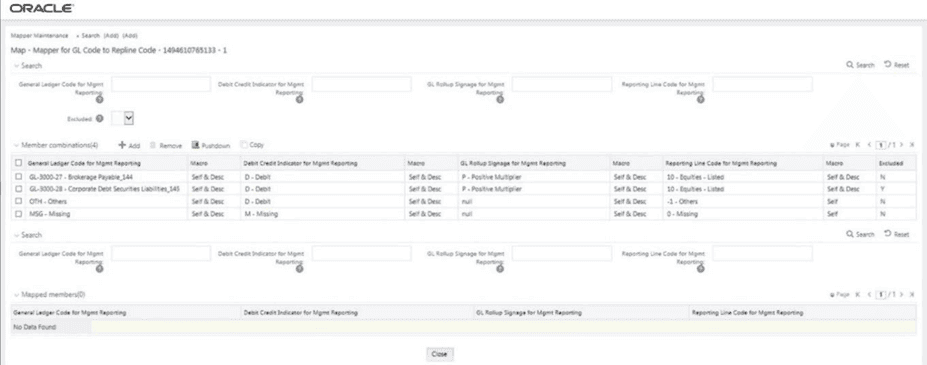
5. The mapped member combinations are listed in the Mapper Maintenance page with the Macro value of GL Code as Self.
Figure 93: Mapped member combinations are listed in the Mapper Maintenance page
To perform mapping more than one time in the Add Mappings page, use the Reset functionality. Follow these steps:
1. In the Mapper Maintenance page, in the Member combinations section, click Add.
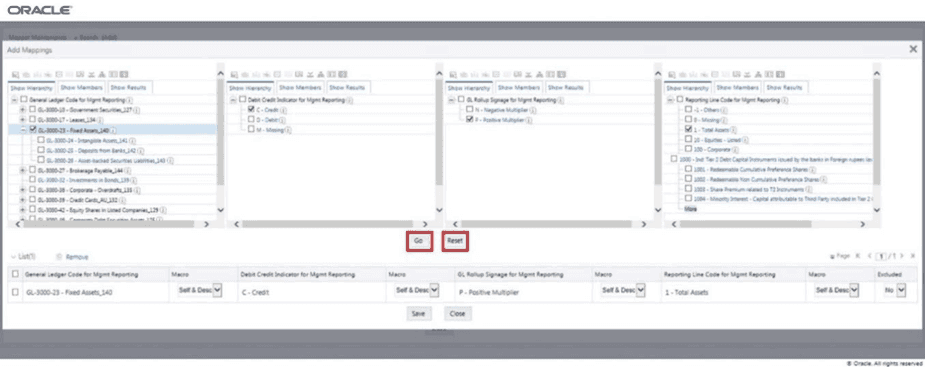
2. The Add Mappings page is displayed. For illustration, select one parent member of the General Ledger Code for Mgmt Reporting hierarchy, GL-3000-23 – Fixed Assets_140, and the member of the Debit Credit Indicator for Mgmt Reporting hierarchy C - Credit to map to the member of the Reporting Line Code for Mgmt Reporting hierarchy 1 – Total Assets with the member of the GL Rollup Signage for Mgmt Reporting hierarchy P - Positive Multiplier. To map the members, click Go. The list of mapped members appear at the bottom. To initiate mapping of another set of member combinations, click Reset.
Figure 94: Add Mappings page for adding mappings for the first set of members and select Reset
3. The mapping selections clear.
Figure 95: Mapping selections clear up
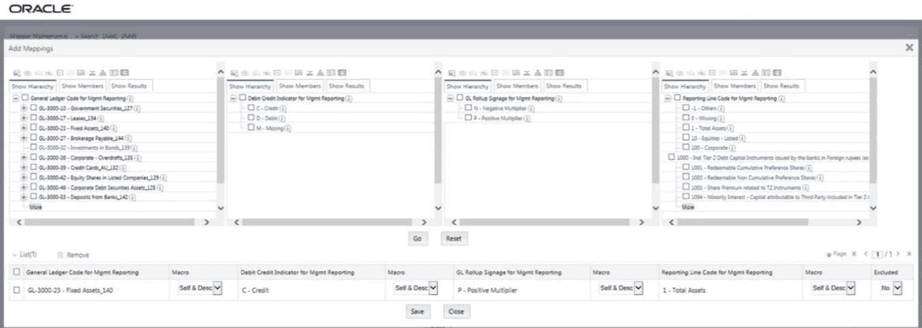
4. For illustration, select parent member of the General Ledger Code for Mgmt Reporting hierarchy, GL-3000-27 – Brokerage Payable_144, and the member of the Debit Credit Indicator for Mgmt Reporting hierarchy D - Debit to map to the member of the Reporting Line Code for Mgmt Reporting hierarchy 10 – Equities - Listed with the member of the GL Rollup Signage for Mgmt Reporting hierarchy P - Positive Multiplier. To map this set of member combinations, click Go. To save the mappings, click Save.
Figure 96: Add Mappings page for adding mappings for the next set of members
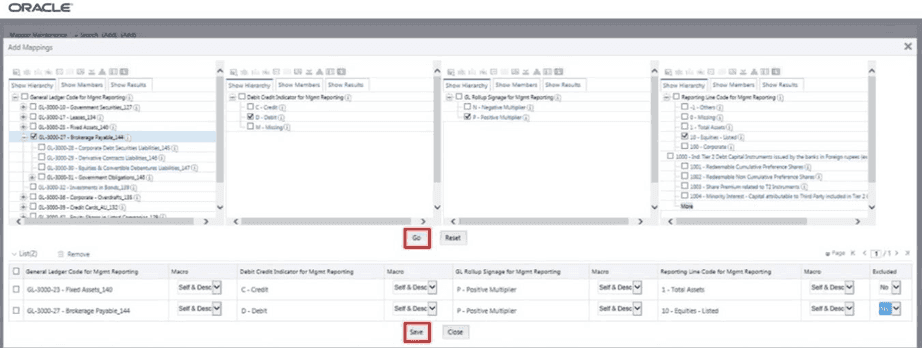
5. An acknowledgement message is displayed. To confirm saving the mappings, click Yes.
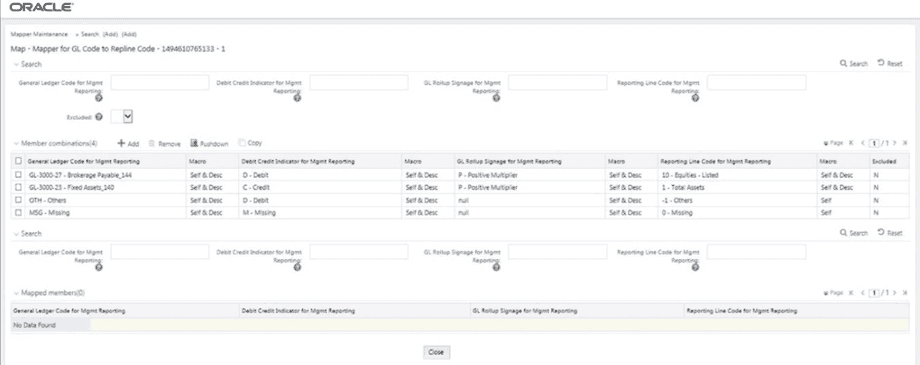
6. Both set of mapped member combinations are listed in the Mapper Maintenance page.
Figure 97: Mapped member combinations are listed in the Mapper Maintenance page
In this illustration, load the MAP_GL_CODE_REP_LINE table in the Atomic schema with the V_MAP_ID value as 1494610765133, and load these column values:
· V_MEMBER_1 = GL Code (values from DIM_GL_ACCOUNT.V_GL_ACCOUNT_CODE).
· V_MEMBER_2 = Debit Credit Indicator (values should be C or D or M).
· V_MEMBER_3 = GL Rollup Signage.
· V_MEMBER_4 = Reporting Line Code (values from DIM_REP_LINE.N_REP_LINE_CD).
Figure 98: Loading the Mapper Maintenance from backend

NOTE |
These values are real business key columns and not display codes. |
The T2T is a part of Financial Services Data Foundation Sourced Run. The process can be executed through the out-of-the-box standard Run, which is Financial Services Data Foundation Execution Run. For more information, see the section Executing Run through Process Modelling Framework in OFSDF.
NOTE |
When executing the process in PMF, RUNSkey auto-generates and stamps against each record. |
The following most common error message may be logged in the T2T log file directory ftpshare/logs/<Run_Date>/FSDFINFO/LOAD DATA:
Unique Constraint Violation
This error occurs after there is an attempt to re‐load or load the existing records for the already executed AS_OF_DATE.
Monitor status of execution can be monitored in the Process Monitor page.
NOTE |
For a more comprehensive coverage of configuration and execution of a process, see the section Executing Run through Process Modelling Framework in OFSDF and the Oracle Financial Services Analytical Applications Infrastructure Process Modelling Framework Orchestration Guide Release 8.1.0.0.0. |
Access the execution log on the application server in the following directory:
ftpshare/logs/<Run_Date>/FSDFINFO/LOAD DATA
The file name contains the batch execution ID. The error log table in the atomic schema is as follows:
· FCT_MGMT_REPORTING$
To retrieve the T2T definitions in Excel document format for reference, go to the metadata browser of the Unified Metadata Manager (UMM) component of OFSAAI.