This section provides information about the Credit Score Model and Probability of Default Model tables in the Data Foundation application and step-by-step instructions to use this section.
Topics:
· About Credit Score Model and Probability of Default Model T2Ts (Result Tables)
· About Mapper for Credit Score Model to Regulatory Credit Score Model
· Maintenance of Mapper for Credit Score Model to Regulatory Credit Score Model
· Loading Mapper Maintenance through Backend
· Deploying Credit Score Model and Probability of Default Model Tables on Hive
· Populating Credit Score Model and Probability of Default Model T2T Result Tables
Credit Score Model and Probability of Default Model T2Ts and their description are given here.
Table 320: Credit Score Model and Probability of Default Model T2Ts and their description
T2T Name |
T2T Description |
T2T_FCT_ACCT_CREDIT_SCORE_DETAILS |
This T2T stores the details of the credit score of account throughout its lifetime. |
T2T_FCT_PARTY_PD_DETAILS |
This T2T stores the probability of default values as of the given date for all relevant Party. |
T2T_FCT_INSTRUMENT_PD_DETAILS |
This T2T stores the probability of default values as of the given date for all relevant instruments. |
The mapping details for the Credit Score Model and Probability of Default Model T2Ts are given here.
Table 321: The mapping details for the Credit Score Model and Probability of Default Model T2Ts
Source Table Name |
Logical Stage Table Name |
Target Table Name |
Logical Fact Table Name |
T2T Definition Name |
STG_ACCT_CREDIT_SCORE_DETAILS |
Stage Account Credit Score details |
FCT_ACCT_CREDIT_SCORE_DETAILS |
Fact Account Credit Score details |
T2T_FCT_ACCT_CREDIT_SCORE_DETAILS |
STG_PARTY_PD_DETAILS |
Stage Party Probability of Default Details |
FCT_PARTY_PD_DETAILS |
Fact Party Probability of Default Details |
T2T_FCT_PARTY_PD_DETAILS |
STG_INSTRUMENT_PD_DETAILS |
Stage Instrument Probability of Default Details |
FCT_INSTRUMENT_PD_DETAILS |
Fact Instrument Probability of Default Details |
T2T_FCT_INSTRUMENT_PD_DETAILS |
Topic:
· Staging Data Expectation for Credit Score Model
Stage Account Credit Score Details and Stage Service Account Credit Score Details tables expect data incrementally and not in snapshot mode.
For example, Account-1 loaded on Day-1 with Model-1 and Score-1need not be loaded every day till data gets changed. However, the Reporting tables Fact Account Credit Score Details and Fact Service Account Credit Score Details are mapped to reports in snapshot mode. In the T2T process, the latest records available on a daily basis for a given account and model are packed and loaded to the Reporting tables.
Credit Score Model dimension table is a slowly changing dimension (SCD), which has user-specific values for available credit score models. Regulatory Credit Score Model dimension table is a seeded dimension, which has the reporting specific values for regulatory reporting requirements. There are one column in the tables Fact Account Credit Score Details table and Fact Service Account Credit Score Details, which stores Regulatory Credit Score Model Surrogate Key (SKey). This column is populated through a mapper table maintained through the Mapper Maintenance Component of OFSAAI.
To maintain the Mapper for Credit Score Model to Regulatory Credit Score Model, perform these steps.
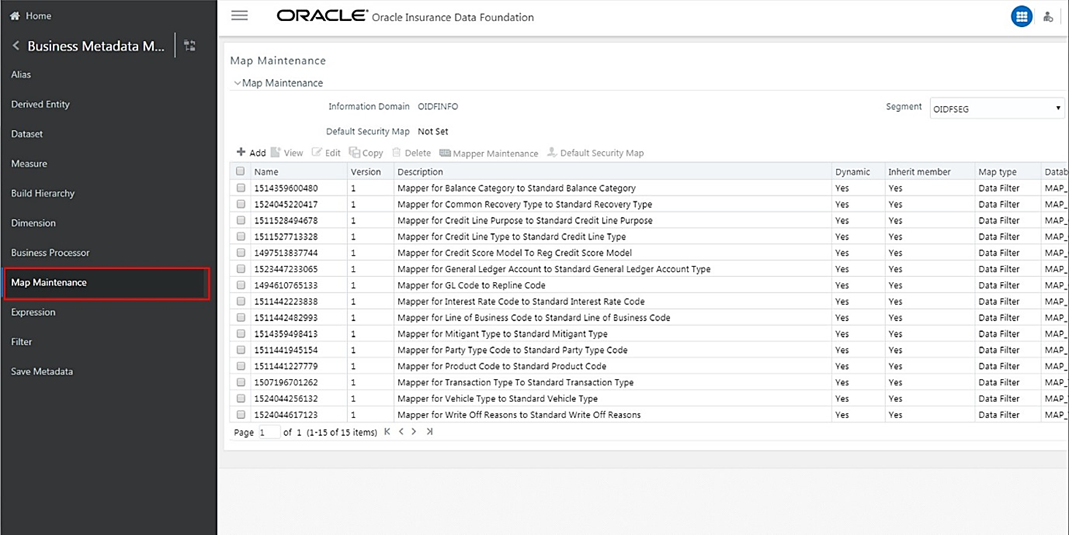
1. From OFSAA Home, select Oracle Insurance Data Foundation, select Unified Analytical Metadata, select Business Metadata Management, and then select Map Maintenance.
Figure 131:Navigate to the Map Maintenance page
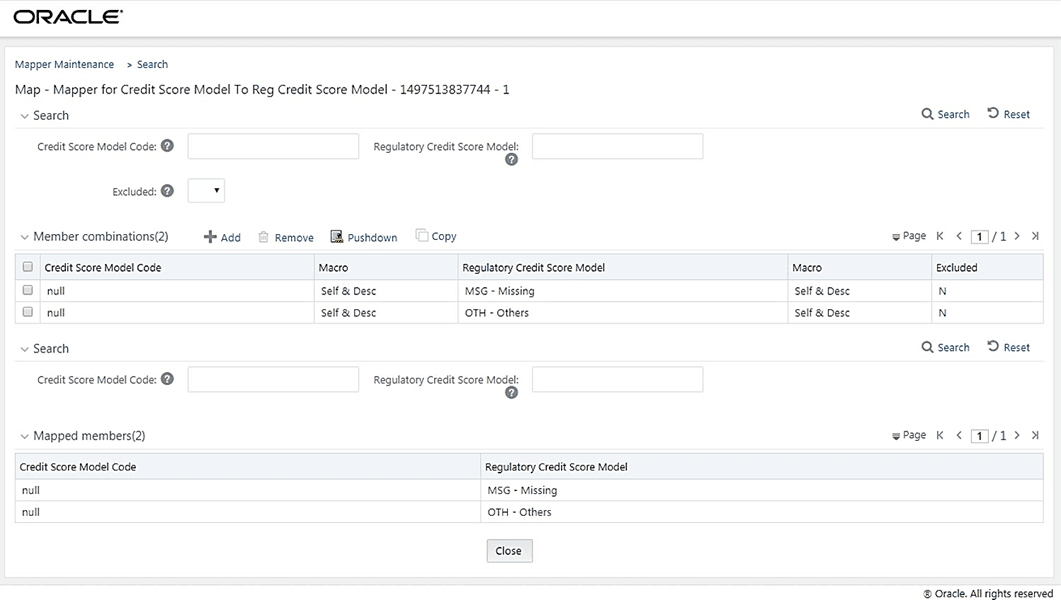
2. The Map Maintenance page appears. Select Mapper for Credit Score Model to Regulatory Credit Score Model. Click the Mapper Maintenance icon.
Figure 132: Select the required Mapper and click Mapper Maintenance

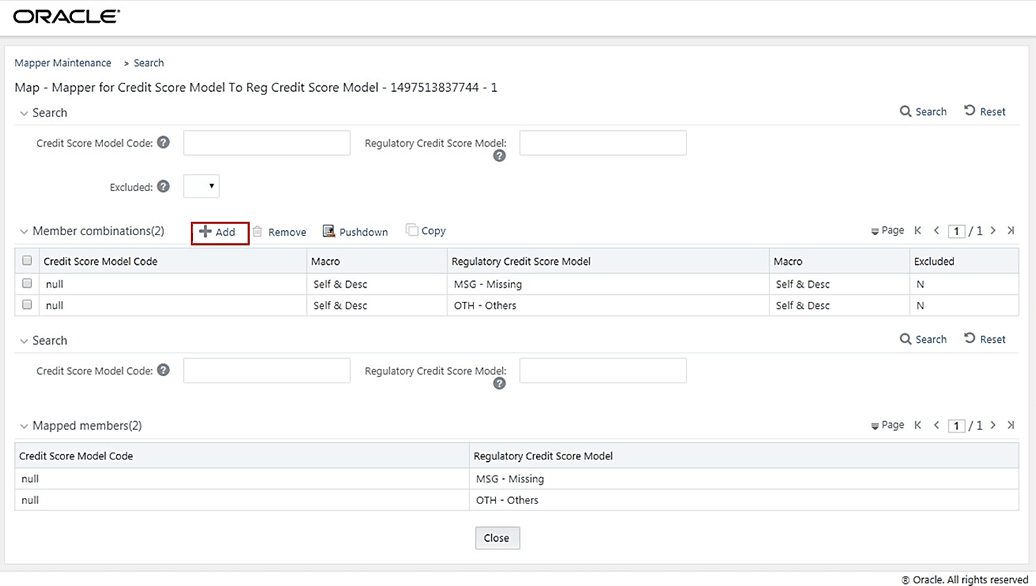
3. The Mapper Maintenance page is displayed. OIDF Maps OTH and MSG out-of-the-box for this mapper. The remaining Mappings can be maintained by the user according to user-specific values.
Figure 133: The Mapper Maintenance page
Topics:
· Prerequisites for Mapper Maintenance
· Possible Mapping Combinations
1. Load Credit Score Model Dimension using SCD.
2. Resave the following hierarchies:
§ HSCRMDL1 - Credit Score Model Code
§ HSCRMDL2 - Regulatory Credit Score Model
One Credit Score Model in the source can be mapped only to one Regulatory Credit Score Model. One to Many or Many to Many mapping will lead to error in T2T as the records will be duplicated. The possible combinations for Credit Score Model to Regulatory Credit Score Model mapping are One to One and Many to One mappings.
Topics:
One Credit Score Model can be mapped to one Regulatory Credit Score Model using the Mapper Maintenance screen. Here, you need to select one Credit Score Model and one Regulatory Credit Score Model. This means the corresponding data in Stage Account Credit Score Details Credit Score Model column for the selected Credit Score Model will be loaded into the Fact Account Credit Score Details Regulatory Credit Score Model column while loading the T2T.
1. In the Mapper Maintenance page, click Add.
Figure 134: Select Add in the Mapper Maintenance page
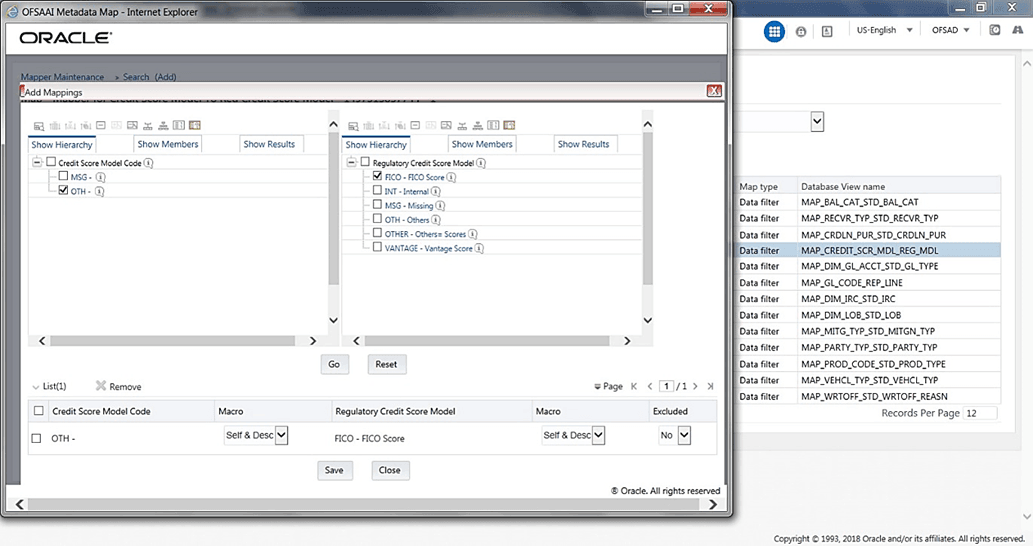
2. The Add Mappings page opens.
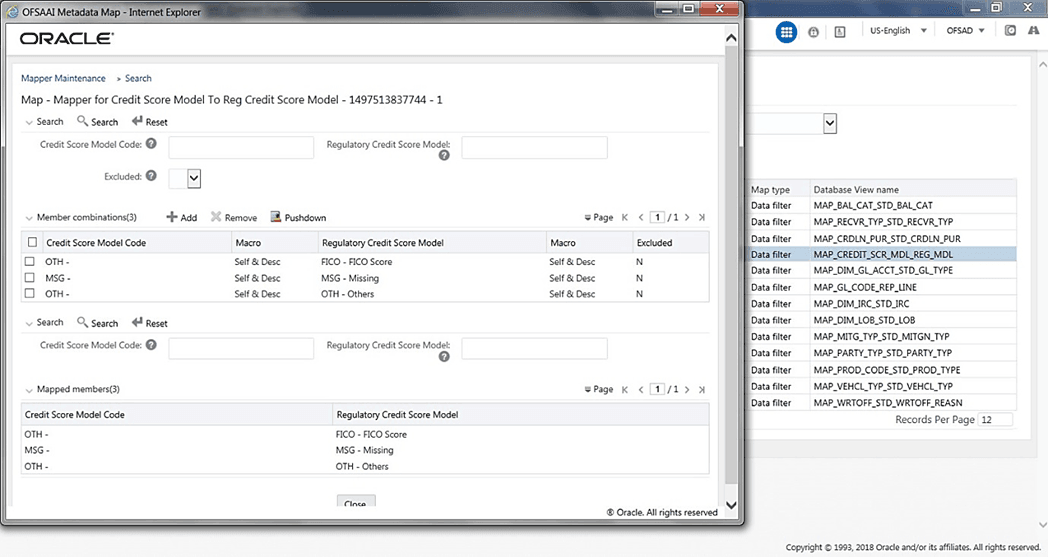
In this example, OTH - Others are mapped to FICO - FICO Score. To map, click Go and then to save the mapping, click Save.
Figure 135: Add Mappings page for the One-to-One Mapping
3. An acknowledgment is displayed. Click Yes to confirm.
4. The Mapped Members are displayed in the Mapper Maintenance page.
Figure 136: Added mappings listed in the Mapper Maintenance page
Many Credit Score Models can be mapped to one Regulatory Credit Score Model using the Mapper Maintenance screen. Here, you need to select two or more Credit Score Models and one Regulatory Credit Score Model. This means the corresponding data in Stage Account Credit Score Details Credit Score Model column for the selected Credit Score Models will be loaded into the Fact Account Credit Score Details Regulatory Credit Score Model column while loading the T2T.
1. In the Mapper Maintenance page, click Add.
Figure 137: Select Add in the Mapper Maintenance page
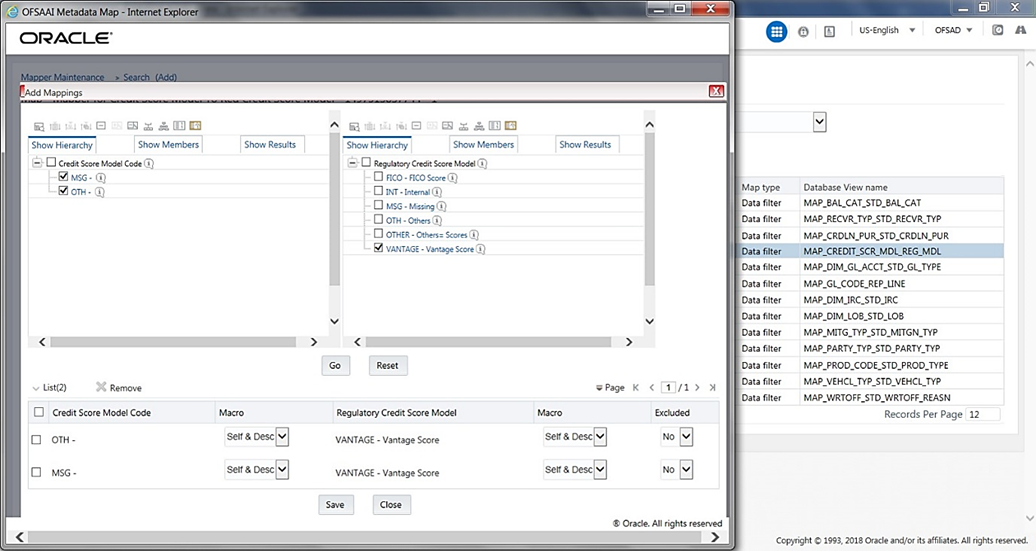
2. The Add Mappings page opens. In this example, MSG – Missing, and OTH - Others are mapped to VANTAGE - Vantage Score. To map, click Go and then to save the mapping, click Save.
Figure 138: Add Mappings page for the Many-to-One Mapping
3. An acknowledgment is displayed. Click Yes to confirm.
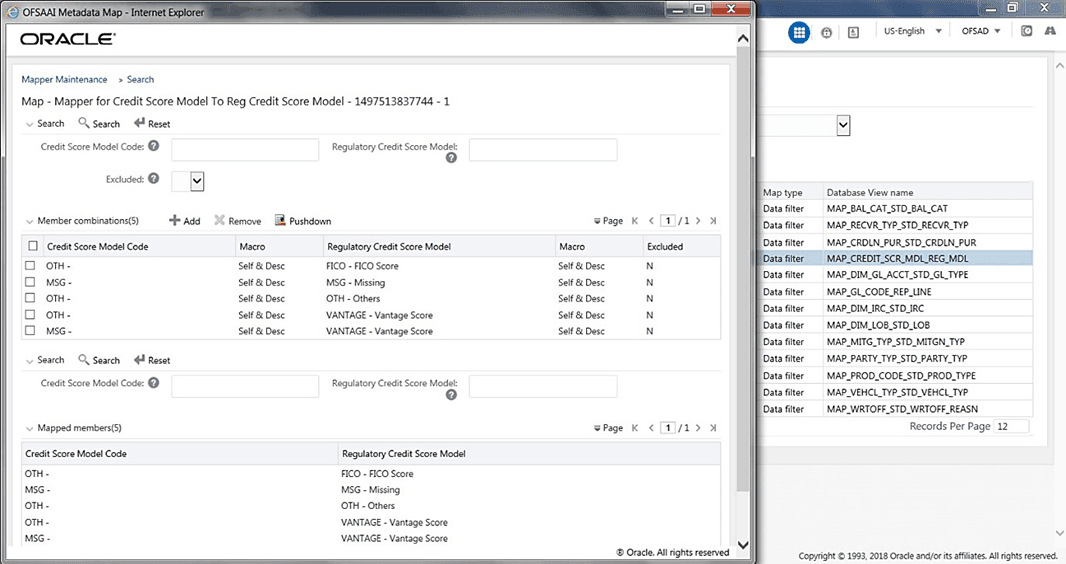
4. The Mapped Members are displayed in the Mapper Maintenance page.
Figure 139: Added mappings listed in the Mapper Maintenance page
Load the MAP_CREDIT_SCR_MDL_REG_MDL table in Atomic Schema with V_MAP_ID as 1497513837744, V_MEMBER_1 => Credit Score Model Code (values from DIM_CREDIT_SCORE_MODEL.V_CREDIT_SCORE_MODEL_CODE), V_MEMBER_2 => Regulatory
Credit Score Model Code (values from DIM_REG_CREDIT_SCORE_MODEL.V_REG_CREDIT_SCORE_MODEL_CODE).
NOTE |
These values are actual business key columns and not display codes. |
Figure 140: Loading the Mapper Maintenance from backend

All RDBMS related Result tables can also be deployed on Hive (Stage and Results). Deploy the Hive T2Ts using the Rules Run Framework. For more information, see the Rules Run Framework section in the Oracle Financial Services Advanced Analytical Applications Infrastructure User Guide Release 8.1.0.0.0.
NOTE |
In general, Stage and Result tables are also supported in Hive. However, there are some exceptions. For a list of tables that are not supported in Hive, see List of Unsupported T2Ts |
Follow this T2T process to populate data into any T2T Result table:
NOTE |
Only RDBMS T2Ts can be executed using the PMF. |
1. To populate data into any T2T Result table, execute the PMF process for that T2T. For a detailed procedure, see the following sections:
a. Prerequisites for loading T2T.
b. Select the Run Parameters and Execute the Run.
2. To check the T2T execution status and verify the log files of any Result table, follow the procedure in the Verify the Run Execution section.
3. To check the error messages, if any, follow the procedure in the Check Error Messages section.
You can see the following topics related to other function-specific tables: