12 Managing KYC Risk Factor
Pipelines
Oracle Financial Crime and Compliance Management Know Your
Customer Cloud Service uses KYC Risk Factor pipelines to assess and evaluate
customers based on their transactions.
ATTENTION:
KYC Risk Factor pipelines are only available if
your firm has implemented Oracle FCCM Know Your Customer Cloud Service.
Depending on the pipeline type, specific widgets are available
in the widgets pane of the pipeline. The following table describes the
widgets available in KYC Risk Factor pipelines.
NOTE:
The widgets used in this pipeline are the same widgets
used for Scenario pipelines. For more information on specific widgets,
refer to Managing Scenario Pipelines.
Widgets in KYC Risk Factor Pipelines and their Descriptions
Widget |
Name |
Description |

|
High Level Dataset (HLD) |
Use this widget to add a High Level Dataset.
Essentially, this is the data that is used to detect unusual or
suspicious behavior. |

|
Risk Indicator |
Use this widget to add a Risk Indicator.
Risk indicators help determine the overall risk of transactions
and parties and aid users working with events. |

|
Create Event |
Use this widget to create an Event. An event
is a record of one or more pattern matches in a detection run,
which is a signal for further investigation. |
The widgets must be updated in the following sequence and
are mandatory.
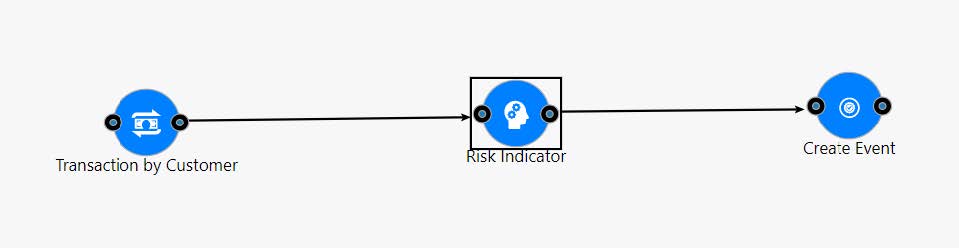
After you have updated the widgets, click Save
 .
.
NOTE:
· You cannot
delete a widget from an existing KYC Risk Factor pipeline. Instead copy
a pipeline and edit it or create a new pipeline as in the above sequence
for this pipeline type.
· On opening
the Create Event widget, it will be blank for this pipeline type but it
is mandatory.
This section provides the workflow of how risk factor pipelines
work to risk assess a customer based on their transaction history.
To implement Transaction-based KYC Assessments on customers,
follow these steps:
1. Configure
the Risk Factor pipeline.
2. Configure
the Threshold and Job. Refer to Managing
Threshold Sets and Using Jobs
for more information.
3. Attach the
new task with the created pipeline job along with the calendar task to
the batch as shown in the following sequence.
a. LoadKYCCustomerInterestedParties
b. Calender
c. KYCScenarioBasedRiskFactors
d. KYCProcessingAccountData
4. Configure
the risk indicator ranges for behavioral risk in the Behavioral Risk Indicator
menu. Refer to the Behavioral Risk Indicator section in Configuring
Dimension Data.
5. Configure
the Risk Elements for the risk indicator by adding the applicable customer
type, KYC check and Mapping lookup. Refer to the Risk Element Conguration
section inConfiguring
Dimension Data..
6. Add the rules
in Business Check and Algorithmic Scoring as necessary.
After running the batches, the customers are scored using
the configuration in the above widget.
Using High Level Dataset in KYC Risk Factor Pipelines
Refer to Using
High Level Dataset to understand how to use the High Level Dataset
in a pipeline. For KYC Risk Factor pipelines, use only the Transaction
by Customer High level dataset.
The Transaction Type filter is mandatory to include in
the Transaction by Customer widget for KYC Risk Factor pipelines. You
can add additional filters as required.
For more information about how to configure a specific
risk factor, refer to Managing
Risk Indicator.
Performing KYC Assessments Without Transaction-based Scenarios
You can opt out of risk assessing customers based on their
transaction history.
To conduct KYC assessments without transaction based scenarios,
follow these steps.
1. Do not add
any rules related to KYC Risk Factors in Algorithmic Scoring & Business
Check Scoring Widgets.
2. Remove the
tasks Calendar, KYCScenarioBasedRiskFactor tasks from KYCDeploymentInitiation,
KYCDaily batches.