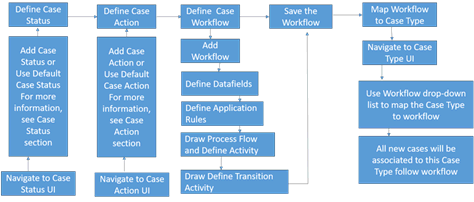
Process Modeling Framework (PMF)is an intuitive workflow-automation solution that allows you to create and manage workflows diagrammatically, much like creatingflowcharts in Microsoft Visio. You can createworkflows to automateprocesses that requireshuman orsystem interaction or both to accomplish a desired set of tasks. After integration with an application such as Case Management (CM), PMF makes it easy to execute,manage, and monitorworkflows for that application. The Case Management application is seamlessly integrated with PMF to automate case investigation workflows. CM includes default workflows that you can customize within PMF, or they can create new workflowsfor any case type. When a new workflow (defaultor custom) is created, PMF assigns a version number 0 to that workflow.All default workflows will always have a versionnumber 0. You cannot changethis value.
When a workflow is saved in PMF, it becomes available for use by CM. However,for CM to invoke a workflow, the workflow must be linkedto at least one case type in the Case Types UI. This link is the only way CM knows which workflow to call for which case type. The Case Types UI allows you to associate the case type with only one workflow.
During the Investigation, case (mapped to case type) follows the path defined in the associated workflow.
· Case Status: represents the stage of the case in workflow. Case status code is used in Process Modeling Framework. This case status is associated to the workflow action, that is when an action is executed. To define the Case Status, see Step 1. For more information, see the Case Status section.
· Case Action: is required if PMF is using Non-status changing actions. You can take action on a selected case, such as closing it, taking follow-up action on it, or assigning it to other users. When you take any action on the case, the status of case can be changed. For example, when an Analyst recommends a case for closure to the Supervisor, the case changes status from Investigation to Pending Review. To define the Case Action, see Step 1. For more information, see the Case Action section.
· Case Type: classifies the type of the case among the group of cases. In the Case Type UI, you can define the various case types and map the workflows that all casesof this case type will follow. To map the Case Type to workflow, see Step 3.
Prerequisites
Before creating a workflowin PMF, ensure the following:
Appropriate Case Status should be defined.
Appropriate Case Action should be defined. This is applicable for Non-status changing actions.
You begin by configuring case actions and statuses, if required. Then you create workflows. After creating workflows, associate each case type to a workflow using instructions given in the Mapping Workflow to Case Type section.