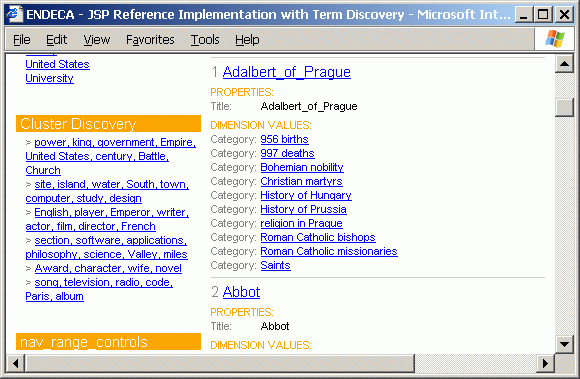
You can add a new nav_clusters.jsp file for rendering clusters.
Appendix A of this guide includes a new nav_clusters.jsp file that can be used as a template for rendering cluster contents. This file should be included at the end of the nav_controls.jsp file. Note that it is recommended that you display clusters only if there are two or more.
The highlights of this file are as follows:
Get all the
Supplementobjects from theNavigationobject, which will be encapsulated in aSupplementListobject (note that the list can also include non-clusterSupplementobjects):SupplementList navsups = nav.getSupplements();
Within a For loop (labeled supLoop), get a
Supplementobject and then get that object’s properties:Supplement sup = (Supplement)navsups.get(I); PropertyMap propsMap = sup.getProperties();
Get the value of the
Dgraph.SeeAlsoClusterproperty:String clustersPropName = (String)propsMap.get("DGraph.SeeAlsoCluster");Test the value returned from the
Dgraph.SeeAlsoClusterproperty. If it is null, then thisSupplementobject is not a cluster and we should loop back to step 2; if the value is non-null, then this is a cluster and we continue to step 5:if (clustersPropName != null)
If this is the first discovered cluster, then the
clustersOnvariable will be set to false. Therefore, first display the Cluster Discovery header and then set theclustersOnvariable to true (so that the header will not be displayed again):if (!clustersOn) { // display title ... clustersOn = true; }Get the ranking (
ClusterRankproperty) of the cluster and the number of terms (NTermsproperty) it contains. The returned string values are then transformed to integers:String rankString = (String)propsMap.get("ClusterRank"); String nTermsString = (String)propsMap.get("NTerms"); int rank; int nTerms; try { rank = Integer.parseInt(rankString); nTerms = Integer.parseInt(nTermsString); }Within a For loop, retrieve the terms from the
NTermsproperty and format them by separating them with commas and spaces. The list of terms will then be:StringBuffer termsSB = new StringBuffer(); StringBuffer termsSBSpace = new StringBuffer(); for (int iTerm = 0; iTerm < nTerms; ++iTerm) { String term = (String)propsMap.get("Term_"+iTerm); ... if (termsSB.length() != 0) { termsSB.append(", "); termsSBSpace.append(" "); } termsSB.append(term); termsSBSpace.append('"').append(term).append('"'); }For a given cluster, begin to create a
UrlENEQueryrequest (using the current request), in case the user wants to click on that cluster. Also get the current navigation searches (as anERecSearchList) to determine if the cluster selection is already active in the searches.UrlENEQuery newq = new UrlENEQuery(request.getQueryString(),"UTF-8"); ERecSearchList searches = newq.getNavERecSearches();
Create a new search (an
ERecSearchobject), using theclusterPartialsearch interface as the search key, the list of related terms (in theclusterSpacevariable) as the terms for the search, and mode matchpartial as the search option (which specifiesMatchPartialas the search mode).ERecSearch newSearch = new ERecSearch("clustersPartial", clusterSpace, "mode matchpartial");Test whether the current navigation searches are null or do not contain the new search (from step 9). If the test is true, then the new search can be added to the
UrlENEQueryrequest; if it is false, do not add the new search because the cluster selection is already active.if (searches == null || !searches.contains(newSearch)) { ... searches.add(newSearch); newq.setNavERecSearches(searches); ... }Loop back to step 2 to get another
Supplementobject. The loop is done when all the objects in theSupplementListhave been retrieved.Display the clusters, which are stored as a list of strings in the
clusterStringsvariable. TheclusterUrlsvariable is a list of the cluster URLs:for (int I = 0; I < clusterStrings.size(); ++I) { %><tr><td><img src="b.gif" width=10></td> <td width="100%"><font face="arial" size="1" color="gray"> > <a href="<%= clusterUrls.get(I) %>"> <font face="arial" size="1" color="blue"> <%= clusterStrings.get(I) %></font></a> </td></tr><% }
The following is an abbreviated example of the JSP reference implementation showing the clusters rendered by the nav_clusters.jsp file. Clicking on a cluster link will execute the partial match query built by steps 8-10.