This module discusses modeling of new business activity through the Forecast Balance rules. Included are assumption setup and processing.
Within a Forecast Balance rule, you specify the amount of new activity generated per modeling bucket on each product within each active currency. To create a new business assumption, you select from eight available forecasting methods. You can further tailor the new business assumptions to meet your expectations of future originations, including the timing of new business and the effect of interest rates on new business amounts.
Topics:
· Creating a Forecast Balance Rule
· Examples of Forecast Balance Assumptions
The new business methods within the Forecast Balance rule determine how new business assumptions are applied per product leaf within each active currency. They consist of:
For the Target Growth, Target End, and New Add methods, you select one of two timing options to indicate when new business for a new account should be originated. The two options are:
· No New Business
· Target End Balance
· Target Average Balance
· Target Growth Percent
· New Add Balance
· Rollover
· Rollover with New Add
· Rollover with Growth %
For the Target Growth, Target End, and New Add methods, you select one of two timing options to indicate when new business for a new account should be originated. The two options are:
· Distributed Option: Solves for the origination date of the new business account to reach an expected average balance, assuming even distribution of new business throughout the modeling bucket. For each modeling bucket, this calculation results in an average balance amount that is midway between the beginning balance and the ending balance.
· Bucket End Method: Generates new originations at the end of the modeling bucket. Adding new business at the end of the modeling bucket is effective in terms of processing time, but may result in irregular average balances and interest accruals over the bucket.
For the Target Average method, the system automatically determines the timing of new originations to ensure that the user-input target is achieved. For Rollover business, the system assumes that the rollover occurs at the time of runoff of existing accounts.
NOTE:
For distributed originations of Target Growth and Target End balances, Transaction Strategies and future origination in the current position may impact the distributed originations calculation. Because the origination date on Transaction Strategy and current position accounts cannot be modified, the timing algorithm may not be able to find an origination date for the remaining new business which achieves the expected average balance.
The application of each new business method, including how different timing options are applied, is described below:
No New Business (forecasting zero changes in balances) is the default method for the Forecast Balance rule. This method allows runoff without replacement of the paid-down balances.
Use the Target End Balance method to define the total expected balance by the end of each modeling bucket. The new origination amount and the timing of originations within each modeling bucket are determined during processing, as described below:
The new origination amount per bucket is calculated as:
Target Ending Balance - Beginning Balance - Total Runoff + Transaction Strategy Originations + Current Position Originations
For the Target End method, you can choose either the At Bucket End timing option or the Distributed timing option.
At Bucket End: The new origination amount is added on the final date in the bucket. Interest starts accruing on the next day, the first date of the next bucket.
Distributed: The new origination amount is added on the calculated date(s) which allow the average balance to equal the beginning balance plus the ending balance divided by two, accounting for timing of runoff and other originations occurring during the modeling bucket.
Use the Target Average Balance method to define the expected average balance per modeling bucket. The new origination amount and the timing of originations within each modeling bucket are determined during processing, as described below:
The new origination amount per bucket is calculated as:
2*(Target Average Balance - Bucket Beginning Balance) + Total Runoff - Transaction Strategies Originations - Current Position Originations
The new origination amount is added on the calculated date(s) which allow the average balance to equal the user-input target average. This calculation accounts for timing of runoff and other originations occurring during the modeling bucket.
NOTE:
Here, Target Average formula is a general use statement that helps users to understand how Target Average Balance calculations are made and to validate output. Given the complexities of formula inputs, external detail calculation results may vary.
When you are using Target Average, it is recommend that only Target Average Balance is reported as other financial elements may fluctuate widely to achieve average targets from period to period.
Use the Target Growth Percent method to define the expected percentage change in the balance over each modeling bucket, expressed as a percent of the bucket's initial balance. Target Growth can be used to model flat balance sheet by assuming a growth rate of 0%. This method can be set at the node level and inherited to leaf level,* making setup and maintenance efficient. The method does work on products that have no current business and will return 0 (zero) new business, but it is highly advised that you align the forecast balances to products that do have current business, so as not to cause unnecessary processing time. There is no restriction in the number of product/currency combinations that OFSAA can process. However, the duration of the process will increase depending on the number of product/currency combinations.
NOTE:
This is the only forecast balance method that allows inheritance.
The new origination amount and the timing of origination are determined during processing, as described below:
The new origination amount per bucket is calculated as:
(Beginning Balance * Target Growth Percent + Total runoff – Transaction Strategy Originations - Current Position Originations) for bucket end option, and,
(Beginning Balance * Target Growth Percent + Total Runoff - Transaction Strategy Originations - Current Position Originations) for distributed option
For the Target Growth method, you can choose either the At Bucket End timing option or the Distributed Originations timing option.
At Bucket End: The new origination amount is added on the final date in the bucket. Interest starts accruing on the next day, the first date of the next bucket.
Distributed: The new origination amount is added on the calculated date(s) which allow the average balance to equal the beginning balance plus the ending balance divided by two. This calculation accounts for timing of runoff and other originations occurring during the modeling bucket.
The New Add Balance method defines the absolute amount of new business that is added within a bucket. The new origination amount and the timing of origination are determined during processing, as described below:
The new origination amount is equal to the user-input new add balance.
For the New Add method, you can choose either the At Bucket End timing option or the Distributed Originations timing option.
At Bucket End: The new origination amount is added on the final date in the bucket. Interest starts accruing on the next day, the first date of the next bucket.
Distributed: The new origination amount is added at the mid-point of the modeling bucket. If the modeling bucket contains an uneven number of days, the origination is apportioned evenly over the two days in the middle of the bucket.
Use the Rollover method to base the amount of new business on the rollover (reinvestment of principal on a given or like products) of existing business. You can roll any combination of prepayments, maturing balances, and principal runoff from a product into itself or into another product. For multiple currency processing, rollover processing occurs within each individual currency. Rollover cannot occur between two currencies. The new origination amount into a particular target leaf member and the timing of that origination are described below.
For a single target leaf member within a single currency, the new origination amount depends on the rollover sources, which are product leaves of the same currency whose runoff drives the amount of new business generated into the target leaf member. For each rollover source, you must also define the components of principal runoff you would like to roll over. Your choices are:
Total: Total runoff includes runoff from all three categories of run-off: scheduled principal payments, prepayments, and maturing balances.
Prepay: Prepay includes runoff from prepayments, early repayment of principal balances.
Maturity: Maturity incorporates payment of principal on the maturity date, above that incorporated in the scheduled principal payment. Balloon payments and final principal repayment of non-amortizing instruments are included in this category.
Payment: Payment runoff includes scheduled principal payment on an amortizing instrument.
For each combination of source leaf and runoff type, you can input a different rollover percent. The new origination amount within a modeling bucket equals the runoff amounts multiplied by the percentage rollover for all source leaves.
All runoff from sources are added as new business into the target leaf with the proper currency at the average time of runoff.
The average time of runoff is calculated by taking an average of the runoff date weighted by the amount of runoff for all instruments which make principal payments during the modeling bucket.
NOTE:
Rollover of runoff components, prepayment, payment, or maturity requires that those components exist in the output data set. In a Dynamic Deterministic Process rule, you must select those financial elements from the Calculation Elements block. Otherwise, no new business is generated from those runoff components.
Use the Rollover with New Add method to apply both rollover assumptions and new add assumptions to a single product within a single currency. It allows new business to be driven by reinvestment of existing accounts plus an expectation of new business amounts. The New Add method and the rollover method are applied independently, with the New Add applied first.
Use the Rollover with Growth Percent method to apply both rollover assumptions and an overall Growth Percent assumption to a single product within a single currency. It allows new business to be driven by reinvestment of existing accounts plus an expectation around growth percentage. Growth Percent defined in Target Growth, determines overall growth of product, including rollovers.
Rollover assumption is applied first and is calculated independently on Runoff type selected in rule. To determine Rollover Runoff, see the Rollover. New business via Target Growth is calculated thereafter, and is calculated as
(Beginning Balance * Target Growth Percent + Total runoff - Transaction Strategy Originations - Current Position Originations - Rollover New Business).
For more information on Target Growth, see the Target Growth Percent.
The availability of a new business method depends on the account type of the product leaf member. The account type of a product leaf comes from its associated Common COA attribute. Setup requirements for each of the account types are described below:
· Interest Bearing Accounts:
· Earning asset
· Interest bearing liability
· Off balance sheet receivable
· Off balance sheet payable
Income Statement Accounts: The only method available is New Add. For these accounts, input the desired income statement value for each bucket. The following account types are classified as income statement:
· Non-interest income
· Non-interest expense
· Interest income
· Interest expense
Balance Sheet Accounts: The only method available is New Add. For balance sheet accounts, the input amount is interpreted as a balance. The following account types are classified as balance sheet:
· Other asset
· Other liability
· Equity
Customer demand for new products often depends on interest rates (either the absolute level of interest rates or the spread between two rate indices) or other variables such as macro-economic drivers. You can model this behavior by selecting a rate-volume assumption. Once you have selected the rate-volume assumption, you must incorporate additional parameters through selection of a Rate Dependency Pattern, which control how interest rates or economic variables affect new business levels.
Rate-Volume Assumptions
There are four rate-volume options to choose from:
No Relationship
If you want new business amounts to stay constant regardless to the interest rate environments, select this option.
Rate-Level Dependent
The Rate-Level dependent relationship allows you to change new business behavior for different values of a single indicator interest rate. The indicator interest rate, referred to as the Base Interest Rate, is defined by an Interest Rate Code, a term selection, and a rate lag.
Interest Rate Code: The Interest Rate Code identifies the reference yield curve or rate index whose forecasted value determines the new business amount. You can select the Interest Rate Code from all available interest rate codes for the selected currency, as defined within Rate Management. The list of Interest Rate Codes includes only codes with a reference currency equivalent to the currency selected in the Floating Tree Bar.
Term Selection: If the selected Interest Rate Code is a yield curve, you must also select a term. Your term choices depend on the definition of the Interest Rate Code within Rate Management. Note that the selection automatically defaults to the shortest available term.
Rate Lag: If you want the base interest rate calculation to perform a look back function, you can input a rate lag. The new business assumption lookup uses the forecasted interest rates as of a date within the current modeling bucket less the rate lag.
If the timing of new business is End of Bucket, the lookup function uses the last day of the modeling bucket less the rate lag. For all other cases, the mid-point of the bucket less the rate lag is used.
Rate-Spread Dependent
With the Rate-Spread dependent relationship, you can input new business assumptions for different spreads between two indicator interest rates, or a spread between two term points on the same yield curve. You define the first indicator interest rate, the Base Interest Rate, as described previously. The second indicator interest rate, the Alternate Interest Rate, also requires definition of an Interest Rate Code, a term selection, and a rate lag.
The rate spread equals the Alternate Interest Rate minus the Base Interest Rate.
Economic Indicator Dependent
With the Economic Indicator Dependent relationship, you can input new business assumptions related to defined economic indices (as defined in Rate Management), where the change in the index will drive a different outcome of new business. For example, you can forecast a higher GDP and tie the new business assumptions to that particular forecast.
Rate Tiers
The Rate Tiers tab will become available to edit when one of the following three rate volume relationships have been selected (Rate Level, Rate Spread, and Economic Indicator). Once you have selected a rate-volume relationship and defined your base and alternate interest rates, you must define rate tiers. Rate tiers provide the lookup values for which different new business assumptions can be input.
Lookup Method
The lookup method determines which new business assumption is selected from the input values when the forecasted interest rate falls between two rate tiers.
There are two methods to choose from:
Interpolate:
Range: If you select Range, Oracle ALM selects the new business assumption as the closest assumption associated with the rate tier which is less than or equal to the forecasted interest rate.
To create a new Forecast Balance rule, complete the following steps:
1. Click the Add on the Forecast Balances summary page to add a new rule.
2. Enter a descriptive name for the rule.
3. Enter a description (optional).
4. Select a folder.
5. Select Product Hierarchy folder.
6. Select Product Hierarchy
7. Select Currency
8. Drill down to desired leaf level node(s) in the Assumption Browser
9. Click Save
When saved, go back to edit the Forecast Balance rule just created. Check the box next to the description and click the Edit icon.
The Forecast Balance rule dialog opens on the Method tab. The other tabs (Rate Tiers, New Volume detail, Roll-over Set up and Detail) are dependent upon method chosen and the rate volume relationship. You must begin the assumption setup on the Method Tab and work your way through the remaining tabs, as needed. To input new assumptions for a particular product leaf and currency, follow the steps detailed under each Tab heading, described next:
The Method Page is used to define the Forecast Balance method per product leaf and currency. On this page you define the New Business method, the timing option, and the type of rate-volume relationship.
Follow the steps listed below to complete this information.
1. Select a product leaf from the drop-down list under the Product and Currency Details (in this case, Commercial Loans fixed).
2. Select preferred New Business Method. If you select Target End, Target Growth, New Add, or any combined rollover option, note that the Timing selection is enabled.
3. Select preferred Timing option (with Target End, Target Growth, New Add, Rollover with Growth % and Rollover with New Add only).
4. Select the type of Rate-Volume Relationship you want to model. If the relationship is Rate Spread, Rate Level, or Economic Indicator, the Rate Tiers tab is enabled.
On the Rate Tiers tab the Rate Dependency Pattern drop-down list appears. Select the desired name you defined in the Rate Dependency Patterns user interface. If you have selected No Relationship on the Method Page, this page is not accessible.
You can see the defaulted values for the Base Rate and the Rate Tier Bars appear as input in, when the pattern was defined.
The New Volume Detail Page is used to input new volume assumptions for the methods:
· New Add
· Target End
· Target Average
· Target Growth
· New Add component of the Rollover with New Add method
· Growth % component of the Rollover with Growth % method
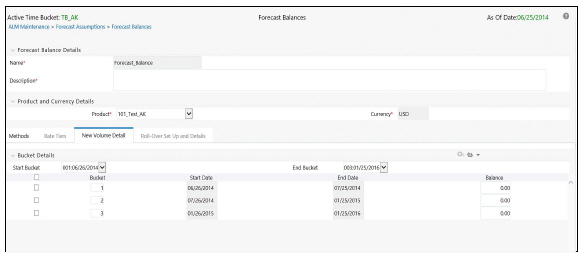
On this page you select the range of modeling buckets and input balance or percentage assumptions for each modeling bucket within this bucket range. An example of the New Volume Detail page appears as shown in the following figure:
Description of New Volume Detail Tab in Forecast Balance Rule Definition page as follows
1. Select the New Volume Detail tab.
2. Select the modeling bucket start and end range. The default Bucket Range includes all modeling buckets. To forecast new business in a subset of the modeling horizon, reduce the bucket range by increasing the bucket start date or decreasing the bucket end date. As you change the bucket start and/or the bucket end, the view adjusts accordingly to display only buckets within the selected range.
3. Select corresponding row to the first modeling bucket. If rate-volume relationships are used, this cell also corresponds to the first rate tier. Input the targeted value. For New Add, Target End, and Target average, input an amount. For Target Growth, input a percent. The percent should represent the percentage growth within the modeling bucket. It should not represent an annualized amount.
4. You can also use the Excel import/export feature to add the New Volume Detail information.
In the Rollover Setup and Details tab, first input the setup details necessary for definition of rollover percentages (source product leaves and bucket ranges), second, input rollover percentages. The rollover percentages represent the percent of the runoff amount from the source (leaf and runoff type for the selected currency) which generates new business into the target leaf for the selected currency. An example of the Rollover Setup and Details tab appears as shown in the following figure:
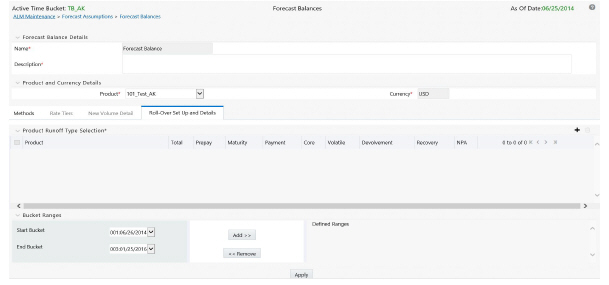
Description of Rollover Setup and Details Tab in Forecast Balance Rule Definition page as follows
1. Click the Rollover Setup and Details tab to display the page.
2. Click the Add icon to select the Product Runoff Type Selection.
3. The Hierarchy page will appear. Select the product leaf members for the rollover and click Ok.
4. The selected products will appear below the Product Runoff Type selection bar.
5. Choose the desired runoff type (Total, Prepay, Maturity, Payment, Core, Volatile, Devolvement, Recovery, or NPA).
6. Define the input bucket ranges. You only need to define multiple bucket ranges if you want to vary rollover assumptions by modeling buckets. The bucket ranges defined here only apply to rollover occurring from the source leaf to the target leaf. You must have at least one bucket range defined. Typically, you define a bucket range from the first modeling bucket to the last modeling bucket, covering the entire modeling horizon. To define a bucket range, complete the following steps:
· Select a start bucket date for the first date range.
· Select an end bucket date for the first date range.
· Select Add to add a bucket range which begins on the first date of the start bucket and ends on the last date of the end bucket.
· Select a new start date for the next date range. You can select from any buckets that are not encompassed by a defined bucket range. Modeling buckets which are a part of an existing bucket range do not appear in this list.
· Select an end date for the next date range. You cannot create overlapping modeling buckets. To prevent this, the list of available bucket end dates only includes modeling buckets which follow consecutively from the selected start bucket.
· Continue adding bucket ranges until all desired ranges have been defined.
· Once all desired products and bucket ranges are selected and defined, click Apply.
7. The Rollover Bucket Range Details form will appear at the bottom.
To define the details for the above prescribed bucket ranges, do the following:
· Select a bucket from the drop-down list of defined bucket ranges.
NOTE:
The defaulted values for runoff type are populated.
§ Enter the percentage rollover for the given products.
§ You can also use the Excel Import/Export feature to add the Rollover Bucket Range Detail information.
§ Click Apply.
You can modify or edit an existing forecast balance by opening it, making the changes and then saving it as either a:
· Different Method with a new name, or
· The same forecast balance name
Naming Convention: It is best to use a naming convention that creates different groups of forecast balances. This keeps track of which methods were created, in the context of specific modeling buckets.
The Active Time Bucket Rules: Assumptions that you define when creating a forecast balance are based on a specific modeling horizon, which is defined in the Time Buckets section.
· If you define a forecast balance based on a Time Bucket with a monthly modeling horizon, your results are calculated in monthly time periods.
· If you redefine that same forecast balance, using a different time bucket with a weekly modeling horizon, your results are calculated in weekly time periods.
If assumptions in your Forecast Balance are based on a modeling horizon that is different from the horizon defined in the active time bucket, inaccurate data will result. You should verify that date-sensitive rules are consistent with the active Time Bucket.
Defining Forecast Balances Using Node Level Assumptions
Node Level Assumptions allow you to define assumptions at any level of the Product dimension Hierarchy. The Product dimension supports a hierarchical representation of your chart of accounts, so you can take advantage of the parent-child relationships defined for the various nodes of your product hierarchies while defining rules. Children of parent nodes on a hierarchy automatically inherit the assumptions defined for the parent nodes. However, assumptions directly defined for a child take precedence over those at the parent level.
NOTE:
The only method supported for inheritance is Target Growth.
Below are two examples describing how to input assumptions into the Forecast Balance for a product using the target growth method and a product using the rollover capabilities.
Target Growth Example
The following example describes how to model the effect of interest rate changes on growth in a loan product. We will input values that cause the growth rate of loans to decrease as interest rates increase.
1. Create a new Forecast Balance rule.
2. Select US dollars in the Currency Selection.
3. Select the desired product leaf from the product list.
4. Click the Add icon to add new forecast balance rules.
5. Select Target Growth as the New Business method.
6. Select Distributed as the Timing option.
7. Select Rate-level dependent as the Rate-Volume relationship. The completed Method information should appear as shown in the following example:
8. Click the Rate Tiers Tab.
9. Select a Rate Dependency Pattern from the drop-down list.
10. Click the New Volume Detail Tab. The two lookup methods for 1% and 4% will appear in the columns, next to each bucket. Enter 8% growth for a 1% 3 year rate environment, and 2% growth for a 4% 3 year rate environment.
This example shows how to input rollover behavior for a product where as the yield curve steepens, holders of shorter term products increasingly choose to roll into another longer term product (for example, CD investors).
1. Create a new Forecast Balance rule.
2. Select US dollars in the Currency selection.
3. Select the desired product leaf from the product list.
4. Click the Add icon to add new forecast balance rules.
5. Select the New Business method Rollover.
6. Define the Rate-Volume relationship as Rate-Spread Dependent.
7. Click the Rate Tiers Tab.
8. Select the desired rate dependency pattern.
9. Click the Rollover Setup and details tab.
10. Click the Add icon to add desired products in Product Runoff Type Selection.
Choose Total, Prepay, Maturity, or Prepayment runoff.
11. Define the bucket range. (In this case the entire bucket range). Click “Add” to create the range.
12. Click Apply. The rollover Bucket Details Bar will appear at the bottom of the page.
13. Input the desired rollover for each rate spread scenario. In this case it is the steepening spread between 6 month and 5 yr Libor curve points.
14. Click Apply.
To process the assumptions you have input, the Forecast Balance rule must be selected in a Dynamic Deterministic or Dynamic Stochastic ALM Processing Rule. The output process selections defined within the Output Preferences block Process rule of , determine which forecast balance assumptions per currency are used. If processing output is product-only, forecast balance assumptions for the reporting currency are processed. New business assumptions for all other currencies are ignored. If the output is product and currency, forecast balance assumptions for each product and currency combination are processed. See ALM Processing for more information on processing.