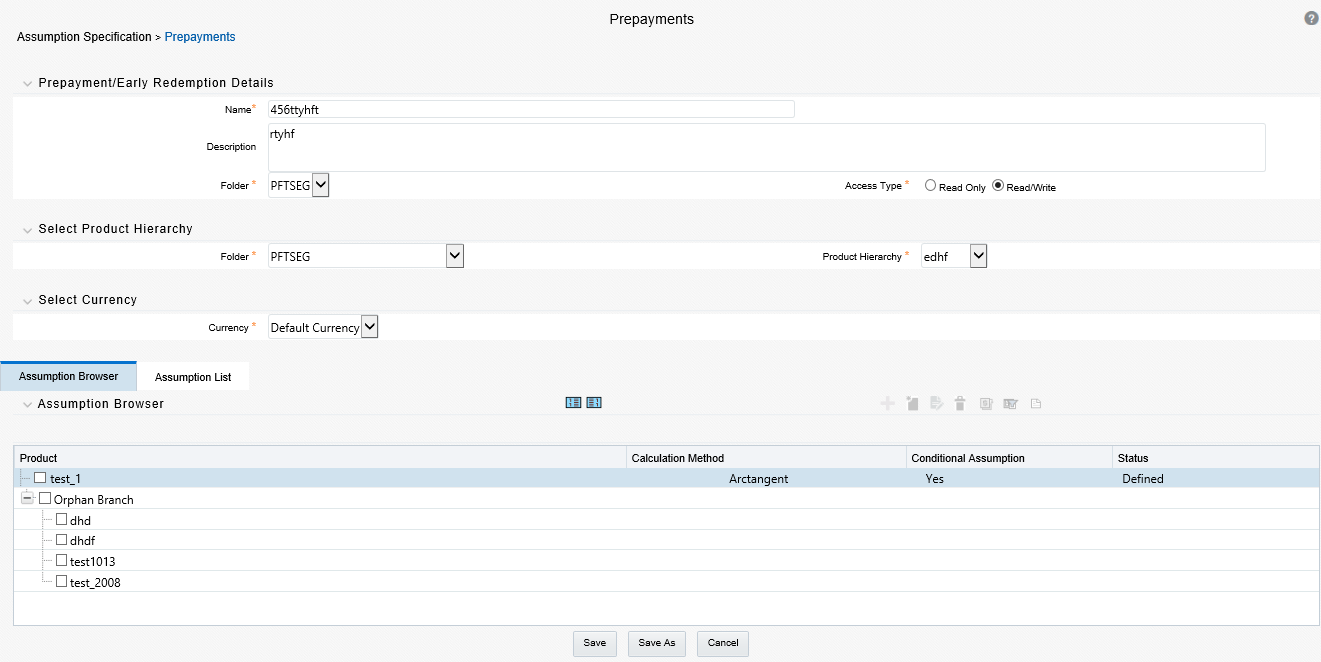
Prepayment rules allow you to specify methodologies to model the loan prepayment and deposit early redemption behavior of products in your portfolio and quantify the associated prepayment risk in monetary terms. For more information, see Define Prepayment Rules.
The methodologies contained in the Prepayment rule are referenced by both Transfer Pricing and ALM Processes. These prepayment assumptions are used in combination with cash flow based transfer pricing methods to generate the transfer pricing results.
The procedure for working with and managing the Prepayment rule is similar to that of other Oracle Funds Transfer Pricing business rules. It includes the following steps:
· Searching for Prepayment Rules
· Creating Prepayment Rules
· Viewing and Editing Prepayment Rules
· Copying Prepayment Rules
· Deleting Prepayment Rules
As part of creating and updating Prepayment rules, you can also define prepayment methodologies for all relevant product and currency combinations. See:
· Defining Prepayment Methodologies
· Defining the Constant Prepayment Method
· Defining the Prepayment Model Method
· Defining the PSA Prepayment Method
· Defining the Arctangent Calculation Method
Oracle Funds Transfer Pricing provides you with the option to copy, in total or selectively, the product assumptions contained within the Prepayment, Transfer Pricing, and Adjustment rules from one currency to another currency or a set of currencies or from one product to another product or a set of products.
You create a Prepayment rule to define prepayment assumptions for new products.
To create prepayment rule, do the following:
1. Navigate to the Prepayment rule summary page.
2. Complete standard steps for this procedure.
Figure 1: Prepayments Window
|
NOTE |
In addition to the standard steps for creating rules, the procedure for creating a Prepayment rule involves one extra step. After Standard Step 6, you can select a product hierarchy. You can define methodologies at any level of the hierarchical product dimension. The hierarchical relationship between the nodes allows the inheritance of methodologies from parent nodes to child nodes. |
The assignment of prepayment assumptions is part of the Create or Edit Prepayment rule process where assumptions about loan prepayments or deposit early redemptions are made for product-currency combinations. When you click Save in the Create Prepayment rules process, the rule is saved and the Prepayment rule Summary page is displayed. However, prepayment assumptions have not yet been defined for any of your products at this point. Typically, you would start defining your prepayment assumptions for product-currency combinations before clicking Save.
The Prepayment rule supports the definition of prepayment assumptions for combinations of two dimensions: Product and Currency.
Once you have created a Prepayment rule, you can assign prepayment methodologies to product-currency combinations in either of the following two ways:
· By creating a conditional assumption using conditional logic.
· Directly on the Prepayment methodology page, as described here.
The prerequisites for defining are performing basic steps for creating or editing a Prepayment rule.
This table describes the key terms used for this procedure.
|
Term |
Description |
|---|---|
|
Calculation Method |
The method used to model the prepayment behavior of instruments. Oracle Funds Transfer Pricing provides four prepayment calculation methods: Constant, Prepayment Model, PSA, and Arctangent. |
|
Cash Flow Treatment |
The Cash Flow Treatment allows you to specify one of the following two ways in which prepayments are made. · Refinance: This is the most commonly used option. Select refinance to keep payment amounts after prepayment consistent with a portfolio-based assumption. This reduces the scheduled payment amount on each loan and maintains the same maturity term. · Curtailment: Select curtailment to change the periodic payment amounts due. The prepayments are treated as accelerated payments, with a payoff earlier than the originally scheduled term. |
|
Market Rate |
The market rate is defined as the sum of the Index (the yield curve rate as described by the Interest Rate Code) and the Spread (the difference between the customer rate and market rate). |
|
Associated Term |
The Associated Term allows you to define the term for the point on the yield curve selected in the Market Rate definition that will be used in obtaining the market rate. · Remaining Term: The number of months remaining until the instrument matures. · Reprice Frequency: The frequency with which the instrument reprices. This defaults to the original term for a fixed-rate instrument. · Original Term: The number of months that was the originally scheduled life of the instrument. |
|
Prepayment Rate Definition |
This table allows you to specify constant annual prepayment rate, or the associated factors, that you want to apply to the instruments having origination dates in a particular date range. The enhancement “Prepayment on custom dates using remaining balance and de0annualised rate” done by OFS ALM in the release 8.0.7.0.0 is not supported by FTP currently. |
|
Seasonality |
This table allows you to specify seasonality adjustments. Seasonality refers to changes in prepayments that occur predictably at given times of the year. Seasonality adjustments are based on financial histories and experiences and must be modeled when you expect the amount of prepayments made for certain types of instruments to increase or decrease in certain months. The default value for seasonality factors is 1, which indicates that no seasonality adjustment is made for a month. Changing seasonality factors is optional. You can change the seasonality factors for none, one, or multiple months. To make seasonality adjustments, you need to enter a value between 0.00 and 99.9999 for the seasonality factors associated with each month. Seasonality factors less than 1 mean that prepayments are decreased for a particular month. Seasonality factors greater than 1 indicate that prepayments are increased for a particular month. |
To define the prepayment methodologies, do the following:
1. Navigate to the Prepayment assumption details page by selecting a currency and one or more products from the hierarchy.
2. Select a Calculation Method, Constant, Prepayment Model, PSA, or Arctangent.
|
NOTE |
The default value for the Calculation Method drop-down list is Constant. If you select "Do not calculate" as the calculation method, the prepayment assumptions will not be assigned to the particular product-currency combination. This is a particularly useful option when using node-level assumptions because it allows you to exclude a particular child from inheriting a parent’s assumption. |
3. Select a Cash Flow Treatment type, Refinance, or Curtailment.
Figure 2: Prepayment Calculation Method pane

|
NOTE |
Refinance is the most commonly used method. Define the parameters and annual prepayment rates for the selected calculation method: Constant, Prepayment Model, PSA, or Arctangent. |
The parameters displayed on the Prepayment methodology page vary depending on the calculation method (Constant, Prepayment Model, PSA, or Arctangent) that you have selected. For more information, see the following:
§ Arctangent Calculation Method
4. Click Apply.
The assumption browser definition page is displayed.
At this point you can:
§ Continue defining additional methodologies for other product-currency combinations by repeating the above procedure.
5. Complete the process by clicking Save.
When you click Save, the prepayment assumptions are saved and the Prepayment rule summary page is displayed.
Oracle Funds Transfer Pricing provides you with the option to copy, in total or selectively, the product assumptions contained within the Prepayment, Transfer Pricing, and Adjustment rules from one currency to another currency or a set of currencies or from one product to another product or set of products.
For cases where you have the same assumption (method and IRC) which is applicable to all currencies or multiple currencies, you can define rules for the combination of Product and "Default Currency". To define assumptions for the Default Currency, select a Product from the Hierarchy and “Default Currency” from the currency list and proceed with the assumption definition as described above. When processing data, the TP engine will first look for an assumption that exactly matches the product/currency of the instrument record. If not found, the engine will then look for the combination of the product and the Default Currency. This is a useful option to utilize during setup when the same product exists across multiple currencies and shares the same TP assumption and Interest Rate Code.
Figure 3: Transfer Pricing Rules - Definition Mode

Default Currency setup example: If you have two instrument records of the same Product, each with a different currency, for example, 1 is 'USD' and the other is 'AUD', you have two configuration choices. You can either:
· Define the assumptions individually for each product-currency combination using direct input or copy across,
· You can create 1 assumption for the combination of Product and “Default Currency”. When you use “Default Currency”, the TP Engine will apply this assumption to ALL currencies (unless a direct assumption is available for the product + currency being processed). In the case where users have many individual currencies that utilize the same TP Method and reference IRC rates, this is a useful option because you only have to define the assumption 1 time and it applies to many different Product + Currency combinations.
Use this procedure to define prepayment assumptions using the Constant Prepayment method. The prerequisites for defining the constant prepayment method are performing basic steps for creating or updating a Prepayment rule.
To define the constant prepayment method, do the following:
1. Select the Start Origination Date using the date picker. Alternatively, you can enter the Start Origination Date in the space provided.
|
NOTE |
The first cell in the Start Origination Date column and all of the cells at the End Origination Date column are read-only. This ensures that all possible origination dates have supporting reference values when Prepayment assumption lookups occur. Each row in the End Origination Date column is filled in by the system when you click Add Row or save the rule. |
The first Start Origination Date (in row 1) has a default value of January 1, 1900. When you enter a Start Origination Date in the next row, the system inserts a date that is a day before the previous End Origination Date field.
2. Enter the annual prepayment rate percent that you want to apply to the instruments having origination dates in a particular Start Origination-End Origination Date range.
|
NOTE |
The Percent column represents the actual annualized prepayment percentage that the system uses to generate the principal runoff during the cash flow calculations. |
3. Click Add Row to add additional rows and click the corresponding Delete icon to delete a row. You can add as many rows in this table as you require. However, you need to enter relevant parameters for each new row.
4. Define Seasonality assumptions as required to model date-specific adjustments to the annual prepayment rate. Inputs act as a multiplier, for example, an input of 2 will double the prepayment rate in the indicated month.
Use this procedure to define prepayment assumptions using the Prepayment Model Calculation method. The prerequisites for defining a prepayment model method are performing basic steps for creating or updating a Prepayment rule.
Figure 4: Prepayment Calculation Method with Calculation Method as Prepayment Model

To define the prepayment model method, do the following:
1. Define the source for the Market Rate by selecting an Index (Interest Rate Code) from the list of values.
2. Enter the Spread. A Spread is a difference between the Customer Rate and the Market Rate.
3. Select an Associated Term from Remaining Term, Reprice Frequency, or Original Term.
4. Specify the Prepayment Model parameters.
§ Select the Start Origination Date using the date picker. Alternatively, you can enter the Start Origination Date in the space provided.
§ Enter the Coefficient (if needed) by which the Prepayment Rate should be multiplied. This multiple is applied only to the instruments for which the origination date lies in the range defined in the Start Origination Date-End Origination Date fields.
§ Select a predefined prepayment model from the Prepayment model Rule list of values. Click the View Details icon to preview the selected Prepayment Model. The system uses the prepayment model assumptions to calculate the prepayment amounts for each period. You need to associate a prepayment model for every Start Origination-End Origination Date range.
§ Click Add Another Row to add additional rows and click the corresponding Delete to delete a row. You can add as many rows in this model as you require. However, you need to enter relevant parameters for each new row.
5. Define Seasonality assumptions as required to model date-specific adjustments to the annual prepayment rate. Inputs act as a multiplier, for example, an input of 2 will double the prepayment rate in the indicated month.
Use this procedure to define prepayment assumptions using the Public Securities Association Standard (PSA) Prepayment method. The prerequisites for defining the PSA prepayment method are performing basic steps for creating or updating a Prepayment rule.
Figure 5: Prepayment Calculation Method with Calculation Method as PSA

To define the PSA prepayment method, do the following:
1. Select the Start Origination Date using the date picker. Alternatively, you can enter the Start Origination Date in the space provided.
|
NOTE |
The first cell in the Start Origination Date column and all of the cells at the End Origination Date column are read-only. This ensures that all possible origination dates have supporting reference values when Prepayment assumption lookups occur. Each row in the End Origination Date column is filled in by the system when you click Add Row or save the rule. |
The first Start Origination Date (in row 1) has a default value of January 1, 1900. When you enter a Start Origination Date in the next row, the system inserts a date that is a day before the previous End Origination Date field.
2. Enter the PSA speed that you want to apply to the instruments having origination dates in a particular Start Origination-End Origination Date range. The PSA method is based on a standard PSA curve. You can view the seeded model by selecting the View Details icon.
The default value is 100 PSA and inputs can range from 0 to 1667.
3. Click Add Row to add additional rows and click the corresponding Delete icon to delete a row. You can add as many rows in this table as you require. However, you need to enter relevant parameters for each new row.
4. Define Seasonality assumptions as required to model date-specific adjustments to the annual prepayment rate. Inputs act as a multiplier, for example, an input of 2 will double the prepayment rate in the indicated month.
Use this procedure to define prepayment assumptions using the Arctangent Calculation method. The prerequisites for defining the arctangent calculation method are performing basic steps for creating or updating a prepayment rule.
Figure 6: Prepayment Calculation Method with Calculation Method as Arctangent

To define the arctangent calculation method, do the following:
1. Define the source for the Market Rate by Selecting an Index (Interest Rate Code) from the list of values.
2. Enter the Spread. A Spread is a difference between the Customer Rate and the Market Rate.
3. Select an Associated Term from Original Term, Reprice Frequency or Remaining Term.
4. Specify the Arctangent Argument table parameters.
5. Select the Start Origination Date using the date picker. Alternatively, you can enter the Start Origination Date in the space provided.
6. Enter the values for the Arctangent parameters (columns K1 through K4) for each Start Origination Date in the table. The valid range for each parameter is -99.9999 to 99.9999.
7. Click Add Another Row to add additional rows and click the corresponding Delete to delete a row. You can add as many rows in this table as you require. However, you need to enter relevant parameters for each new row.
8. Define the Seasonality assumptions as required to model date-specific adjustments to the annual prepayment rate. Inputs act as multiplier, for example, an input of 2 will double the prepayment rate in the indicated month.
If you are working with deposit products, it is possible to define Early Redemption assumptions within the Prepayment Rule. While defining these assumptions, the Prepayment rule will consider whether or not the product is an asset or liability (based on the account type attribute defined in dimension member management). If the product is an asset, then the Prepayments tab will be active in the prepayment assumption detail page. If the product is a liability, then the Early Redemption tab will be active. The prerequisites for defining early redemption assumptions are performing basic steps for creating or updating a prepayment rule.
|
NOTE |
To define Early Redemption assumptions, the account type for the selected product must be a Liability. |
Figure 7: Prepayment Calculation Method with Calculation Method as Constant

To define early redemption assumptions, do the following:
The procedure for defining Early Redemptions is the same as noted above for prepayments, with two exceptions:
· The list of Calculation Methods is limited to Constant and Prepayment Models
· The range definitions are based on Maturity Date ranges of the instruments rather than Origination Date ranges
Users also have two options for determining the timing of the early redemption assumption. Options include:
· Use Payment Dates: This is the default option. If selected early redemption runoff will occur on scheduled payment dates only
· User Defined Redemption Tenors: If selected, users can specify any runoff timing. For example, users might choose to define the early redemption to a runoff on the first day of the forecast.
To define Early Redemptions within the Prepayment Rule, follow the steps given below:
Use Payment Dates:
Select the “Use Payment Dates” option
Figure 8: Prepayment - Early Redemption Details

· Enter the Start Maturity and End Maturity Dates.
|
NOTE |
The first cell in the Start Maturity Date column and all of the cells in the End Maturity Date column are read-only. This ensures that all possible origination dates have supporting reference values when Prepayment assumption lookups occur. Each row in the End Origination Date column is filled in by the system when you click Add Row or save the rule. The first Start Origination Date (in row 1) has a default value of January 1, 1900. When you enter a Start Maturity Date in the next row, the system inserts a date that is a day before the previous End Maturity Date field. |
· Enter the annual prepayment rate percent that you want to apply to the instruments having origination dates in a particular Start Maturity-End Maturity Date range.
|
NOTE |
The Percent column represents the actual annualized prepayment percentage that the system uses to generate the principal runoff during the cash flow calculations. |
· Click Add Row to add additional rows and click the corresponding Delete icon to delete a row.
· You can add as many rows in this table as you require. However, you need to enter relevant parameters for each new row.
· You can use the Data Input Helper feature. For more information, refer to Data Input Helper, page 10-14.
· You can also use the Excel import/export feature to add the Prepayment rate information. For more details, see Excel Import/Export.
User-Defined Redemption Tenors:
· Select the User Defined Redemption Tenors option. This option allows you to specify the term to runoff for the particular row. For example, if "1 Day" is defined, then the specified balance (redemption %), will runoff (mature) on the As of Date + 1 Day.
Figure 9: Prepayment and Early Redemption Details

· Enter the Start Maturity and End Maturity date ranges, add additional ranges as required using the Add Row button.
· Enter the term to runoff tenor and multiplier for each of the date ranges.
· Enter the early redemption runoff percentage for each of the date ranges.
· Click Add Row to add additional runoff % rows and click the corresponding Delete icon to delete a row.
Figure 10: Prepayment and Early Redemption Details - Calculation Method as Constant

· Define Seasonality assumptions as required to model date-specific adjustments to the annual prepayment rate or early redemption rate. Inputs act as a multiplier, for example, an input of 2 will double the runoff rate in the indicated month.