This section provides information about classification and stage determination.
OFS Loan Loss Forecasting and Provisioning application support two sequential runs, Stage Determination and Allowance Calculation, that are seeded within the application to support the Expected Credit Loss, Allowance and Provision, calculation as per the IFRS 9 guidelines. The Stage Determination run starts with the data population subprocesses to obtain the data required for both Stage Determination. After this, the reclassification subprocess is executed to convert non-standard or external data formats to standard or internal data formats. The final stage is to evaluate the change in credit risk and macroeconomic factors to determine the stage at an account level granularity with the stage determination subprocess. Upon successful execution of the stage determination run, the application provides an option for the manual reclassification of the stages assigned to accounts, based on various parameters.
Upon completion of manual reclassification of stages, the application obtains the additional data required for ECL calculation. The Cash Flow and Forward Exposure subprocesses along with the Probability of Default calculation are performed and the ECL amount is calculated. Separate processes are applicable for the Provision Matrix and Specific provision methods. The application also displays the execution status of the Run through the UI. For more details, see the Process Modelling Framework section. Upon successful execution, the outputs including but not limited to, Expected Credit Loss, Allowance, Provision, Effective interest rate, and so on are available for reporting. For detailed information on using the Run Management feature, see the Run Management Section in the Oracle Financial Services Asset Liability Management (OFS ALM) User Guide.
To map a Run Definition that is saved in a new version, perform the following steps:
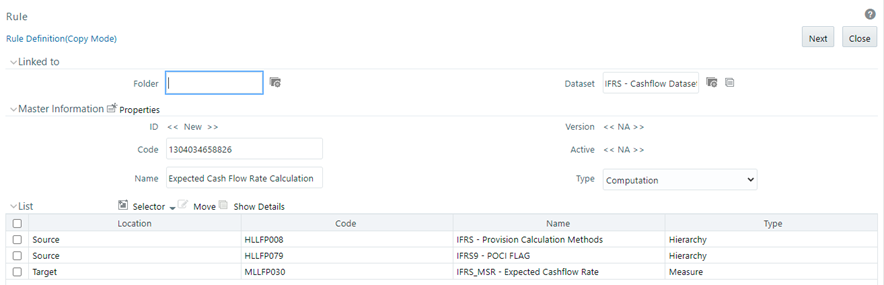
1. On the Rule Page, select the desired Rule and click Copy. To open the Rule Definition (Copy Mode) Page.
Figure 3: The Rule Definition (Copy Mode) Window
2.
3. Create a copy of the desired rule with a unique name. For more information on creating a copy of the Rule, see the Oracle Financial Services Asset Liability Management (OFS ALM) User Guide.
4. Save the copy.
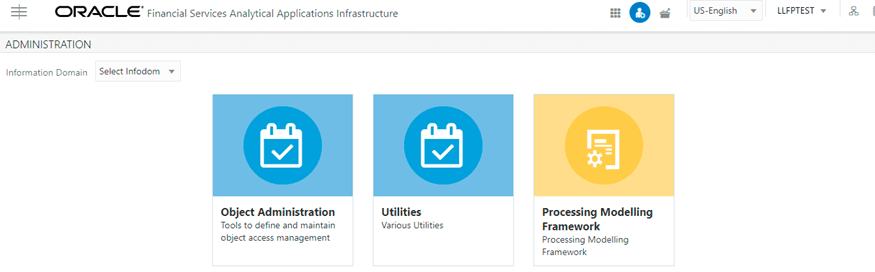
5. Click Administration to open the Administration Page.
Figure 4: The Administration Page
6. 
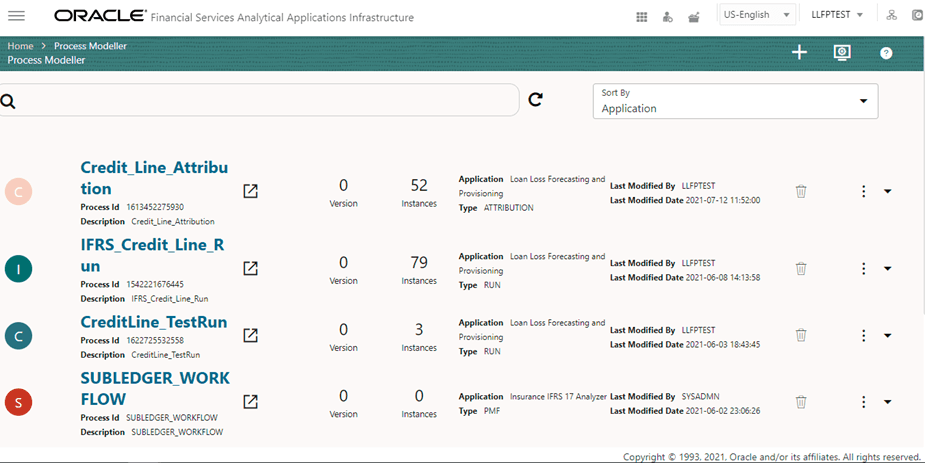
7. Select the Information Domain from the Information Domain drop-down box and click Process Modelling Framework.
Figure 5: The Process Modelling Framework Summary Page
8. 
9. Select the desired process.
Figure 6: The Process Modelling Framework Canvas
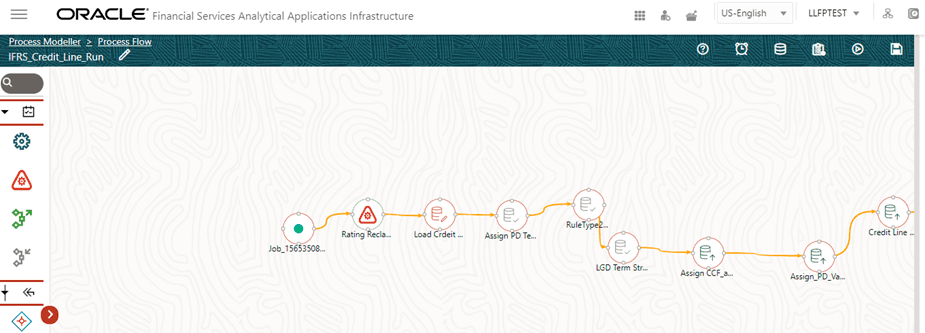
10. Map the newly created copy of the rule to the corresponding task in the PMF run. For more information, see the Process Modelling Framework Orchestration Guide.
Financial instruments are required to be classified into three categories and thereby accounted as suggested in the Phase 1 section of the IFRS 9 guidelines. The three categories are the following:
· Amortized Cost (AMRTCOST)
· Fair Value through Other Comprehensive Income (FVOCI)
· Fair Value through Profit and Loss (FVTPL)
Financial assets must undergo the Business Model test (BM) and Cash Flow Characteristics test (SPPI) and Financial Liabilities must undergo the Business Model Test for classifying in the aforementioned categories.
The Business Model Test is conducted at an aggregated level. This test allows the banks to classify instruments into any of the subcategories of business model such as Held to Collect (Assets), Held to Collect and Sell (Assets), Held to Sell (Assets and Liabilities), Held to Maturity (Liabilities), and Available for Sale (Liabilities).
To conduct the Business Model Test, various dimensions are considered to assign a business model. You can create Rules that are executed in a specific order and that helps in the categorization. The application is seeded with certain Rules which can be modified or removed.
The Rules around Business Model Test enable banks to design a hierarchy-based Holding Type assessment, that is the Rules help banks to classify their accounts into any one of the holding types, such as Held to Collect, Held to Sell, or Held to Collect and Sell.
Banks can configure Rules based on various available Hierarchies or a combination of hierarchies. For example Portfolio, Customer Type, Product, Branch, Industry, Country, and Line of Business, and so on.
The standard product consists of the following rules:
Source Dimensions |
Target Dimension |
|---|---|
Product, Customer Type |
Holding Type |
Product, Capital Exposure Flag |
Holding Type |
Product, Exposure for Sale Indicator |
Holding Type |
IFRS 9 requires all financial instruments to be tested for their cash flow characteristics before being classified into any of the three accounting classifications. This test is conducted at the instrument level. To pass the cash flow characteristics or the Solely Payments of Principal and Interest (SPPI) test, an entity needs to prove that the contractual cash flows received from an instrument are Solely Payments of Principal and Interest on the principal amount outstanding.
To conduct the Cash Flow Characteristics Test, various dimensions are considered. However, more importantly, the contract level characteristics are taken into consideration with the help of certain flags, parameters, values, and so on. This defines the instrument in detail.
The application picks the dimension-based Rules to assign the SPPI flag as YES. Primarily, the SPPI flag is assigned based on the broad knowledge of the Portfolio, Product, or Product type. After the SPPI flags are assigned based on a given set of dimensions, further evaluation is conducted for those accounts with the SPPI flag as YES.
The Rules related to the SPPI test enable the bank to evaluate every instrument or account to check if the contractual cash flows received from an instrument are Solely Payments of Principal and Interest on the principal amount outstanding or SPPI. The initial set of Rules allow you or the bank to define if a product or portfolio may potentially pass the SPPI test, at an aggregated level, that is, the hierarchy at which the Rule is defined. All the subsequent Rules verify the characteristics of an instrument to check if it caters to the SPPI requirements.
The standard product consists of the following Rules.
Source Dimensions |
Target Dimension |
|---|---|
Product |
SPPI |
Behavior Type = 'Development and Recovery' |
SPPI = N |
If SPPI='Y', Fixed, Interest Rate<=0% |
SPPI = N |
If SPPI='Y', Floating Rate, Float Spread<=0% |
SPPI = N |
If SPPI='Y', Embedded Options Flag = 'Y' |
SPPI = N |
If SPPI='Y', Securitized Flag='Y' |
SPPI = N |
If SPPI='Y', Employee Account = 'Y' |
SPPI = N |
If SPPI='Y', Sub Prime Flag='Y' |
SPPI = N |
If SPPI='Y', Payment Pattern <any specific pattern> |
SPPI = N |
If SPPI='Y', Benchmark Currency<>Instrument currency |
SPPI = N |
NOTE:
You can configure or reconfigure the given Rules and also add or remove Rules as per the requirement.
Once the Business Model test or Cash Flow Characteristics test is performed, the classification method needs to be assigned, depending on the outcome of the test. As the first step, accounts that have been assigned the classification through staging or based on election, retain that classification.
For accounts, where the classification is null, the following process assigns the classification:
Business Model |
SPPI Test |
Classification |
|---|---|---|
Held to Collect |
Y |
AMRTCOST |
Held to Collect and Sell |
Y |
FVOCI |
Held to Sell |
Y |
FVTPL |
Held to Maturity |
Y |
AMRTCOST |
Available for Sale |
Y |
FVTPL |
Held to Collect |
N |
FVTPL |
Held to Collect and Sell |
N |
FVTPL |
Held to Sell |
N |
FVTPL |
Held to Maturity |
N |
AMRTCOST |
Available for Sale |
N |
FVTPL |
The final process is to optionally select the accounts to be classified under FVTPL or FVOCI. This is done based on the following Rules:
Fair Value option: If the fair value flag is Y, then Classification = FVTPL
11. Equity Instruments: For Instrument Type = Equities and Business Model = Held to Collect, then Classification = FVOCI.
NOTE:
If the Classifications for all the accounts are provided as downloads, then the application need not process the same. In such cases, all the Classification related Processes have to be removed from the Stage Determination and Classification Run.
In this subprocess, the application reclassifies the external ratings to internal ratings. This is necessary because the wide variety and range of external ratings from various sources have to be mapped to the user's limited set of internal ratings, for ease of processing and comparisons.
Basel reclassification Rule is used to map the bank's customer type and product type to Basel Customer Type and Basel Product Type respectively. Product types, Customer types, and Asset classes are reclassified to standard values for further processing. This is performed with the aid of the following reclassification Rules:
· Basel Product Type Reclassification
· Basel Customer Type Reclassification
· Basel Asset Class Reclassification
In Basel Product Type Reclassification, the bank's product type is mapped to the Basel product Type.
In Basel Customer Type Reclassification, the bank's customer type is mapped to the Basel Customer Type.
In Basel Asset Class Reclassification, the asset classes are standardized for further processing.
Stage Determination is a subprocess in the Stage Determination run. The IFRS 9 guidelines require each account to be classified into three different stages on every reporting date, based on the significance of an increase in Credit Risk from the initial recognition. The guidelines mandate the calculation of a 12 Month or Lifetime Expected Credit Loss for an account, depending upon the stage in which an account, instrument, has been classified into.
The LLFP application supports the Stage Determination requirements of the IFRS 9 guidelines by considering the following factors to determine the Significance of Increase in Credit Risk, thereby deciding the stage in which a particular account is classified into:
· Rating for all customer types other than Retail (Long term or Short term)
· Delinquency Days-past-due (DPD) and LTV for Retail customers
· Industry
· Country
· Development status
· New account
· Restructured status
· Impaired or Default Status
The stage determination rules based on the IFRS 9 Rules are created using any one of the parameters provided in the preceding section and each of these rules is available in the ready-to-use product.
The rules are prebuilt and easily reconfigurable based on the internal risk policy of the bank or based on the regulator's directions.
The application allows you to create new rules from the data available in the model, modify the existing rules, delete specific rules, and reorder the entire set of rules.
Collective Assessment: The ECL run can also determine the stage, collectively, at an aggregated level. For more information about collective assessment, see the Collective Assessment section.
Rating: This rule applies to the wholesale type of accounts. Depending upon the Rating on the Date of Initial Recognition and the Rating on the Current reporting date, the accounts are classified into one of the three stages. Rating as of Initial Recognition is obtained as a download and is reclassified to the Internal Rating. You can configure what number of notches degraded must be considered as a significant increase in Credit Risk.
Delinquency Past Due days: This rule applies to all retail types of accounts.
LTV: This rule is applicable for specific product types such as Secured Lending and Residential Mortgage Exposure. This rule requires the precalculation of the LTV Change. Exposure LTV Ratio is obtained as a download. Exposure LTV Ratio on Date of Initial Recognition is obtained as a download. If the LTV change is greater than the application, it can classify such accounts from Stage 1 to 2. This value can be customized by the customer.
New Account: This rule applies to all accounts. It ensures that the new accounts are classified as Stage 1, immaterial of its rating, or DPD or LTV values as of the current reporting date.
Development Status: This rule is applicable only for Loans and Guarantees (Direct Credit Substitutes). The rule classifies all devolved accounts in stage 2.
Industry: This rule is common for both retail as well as the wholesale type of accounts. The rule can be customized for each run to reflect the economic scenarios at that instance.
Country: This rule is common for both retail as well as the wholesale type of accounts. The rule can be customized for each run to reflect the economic scenarios at that instance.
Simplified: This rule is to ensure that certain product types are directly classified as Stage 2 by the application.
Restructured (Renegotiated or Modified): This rule ensures that renegotiated or modified accounts are retained in Stage 2 for a certain period, Observatory Period, beyond the date of modification. This time is calculated upfront by the precalculation process. The application checks if the time from the date of Modification, Current date - Date of Modification, is within the Observatory period. All modified accounts that are classified into stages 1 and 2 by earlier rules and within this period, will be bucketed into Stage 2. Any account classified into Stage 3 by earlier rules will be retained as Stage 3. You can configure the duration of the Observatory period either as an absolute value or a percentage value.
12 Month PD: This Rule compares the 12 month PD as of Origination Date concerning the current 12 month PD and migrates the account to Stage 2 if the difference is greater than the threshold value of 20 percentage points. However, this Rule can be configured to change the threshold value as per your requirements. This Rule can also be modified to compare the PDs on a relative basis instead of an absolute basis.
Impaired: This rule ensures that all impaired accounts are classified into Stage 3.
Default: This rule ensures that all defaulted accounts are classified into Stage 3.
Stage Migration Check: This rule is to ensure that there is no movement of accounts from Stage 3 to Stage 1 between two consecutive reporting dates.
NOTE:
The Rules stated here are part of the ready-to-use application. New Rules can be added to this list and the existing Rules can be modified or removed, depending on the bank's discrete Risk policy.
While classification is done for all instruments, the Stage and ECL Computation are done only for Asset classes and certain off-balance sheet instruments. This is a configurable idea wherein you may select the list of products that have to be considered for Stage Determination and ECL computation. This is achieved through a Rule.
The Collective Assessment feature of the IFRS 9 Run of LLFP application enables you to form Cohorts, that is, group a set of accounts, based on various parameters or dimensions such that, accounts with similar characteristics are grouped and treated uniformly as a single account while determining the stage as well as computing the Expected Credit Loss (ECL) values.
The Collective assessment feature is part of the IFRS 9 Stage Determination Run and it addresses the following two major aspects:
· Determine the stage of accounts with similar (Risk) characteristics in a similar manner.
· Improvement in performance by reducing the total number of records to be treated.
The application uses the following steps during the Stage determination process, specifically related to collective assessment:
· A configurable rule that defines the dimensions or Parameters deciding the set of accounts that are allowed to be processed, collectively.
· Cohort formation, a grouping of accounts, based on a given set of dimensions.
· Assigning or calculating Cohort level values based on the account level values, which are part of the Cohort.
· Determine the Stage for Cohorts.
· Reassign the Cohort�s stage back to individual accounts that are part of the Cohort.
Dimensions or Parameters Deciding the Type of Accounts that are allowed to be Processed Collectively
This process has been approached in the following two steps:
· Parameters or dimensions that mandatorily filter out specific accounts from the collective assessment.
Accounts matching the following parameters are eligible for collective assessment:
§ The account must not have been restructured.
§ The account must not be impaired or defaulted.
§ The account must not be a POCI account.
§ The account must not have been devolved.
§ The account must not have been classified as stage three on the previous reporting date.
NOTE:
These are mandatory filters that cannot be changed.
· Dimensions that decide the set of accounts enabled for collective assessment.
Using the Run Rule framework, the application enables you to define the dimensions that determine which set of accounts are allowed to be treated collectively. The Rule is flexible enough to allow you to include new dimensions, remove existing ones, and so on. In the ready-to-use product, the default dimensions are:
§ Basel Customer Type
§ Basel Product Type
Dimensions based on which Accounts are grouped
Once the accounts that are eligible for collective assessment are decided, the next step is to decide the parameters based on which the groups are formed. LLFP forms Cohorts based on the following dimensions:
· Basel Customer Type
· Basel Product Type
· Country
· Industry
In addition to the preceding dimensions, for non-retail customer type, the following two dimensions are also considered for cohort formation:
· Rating (counterparty or issuer) on Initial Recognition
· Rating (counterparty or issuer) as of the current date
For retail customer type, the following dimension is also considered for cohort formation:
· Delinquency past due days band
Assigning Values to Cohorts
Once the Cohorts are formed, they are treated as individual accounts. The next step is to assign representative values to the parameters of these Cohorts based on the values of accounts that are part of the Cohort. The following table highlights, how the representative values are computed for the given parameters of a Cohort:
FISD Columns |
Values |
|---|---|
Collective Individual Flag |
"G" |
Exposure Default Status Flag |
"N" |
LTV Flag |
Calculated post cohorts automatically |
Account Sequence Number |
Cohort ID |
Account SKey |
-1 |
Basel Customer Type SKey |
As per Cohort |
Basel Product Type SKey |
As per Cohort |
Counterparty Rating DOIR SKey |
As per Cohort |
Counterparty Rating SKey |
As per Cohort |
Country SKey |
As per Cohort |
Delinquency Bank SKey |
As per Cohort |
Development Status CD |
As per Cohort |
Customer Industry SKey |
As per Cohort |
Issuer Rating DOIR SKey |
As per Cohort |
Issuer Rating SKey |
As per Cohort |
LTV Currency Ratio |
Average |
LTV DOIR Ratio |
Average |
MIS Date SKey |
As per Run |
Run SKey |
As per Run |
Stage Determination of Cohorts
For facilitating the Stage Determination process of the Cohorts, the application's Stage Determination Rule has been reconfigured to work either on Individual accounts not part of Cohorts or on Cohorts.
NOTE:
The Stage Determination Rules do not process Individual accounts that are part of Cohorts.
Reassigning the Stages Assigned to Cohorts back to Individual Accounts
Once the stage is determined for the Cohorts, the same is assigned back to individual accounts.
Audit Trail
After this, the Cohort-related records are removed from the IFRS Stage Determination fact table and moved to a new table for audit purposes.
The Manual Stage Reassignments or Overrides UI enables you to manually update any stage that was assigned to every account by the application using the Stage Determination rules. The stage is assigned through the Stage Determination run. For more details about Stage Determination, see the Segmentation Run section.
The manual reassignment of stage determination involves two steps:
· Manual reassignment step
· Approval process
The users who have the Maker, manual reassignment step, privileges can update the rating using the Stage Reassignment section of the Maker Stage Reassignment module.
The approval or rejection process is performed by the user who has the Checker privileges. The checker can use the Stage Reassignment section of the Checker Stage Reassignment module to approve or reject the reassignments done by the user who had the Maker privileges.
To know more about the Manual Reassignment Process, see the Manual Stage or Classification Reassignments section.
NOTE:
The Preferred Segment Type Code must be updated in the Preference table for the successful execution of the Run. If you do not want to use Segments as a Dimension, the related Processes must be removed.