In today's turbulent markets, financial institutions require a better understanding of their risk-return, while strengthening competitive advantage and enhancing long-term customer value. Oracle Financial Services Analytical Applications (OFSAA) enable financial institutions to measure and meet risk-adjusted performance objectives, cultivate a risk management culture through transparency, lower the costs of compliance and regulation, and improve insight into customer behavior.
OFSAA uses industry-leading analytical methods, shared data models, and applications architecture to enable integrated risk management, performance management, customer insight, and compliance management. OFSAA actively incorporates risk into decision making, enables to achieve a consistent view of performance, promote a transparent risk management culture, and provide pervasive intelligence.
Oracle Financial Services Analytical Applications delivers a comprehensive, integrated suite of financial services analytical applications for both banking and insurance domains.
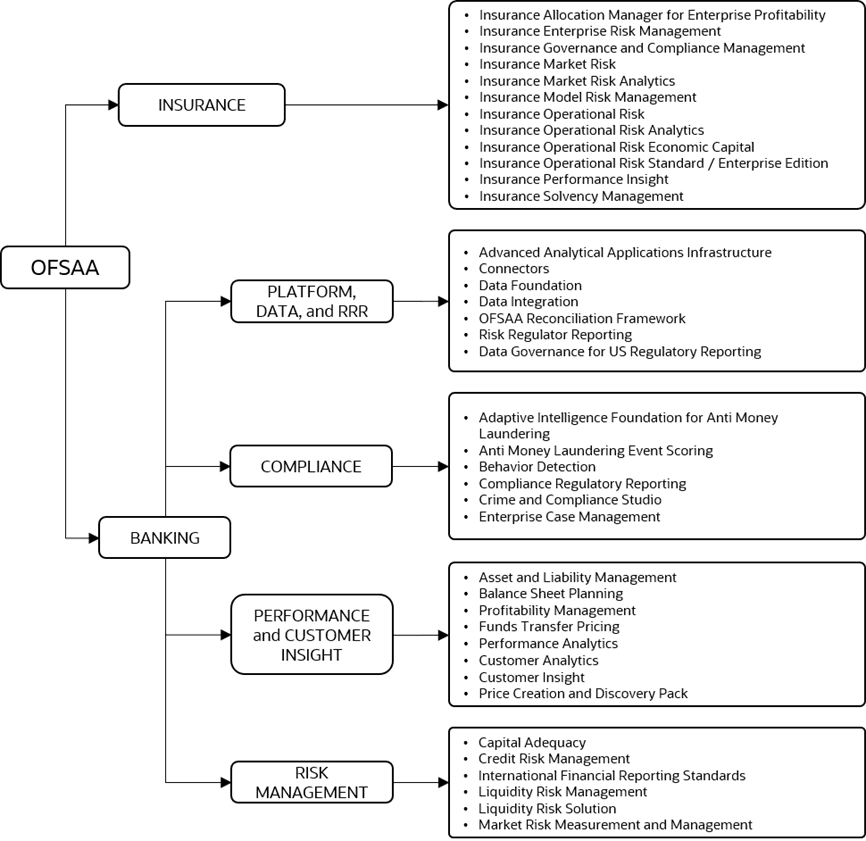
The following figure depicts the various application packs that are available across the OFSAA Banking and Insurance domains.
Figure 1: Application Packs of OFSAA
Topics:
· Oracle Financial Services Analytical Applications Infrastructure (OFSAAI)
· About the Oracle Financial Services Balance Computation Engine Application
· Installation and Upgrade Scenarios
Oracle Financial Services Analytical Applications Infrastructure (OFSAAI) powers the Oracle Financial Services Analytical Applications family of products to perform the processing, categorizing, selection and manipulation of data and information required to analyze, understand and report on specific performance, risk, compliance and customer insight issues by providing a strong foundation for the entire family of Oracle Financial Services Analytical Applications across the domains of Risk, Performance, Compliance and Customer Insight.
The OFSAA Infrastructure includes frameworks that operate on and with the Oracle Financial Services Analytical Applications Data Model and forms the array of components within the Infrastructure.
The OFSAA Infrastructure components or frameworks are installed as two layers; primarily, the metadata server and Infrastructure services run on one layer, while the UI and presentation logic runs on the other. The UI and presentation layer is deployed on any of the supported J2EE Servers.
The following figure depicts the various frameworks and capabilities that make up the OFSAA Infrastructure.
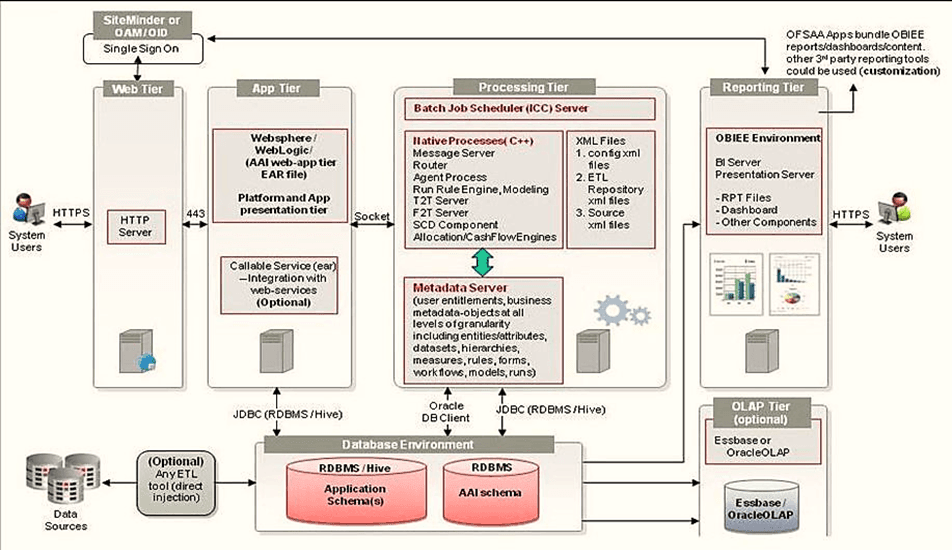
The current release of the OFSAA Infrastructure supports only the Single Instance installation for the Infrastructure components. However, the High Availability (HA) for the Database Server and/ or the Web application server clustering and deployment is supported in this release.
This release supports the Active-Passive model of implementation for OFSAAI components. For more information, see the Oracle Financial Services Analytical Applications (OFSAA) Configuration for High Availability Best Practices Guide Release 8.1.x.
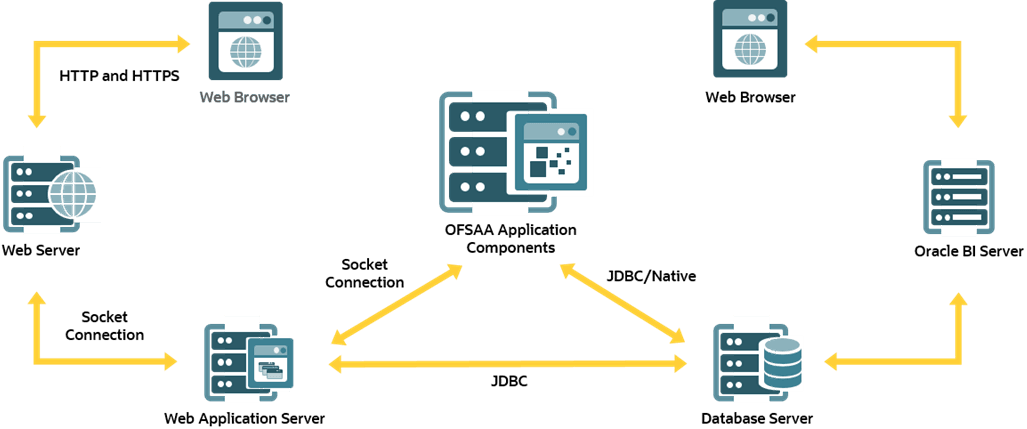
Figure 2: The logical architecture implemented in the OFSAAAI Application Pack
As of Release 8.1.1.0.0, OFSBCE Application may be installed and used independent of the OFSDF Application Pack, which supports the assessment and maintenance of instrument-level accounting balance information. An instrument, in this context, refers to Account in OFSBCE, and this terminology is used in this document to avoid any ambiguity with the Ledger Account.
Balance Computation Engine also supports the following functions:
· Revaluation of instrument-level accounting balance.
· Currency translation of instrument-level accounting balance.
· Statistical derivations (average and period to date) of instrument-level accounting balance.
· Instrument-level balance information stored against an extended version of General Ledger (GL) Chart of Accounts (CoA), constituting a Management Ledger.
· Derivation of instrument-level balance based on GL/Sub Ledger balance (ledger balance) and corresponding journal postings. Ledger balance and journal postings are ingested into the OFSDF application from external sources, including Oracle ERP Accounting Hub Cloud Service (AHCS) and Cloud GL.
OFSBCE Application includes the following applications:
· Financial Services Analytical Applications Infrastructure: This application powers the Oracle Financial Services Analytical Applications family of products to perform the processing, categorizing, selection and manipulation of data and information required to analyze, understand and report on specific performance, risk, compliance and customer insight issues by providing a strong foundation for the entire family of Oracle Financial Services Analytical Applications across the domains of Risk, Performance, Compliance and Customer Insight.
The Oracle Financial Services Analytical Applications Infrastructure Extension (OFS AAIE) Pack adds a set of new advanced features for 8.1.1.0.0 Release across OFSAA applications. This pack can be installed on an OFSAA instance containing one or more OFSAA application packs.
The Oracle Financial Services Analytical Applications Infrastructure Extension Pack includes the following advanced features and functionalities:
· Distributed Processing Capabilities
· Analytic Pipeline and Process models
· Attribution Analysis
· Content Management Interoperability Services
NOTE:
The pack is enabled by procurement of an additional license. For more information, see the OFS AAIE Release Notes and Installation Guide on the OHC Documentation Library.
The OFSBCE Application Release v8.1.1.0.0 supports various installation scenarios. A high-level overview of the possible scenarios is provided in the following table. The detailed procedural steps are provided in the subsequent sections.
Scenario |
Installation Instructions |
|---|---|
|
Installing Release 8.1.1.0.0 application pack for the first time (new installation). |
1. Prepare for the Installation. 2. Run the Schema Creator Utility. 3. Install the OFS BCE Application. |
Install a new OFSBCE Application v8.1.1.0.0 on an Existing OFSAA Instance In this scenario, you have already installed an application pack version v8.1.1.0.0 and now you want to install the OFSBCE application version v8.1.1.0.0. Example: OFSDF Pack is already installed and now you want to install OFSBCE application. |
1. Configure the OFS_IBCE_PACK.xml file for the newly licensed OFSBCE Application Pack. 2. Configure the Silent.props file of the newly licensed pack. 3. Run the schema creator utility ONLY for the newly licensed OFSBCE Application Pack. 4. Trigger the installation. |