This section provides information about accessing the OFSBCE Application and the OFSAAI functions used in OFSBCE.
Topics:
· Access to the OFSBCE Application
· OFSAAI Functions Used in OFSBCE
This section provides information about accessing the OFSBCE application.
Topics:
· Accessing the OFSBCE Application
· Prerequisites to Execute the OFSBCE Processes
After installing the prerequisite OFSAA applications and the OFSBCE application, to access OFSBCE (or any OFSAA Application), follow the steps mentioned in the Access the OFSAA Application section in the OFSAAI Release 8.1.1.0.0 Installation and Configuration Guide for details.
Before executing the OFSBCE processes, complete the following tasks:
· Load the required Dimensions.
The following dimension entities are used by BCE and should be populated:
§ DIM_ORG_UNIT
§ DIM_GL_ACCOUNT
§ DIM_ORG_STRUCTURE
§ DIM_CUSTOMER
§ DIM_DATES
§ DIM_FISCAL_PERIODS
§ DIM_DATA_ORIGIN
§ DIM_ACCOUNT
· Load the following Seeded Data:
§ DIM_GAAP
§ DIM_GL_TYPE
§ DIM_CURRENCY
For the latest list of Dimensions to be loaded, see the OFSBCE Runchart for the current release. For information about loading the Dimension tables, see the Executing SCDs sub-section in the Slowly Changing Dimensions (SCD) section, and Batch Execution sub-section in the Operations section of the Oracle Financial Services Advanced Analytical Applications Infrastructure User Guide Release 8.1.1.0.0.
NOTE:
For populating the DIM_ACCOUNT table, the standard process in OFSDF is to use the data from the Product Processor entities in Staging. Populating the Product Processor entities in Staging is not mandatory for OFSBCE purposes. OFSBCE supports populating the DIM_ACCOUNT entity from unique values for ACCOUNT_ID as supplied in the STG_ACCOUNTING_ENTRIES entity, which needs to be sourced from approproiate sources, typically from Oracle ERP, other accounting systems or other suitable systems of record. The process for populating STG_ACCOUNTING_ENTRIES is defined and the required steps are available out of the box with the OFSBCE installation.
If OFSDF is deployed, institutions may choose to ignore this functionality and as an alternative, populate the DIM_ACCOUNT entity from Product Processor entities.
To populate the DIM_ACCOUNT table entries when OFSDF (or any other OFSAA application, which lists DIM_ACCOUNT in its Runchart) is present, see the Account Dimension Table section in the Oracle Financial Services Data Foundation Application Pack User Guide Release 8.1.1.0.0 and related documents in the OFSDF OHC Documentation Library.
NOTE:
To populate DIM_DATES using DTs, see the Time Dimension Table section in the Oracle Financial Services Data Foundation Application Pack User Guide Release 8.1.1.0.0.
· Load the Exchange Rates table FSI_EXCG_RATES using the insert scripts.
The Exchange Rates table stores the list of all exchange rates for all types of currency. This is a standalone table. The purpose of the Exchange Rates table is to offer the value of one currency in relation to another currency.
Each Legal Entity, for which processing is expected, must have an associated Local Currency to it. So that the system can perform the computations.
· Load the Legal Entity tables.
The reporting entity may be a part of a financial institution that consists of multiple legal entities such as parent or child entities (subsidiaries) under its name. User can select the entity for which processing must be done. In addition, a ‘Solo’ Run execution is supported.
· Load the SETUP_MASTER table
The Revaluation or Translation processes need the Rate Data Origin and Quote Type as input information for processing. This information is present in the SETUP_MASTER table and can be identified by rows where the column V_COMPONENT_CODE consists of the values EXCG_RATE_DATA_ORIG and EXCG_RATE_QUOTE_TYPE, and the Seeded values in the column V_COMPONENT_VALUE are DEFAULT and QUOTE. This information is used when fetching Rates from the table FSI_EXCG_RATES during computation.
To execute batches in the preceding tasks, see the Batch Execution sub-section in the Operations section of the Oracle Financial Services Advanced Analytical Applications Infrastructure User Guide Release 8.1.1.0.0.
To configure, manage, and execute all the OFSBCE processes, use the OFSAA Process Modelling Framework (PMF). For more information, see the Executing the OFSBCE Processes through Process Modelling Framework section.
For information about the Flattening Process of Dimensions, see the Hierarchy Transformation section in the Oracle Financial Services Data Model Utilities User Guide Release 8.1.1.0.0.
This section provides information about executing, scheduling, and monitoring the batches in OFSBCE.
For more information about Batch Maintenance, Batch Execution, Batch Scheduler, Batch Monitor, and View Log, see the Operations section in the Oracle Financial Services Advanced Analytical Applications Infrastructure User Guide Release 8.1.1.0.0.
The following OFSAAI functions are used by OFSBCE:
· Data Model Management
§ The required functionality is accessed through Data Model Maintenance
· Data Management Framework
§ The required functionality is accessed through Data Management Tools
§ Slowly Changing Dimensions (SCD)
· Unified Analytical Metadata
· Rule Run Framework
— Component Registration
· Operations
§ Batch Maintenance
§ Batch Execution
§ Batch Scheduler
§ Batch Monitor
§ View Log
— Metadata Authorization
— Save Metadata
— Write Protected Batch
— Metadata Difference
— Patch Information
§ Object Migration
§ Object Security
· Metadata Browser
For more information, see the Oracle Financial Services Analytical Applications (OFSAA) Metadata Browser User Guide Release 8.1.0.0.0.
For more information about the OFSAAI functions, see the Oracle Financial Services Advanced Analytical Applications Infrastructure User Guide Release 8.1.1.0.0.
This section provides detailed information about the OFSAAI components used to deploy the OFSBCE application.
Topics:
NOTE:
For the latest information about the OFSAAI Components, see the Oracle Financial Services Advanced Analytical Applications Infrastructure User Guide Release 8.1.1.0.0.
Model refers to a data structure that consists of the well-organized business data for analysis. Data Model explicitly determines the structured data, which stores persistent information in a relational database and is specified in a data modeling language. Data Model Maintenance within the Infrastructure system facilitates you to upload the warehouse data from the operational systems to database schema using JSON (ODM) / ERwin XML file or Database Catalog. For more information, see the Data Model Management section in the Oracle Financial Services Advanced Analytical Applications Infrastructure User Guide Release 8.1.1.0.0.
For the erwin Data Modeller version supported in this release, see the Oracle Financial Services Analytical Applications (OFSAA) Technology Matrix Release 8.1.1.0.0.
Topics:
· Business Model Upload Summary
You (Business Analysts) need to have IBMADD (Import Business Model) function role mapped to access the Import Model Framework within the Infrastructure system. You need to also map the DMM_ADD function to a role to provide access to Add.
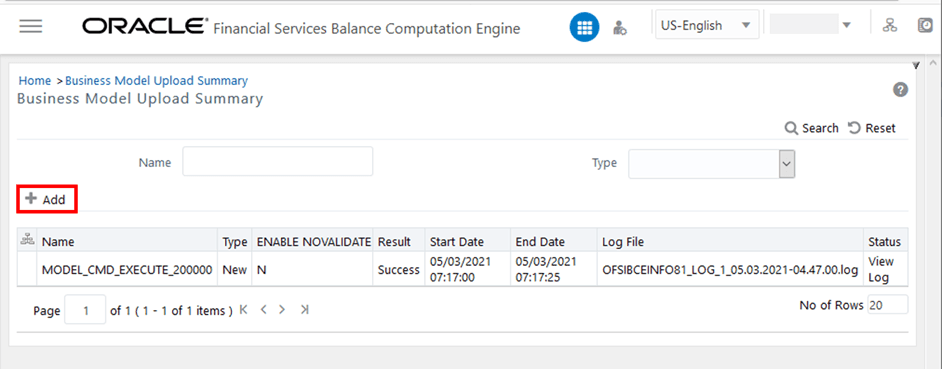
To navigate to the Business Model Upload Summary Page, from OFSAA Home, select Financial Services Balance Computation Engine, select Administration, and select Data Model Maintenance.
Figure 2: Business Model Upload Summary Page with Add option
The Business Model Upload Summary Page facilitates to upload the required Business Model and displays the summary of previously uploaded Business Models with their Name, Type (New/ Incremental/Rebuild/Sliced), Enable NoValidate status (Y or N), Result of upload (Success/Failed/Running), Start Date, End Date, Log File path, and Status.
To initiate the Business Model upload process, click Add. For detail procedure, see the Upload Business Model section in the Oracle Financial Services Advanced Analytical Applications Infrastructure User Guide Release 8.1.1.0.0.
To view the Model Upload details, in the Status column corresponding to the required model, click the View Log link to open the View Log Details page. For more information, see the Viewing Log Details section (and also see the Log File Download section) in the Oracle Financial Services Advanced Analytical Applications Infrastructure User Guide Release 8.1.1.0.0.
You can upload a new model or update or re-build an existing model to the database schema. The option to upload a Business Model is available based on the existing model in the selected Information Domain.
To navigate to the Business Model Upload Page, from OFSAA Home, select Financial Services Balance Computation Engine, select Administration, select Data Model Maintenance, select Add.
Figure 3: Business Model Upload Page
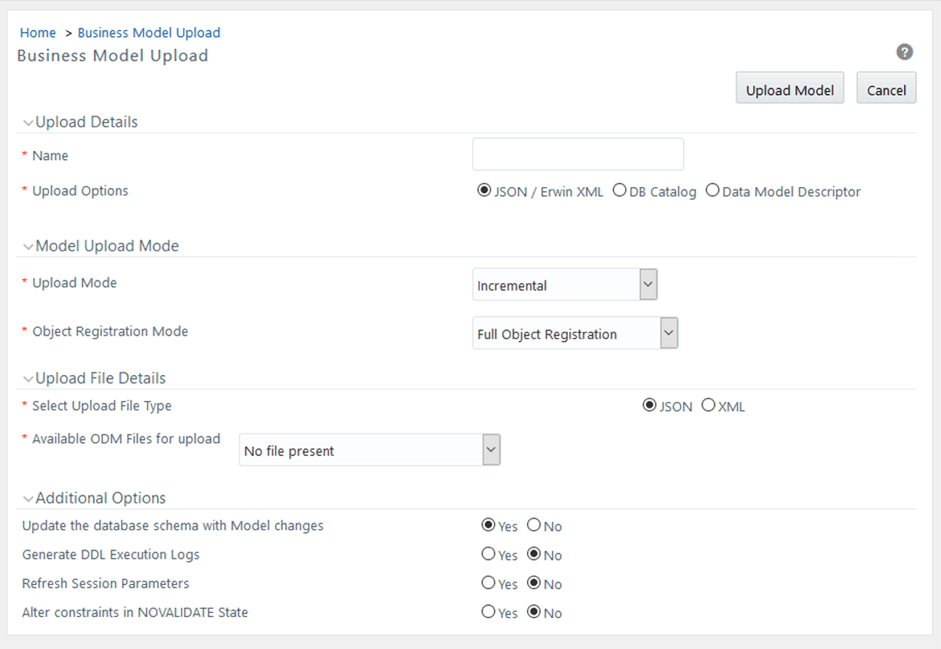
For detail procedure about uploading a Business Model and for the latest information, see the Upload Business Model section in the Oracle Financial Services Advanced Analytical Applications Infrastructure User Guide Release 8.1.1.0.0.
For information about uploading a Business Model using different options, see the following sub-sections in the Upload Business Model section:
· Model Upload Using JSON / ErwinXML section for the Business Model upload using the JSON (ODM) / ERwin XML option.
· Model Upload Using DB Catalog section for the Business Model upload using the Database Catalog option.
· Model Upload Using OFSAA Data Model Descriptor (JSON) File section for the Business Model upload using the Data Model Descriptor option.
Data Management Tools is a software application based on the ETL (extract-transform-load) structure, which is used for data transformation and merging. The E-LT structure in Data Management Tools eliminates the need for a separate ETL server, and the analytical rules facilitate to optimized performance, efficiency, and scalability.
The Data Management Tools module is equipped with a set of automated tools and a tested data integration methodologies that allows you to position the advanced N-tier web-based architecture and integrate the enterprise data sources from the mainframe to the desktop.
In Data Management Tools, you can standardize and integrate the various source system data into a single standard format for data analysis. You can also populate the warehouse in a defined period using the ETL process for data extraction, transformation, and loading.
NOTE:
For the latest information about the Data Management Tools, see the Data Management Tools section in the Oracle Financial Services Advanced Analytical Applications Infrastructure User Guide Release 8.1.1.0.0.
Topics:
· Components of Data Management Tools
· Slowly Changing Dimensions (SCD)
Data Management Tools consists of the following sections:
Data Sources within the Data Management Tools of the Infrastructure system facilitates you to define Data Sources and generates Data Models of the Source systems. When defining a Data Source, the Source Model is generated.
To navigate to the Data Source Page, from OFSAA Home, select Financial Services Balance Computation Engine, select Administration, select Data Management Tools, and select Data Sources.
Figure 4: Data Sources Page
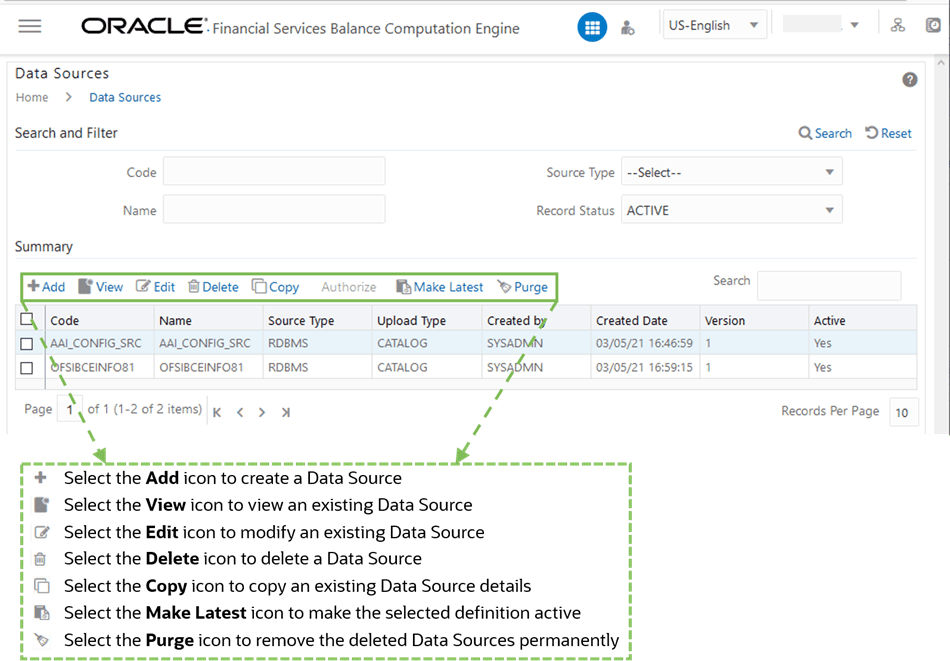
To perform different actions related to the Data Sources, see the following sub-sections in the Data Sources section of the Oracle Financial Services Advanced Analytical Applications Infrastructure User Guide Release 8.1.1.0.0:
· Creating a Data Source section to add a Data Source
· Viewing a Data Source section to view an existing Data Source
· Modifying a Data Source section to edit an existing Data Source
· Deleting Data Sources section to delete a Data Source
· Copying a Data Source section to copy an existing Data Source details
· Versioning and Make Latest Feature section to make the selected definition active
· Purging Data Sources section to remove the deleted Data Sources permanently
For more information about the Data Sources and mapped roles, see the Data Sources section in the Oracle Financial Services Advanced Analytical Applications Infrastructure User Guide Release 8.1.1.0.0.
Data Mapping refers to the process of retrieving unstructured data from data sources for further data processing, storage, or migration. The intermediate extraction process can be followed by data transformation and metadata addition before exporting it to the staging area or to the Business Data Model.
To navigate to the Data Mappings Page, from OFSAA Home, select Financial Services Balance Computation Engine, select Administration, select Data Management Tools, and select Data Mapping.
Figure 5: Data Mappings Page
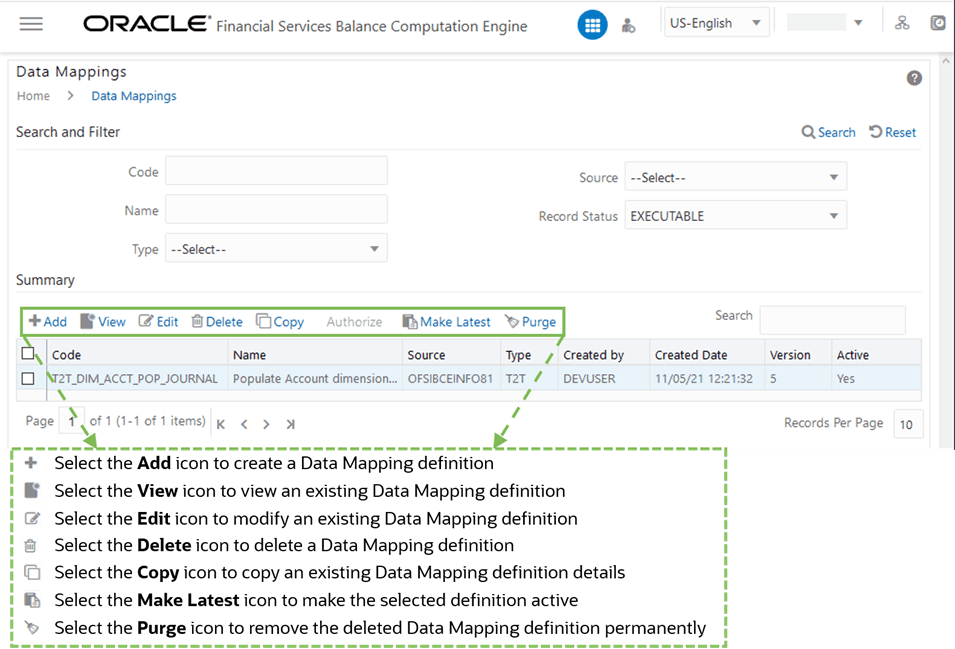
To perform different actions related to the Data Mappings, see the following sub-sections in the Data Mapping section of the Oracle Financial Services Advanced Analytical Applications Infrastructure User Guide Release 8.1.1.0.0:
· Creating a Data Mapping Definition section to add a Data Mapping definition
· Viewing a Data Mapping Definition section to view an existing Data Mapping definition
· Modifying a Data Mapping Definition section to edit an existing Data Mapping definition
· Deleting Data Mapping Definitions section to delete a Data Mapping definition
· Copying a Data Mapping Definition section to copy an existing Data Mapping definition details
· Versioning and Make Latest Feature of Data Mapping section to make the selected definition active
· Purging Data Mapping Definitions section to remove the deleted Data Mapping definition permanently
For more information about the Data Mapping and mapped roles, see the Data Mapping section in the Oracle Financial Services Advanced Analytical Applications Infrastructure User Guide Release 8.1.1.0.0.
Post Load Changes(PLC) refers to a rule describing the conversion of data from sources to Staging or from Staging to Processing (destination) tables. During the data extraction, a PostLoad Changes Rule helps in structuring the required data from sources to the target or an intermediate systems for further processing. Based on the selected mode, Post Load Changes can be applied to execute the process successfully.
Post Load Changes within the Data Management Tools framework allows you to define transformations to the Source Data before extracting or loading it to the target database to populate the data warehouse.
To navigate to the Post Load Changes Page, from OFSAA Home, select Financial Services Balance Computation Engine, select Administration, select Data Management Tools, and select Post Load Changes.
Figure 6: Post Load Changes page

To perform different actions related to the Post Load Changes, see the following sub-sections in the Post Load Changes section of the Oracle Financial Services Advanced Analytical Applications Infrastructure User Guide Release 8.1.1.0.0:
· Creating Post Load Changes Definition section to add a Post Load Changes definition
· Viewing Post Load Changes Definition section to view an existing Post Load Changes definition
· Modifying Post Load Changes Definition section to edit an existing Post Load Changes definition
· Deleting Post Load Changes Definitions section to delete a Post Load Changes definition
· Versioning and Make Latest Feature of Data Mapping section to make the selected definition active
· Purging Post Load Changes Definitions section to remove the deleted Post Load Changes definition permanently
For more information about the Post Load Changes and mapped roles, see the Post Load Changes section in the Oracle Financial Services Advanced Analytical Applications Infrastructure User Guide Release 8.1.1.0.0.
A Slowly Changing Dimension (SCD) is a dimension that stores and manages both current and historical data over time in a data warehouse. The following are the three types of SCDs:
· Type 1 SCDs -Overwriting
· Type 2 SCDs -Creating another Dimension Record
· Type 3 SCDs -Creating a Current Value Field
For information about the Type 1, Type 2, and Type 3 SCDs, see the Slowly Changing Dimensions (SCD) section in the Oracle Financial Services Advanced Analytical Applications Infrastructure User Guide Release 8.1.1.0.0.
To navigate to the Slowly Changing Dimension Summary Page, from OFSAA Home, select Financial Services Balance Computation Engine, select Administration, select Data Management Tools, and select Slowly Changing Dimension.
Figure 7: Slowly Changing Dimension Summary Page
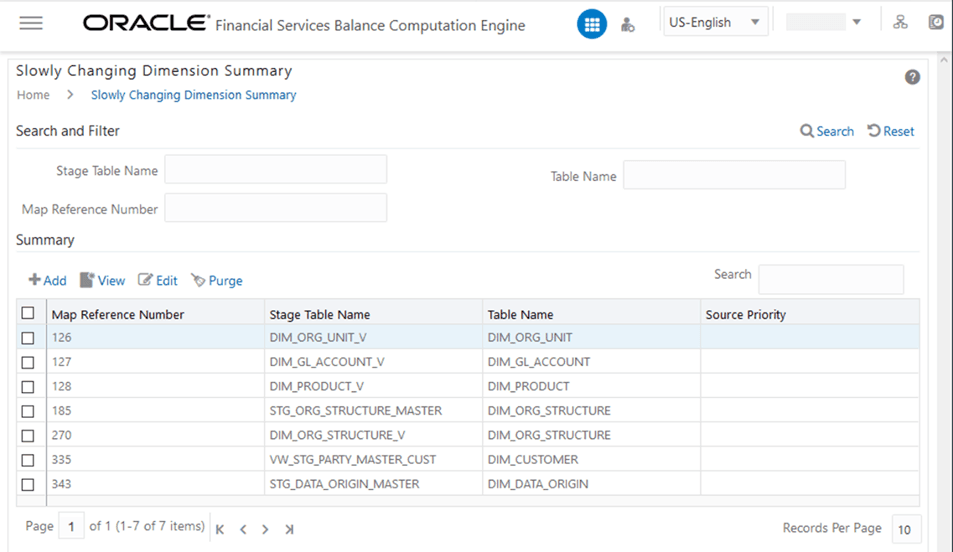
To perform different actions related to the SCD, see the following sub-sections in the Slowly Changing Dimension (SCD) section of the Oracle Financial Services Advanced Analytical Applications Infrastructure User Guide Release 8.1.1.0.0:
· Creating Slowly Changing Dimension section to create an SCD or to define an SCD
· Executing SCDs section to execute an SCD
· Modifying SCD Definition section to edit an existing SCD Definition
· Viewing SCD Definition section to view an existing SCD
· Purging SCD Definitions section to to remove the deleted SCDs permanently
For more information about the SCD and mapped roles, see the Slowly Changing Dimensions (SCD) section in the Oracle Financial Services Advanced Analytical Applications Infrastructure User Guide Release 8.1.1.0.0.
Dimension Management within the Infrastructure system facilitates you to categorize data into a single object as a Member; define levels and aggregate data to form the Hierarchies, and distinguish each member by defining the required Attributes.
NOTE:
For latest information about the Dimension Management and Mapped Roles, see the Dimension Management section in the Oracle Financial Services Advanced Analytical Applications Infrastructure User Guide Release 8.1.1.0.0.
Dimension Management consists of the following sections:
· Member
Dimension Members refer to the individual items that constitute a dimension when data is categorized into a single object. For example, Product, Organization, Time, and so on. Members are available within the Dimension Management section of the Infrastructure system.
For more information about how to set up alphanumeric and numeric codes, see the Configurations to use Alphanumeric and Numeric Codes for Dimension Members section in the Oracle Financial Services Advanced Analytical Applications Infrastructure Administration and Configuration Guide Release 8.1.x.
To navigate to the Members page, from OFSAA Home, select Financial Services Balance Computation Engine, select Administration, select Dimension Management, and select Member.
Figure 8: Members Page in Dimension Management
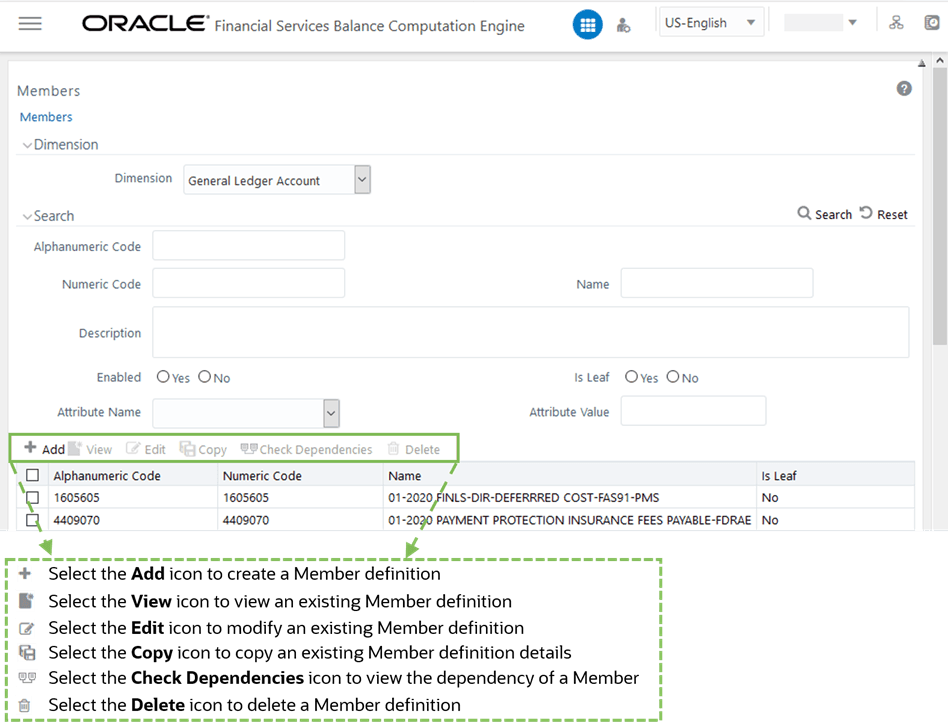
To perform different actions related to the Members, see the following sub-sections in the Members section of the Oracle Financial Services Advanced Analytical Applications Infrastructure User Guide Release 8.1.1.0.0:
· Adding Member Definition section to add a Member Definition
· Viewing Member Definition section to view an existing Member Definition
· Modifying Member Definition section to edit an existing Member Definition
· Deleting Member Definition section to delete a Member Definition
· Copying Member Definition section to copy an existing Member Definition details
· Member Definition Dependencies section to view the dependency of a Member
Attributes refers to the distinguished properties or qualifiers that describes a Dimension Member. Attributes may or may not exist for a simple Dimension.
To navigate to the Attributes page, from OFSAA Home, select Financial Services Balance Computation Engine, select Administration, select Dimension Management, and select Attribute.
Figure 9: Attributes Page in Dimension Management
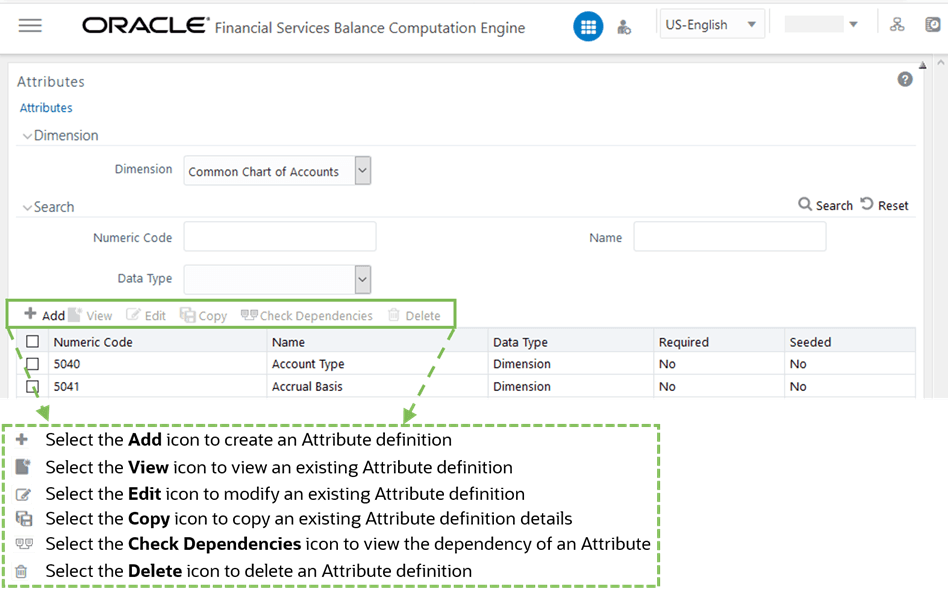
To perform different actions related to the Attributes, see the following sub-sections in the Attributes section of the Oracle Financial Services Advanced Analytical Applications Infrastructure User Guide Release 8.1.1.0.0:
· Adding Attribute Definition section to add an Attribute Definition
· Viewing Attribute Definition section to view an existing Attribute Definition
· Modifying Attribute Definition section to edit an existing Attribute Definition
· Deleting Attribute Definition section to delete an Attribute Definition
· Copying Attribute Definition section to copy an existing Attribute Definition details
· Attribute Definition Dependencies section to view the dependency of an Attribute
Business Hierarchy refers to organizing data into logical tree structure to represent the groups and relations among various levels at which measure can be viewed. A measure can be viewed at different levels depending on the hierarchy breakdown of the dimension category.
To navigate to the Business Hierarchy Page, from OFSAA Home, select Financial Services Balance Computation Engine, select Administration, select Dimension Management, and select Business Hierarchy.
Figure 10: Business Hierarchy Page in Dimension Management
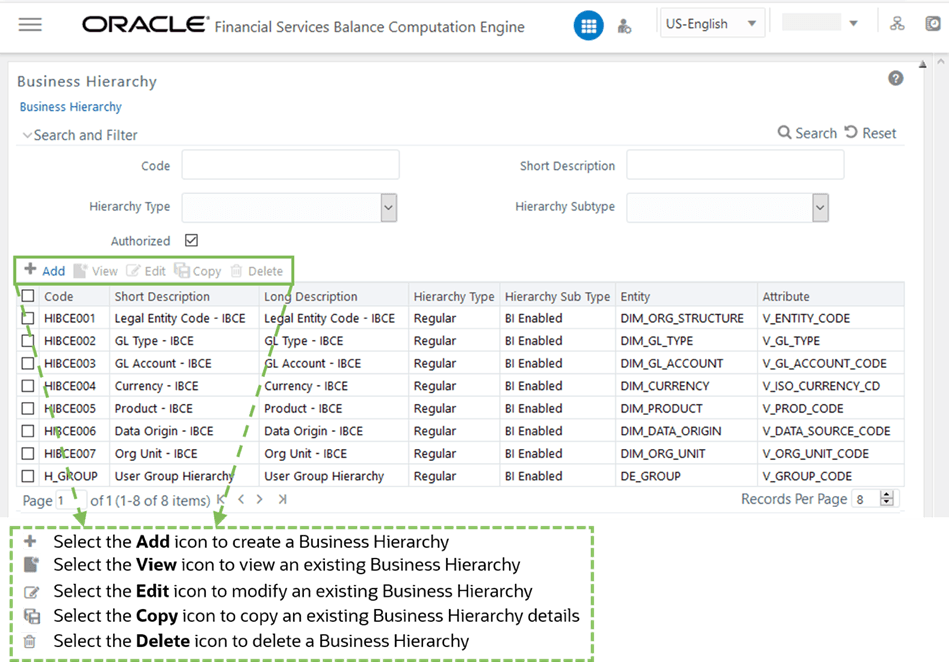
To perform different actions related to the Business Hierarchy, see the following sub-sections in the Business Hierarchy section of the Oracle Financial Services Advanced Analytical Applications Infrastructure User Guide Release 8.1.1.0.0:
· Creating Business Hierarchy section to add a Business Hierarchy
· Viewing Business Hierarchy section to view an existing Business Hierarchy
· Modifying Business Hierarchy section to edit an existing Business Hierarchy
· Deleting Business Hierarchy section to delete a Business Hierarchy
· Copying Business Hierarchy section to copy an existing Business Hierarchy details
For more information about the Business Hierarchy, see the Build Hierarchy section in the Oracle Financial Services Advanced Analytical Applications Infrastructure User Guide Release 8.1.1.0.0.
Hierarchies refer to Dimension Members that are arranged in levels, with each level representing the aggregated total of the data from the level below. One dimension type can have multiple hierarchies associated with it.
To navigate to the Hierarchy Maintenance Page, from OFSAA Home, select Financial Services Balance Computation Engine, select Administration, select Dimension Management, and select Hierarchy Maintenance.
Figure 11: Hierarchies Page in Dimension Management
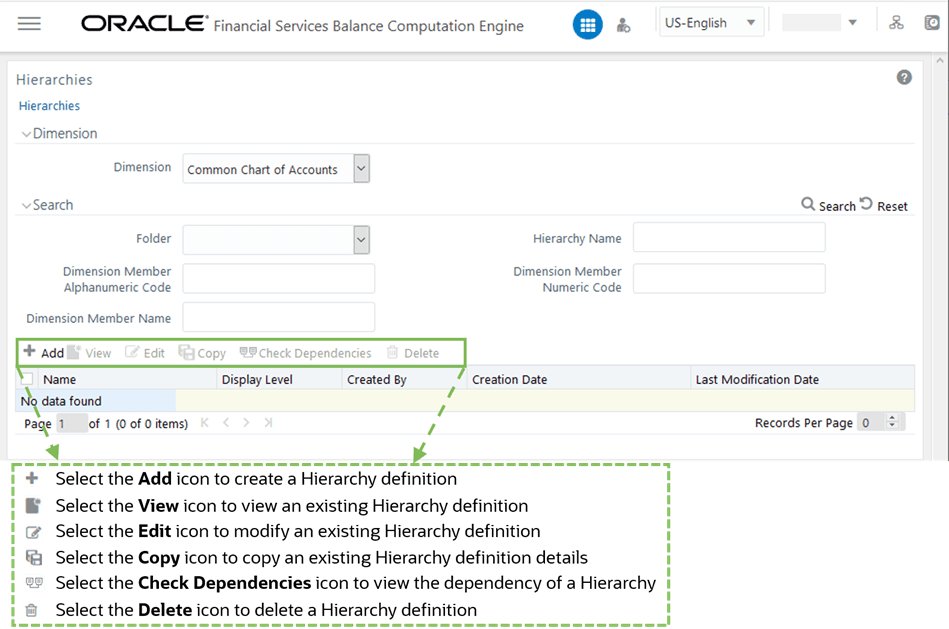
To perform different actions related to the Hierarchies, see the following sub-sections in the Hierarchy Maintenance section of the Oracle Financial Services Advanced Analytical Applications Infrastructure User Guide Release 8.1.1.0.0:
· Adding Hierarchy Definition section to create a Hierarchy Definition
· Viewing Hierarchy Definition section to view an existing Hierarchy Definition
· Modifying Hierarchy Definition section to edit an existing Hierarchy Definition
· Deleting Hierarchy Definition section to delete a Hierarchy Definition
· Hierarchy Definition Dependencies section to view the dependency of a Hierarchy
For more information about the Hierarchies, see the Hierarchy Maintenance section in the Oracle Financial Services Advanced Analytical Applications Infrastructure User Guide Release 8.1.1.0.0.
Utilities refer to a set of additional tools which helps you to fine tune a defined process or maximize and ensure the security of a database based on your need. The Utilities within the Administration framework of Infrastructure system facilitates you to maintain the data in the Oracle Database using the various administrative tools. You can define the user access permissions, batch securities, upload attributes, find metadata difference, and migrate source objects to target database.
You (System Administrator) need to have SYSADM function role mapped to access the Utilities section within the Infrastructure system.
To navigate to the Utilities menu, from OFSAA Home, select Financial Services Balance Computation Engine, select Administration, and select Utilities.
Administration Utilities consists of the following sections:
To access various utilities on the Utilities menu, see the following sub-sections (in the Utilities section) in the Object Administration section of the Oracle Financial Services Advanced Analytical Applications Infrastructure User Guide Release 8.1.1.0.0:
· Metadata Difference
· Metadata Authorization
· Save Metadata
· Write-Protected Batch
· Patch Information
Also see the Component Registration sub-section in the Utilities section of the Rule Run Framework in the Oracle Financial Services Advanced Analytical Applications Infrastructure User Guide Release 8.1.1.0.0.
For information about the Metadata Browser, see the Oracle Financial Services Analytical Applications (OFSAA) Metadata Browser User Guide Release 8.1.0.0.0.
Operations refers to administration and processing of business data to create the highest level of efficiency within the system and to derive results based on a specified rule.
Topics:
· View Log
For latest information, see the Operations section in the Oracle Financial Services Advanced Analytical Applications Infrastructure User Guide Release 8.1.1.0.0.
Batch refers to a set of executable processes based on a specified rule. Batch Maintenance framework within the Infrastructure system facilitates you to create and maintain the Batch Definitions. You can process the Batch scheduled for execution from Batch Maintenance and also from other modules and applications such as Rules Run Framework and Enterprise Modeling respectively.You should have Batch Write User Role mapped to your User Group to cancel a Batch. The Batch Maintenancewindow displays a list of Batches scheduled for maintenance with the other details such as BatchID, Batch Description, and the editable state of the Batch.
Navigation: From OFSBCE Home, select the Financial Services Balance Computation Engine. In the Navigation List, select Execution, and then select Batch Maintenance. The Batch Maintenance page displays.
Batch execution refers to the process of initiating a batch for current processing. When a batch is submitted for execution, a series of commands are sent to the database with respect to the defined component parameters. This in turn returns an array of update counts (required value definitions) when the commands are executed successfully.
You must map Batch Advanced User Role to your User Group to execute a Batch.
Navigation: From OFSBCE Home, select the Financial Services Balance Computation Engine. In the Navigation List, select Execution, and then select Batch Execution. The Batch Execution page displays.
The Batch Execution page displays the list of only those Batches which have at least one task associated, with the other details such as Batch ID and Batch Description. When you select a Batch ID in the list, the Task Details sections displays all the defined Tasks associated with the Batch. The Batch Details section in the Batch Execution page lists the Batches depending on the Batch Mode selected.
· The Run mode displays the Batch definitions which are newly defined and which have been scheduled for execution.
· The Restart mode displays the Batch definitions which are not executed successfully or either has been interrupted during the previous Batch execution.
· The Rerun mode displays the Batch definitions which have been successfully executed, failed, cancelled, or even interrupted during the previous Batch execution.
You can search for a specific Batch based on the Batch ID, Batch Description, Module, or Last Modified Date. The pagination option helps you to view the list of existing Batches within the system.
For more information, see the Batch Execution section in the Oracle Financial Services Advanced Analytical Applications Infrastructure User Guide Release 8.1.1.0.0.
Batch Scheduler in the Infrastructure system facilitates you to schedule a Batch for later processing. You can define a new Batch schedule or update a previously defined Batch schedule for processing.You must have Batch Advanced User Role mapped to your User Group to schedule a Batch. The Batch Scheduler page displays the list of Batches scheduled for execution with the other details such as Batch ID and Batch Description. When you select a Batch in the list, the Batch Scheduler options are displayed.
Navigation: From OFSBCE Home, select the Financial Services Balance Computation Engine. In the Navigation List, select Execution, and then select Batch Scheduler. The Batch Scheduler page displays.
For more information, see the Batch Scheduler section in the Oracle Financial Services Advanced Analytical Applications Infrastructure User Guide Release 8.1.1.0.0.
Batch Monitor in the Infrastructure system facilitates you to view the status of executed Batch Definitions along with the Task details. You can track the issues, if any, on regular intervals and ensure smoother Batch execution. An event log provides you the real time status of the executed Batches. You must have Batch Read Only User Role mapped to your User Group to monitor a Batch. The Batch Monitor page displays a list of Batches with the other details such as Batch ID and Batch Description. You can search for a specific Batch based on Date range, Module, Status, and Batch Description. The Batches listed in the Batch Details section can be sorted based on the current state as Successful, Failed, Held, or New.
Navigation: From OFSBCE Home, select the Financial Services Balance Computation Engine. In the Navigation List, select Execution, and then select Batch Monitor. The Batch Monitor page displays.
For more information, see the Batch Monitor section in the Oracle Financial Services Advanced Analytical Applications Infrastructure User Guide Release 8.1.1.0.0.
The View Log page allows you to view the log files generated during a batch execution.
To view the log files of a batch execution, follow these steps:
1. From OFSBCE Home, select the Financial Services Balance Computation Engine. In the Navigation List, select Execution, and then select View Log.
2. The View Log page is displayed. This page contains Component Type, Folder, User, As of Date, Task Name, Batch Run ID, and the Task ID Information section.
Figure 12: View Log Page
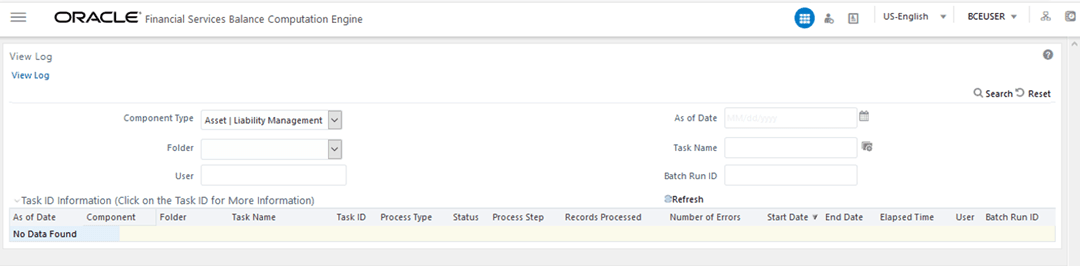
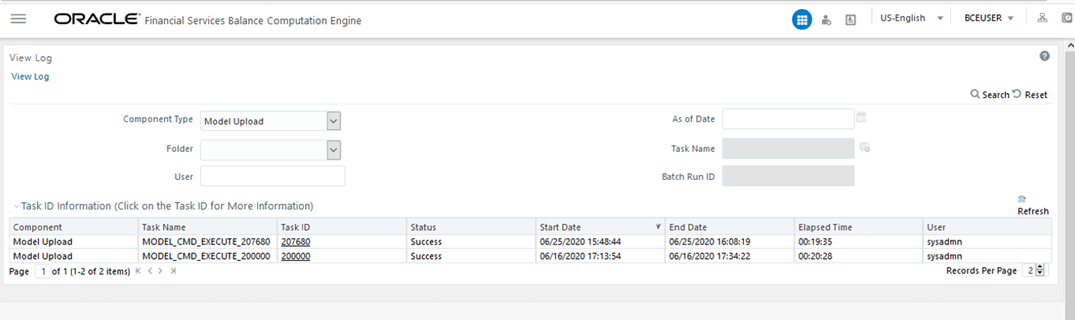
3. Select the required Component Type and other attributes, and click Search. The list of Task IDs corresponding to the selected component is displayed in the Task ID Information section. Click the required Task ID.
Figure 13: Select the Component Type and other Attributes in the View Log Page
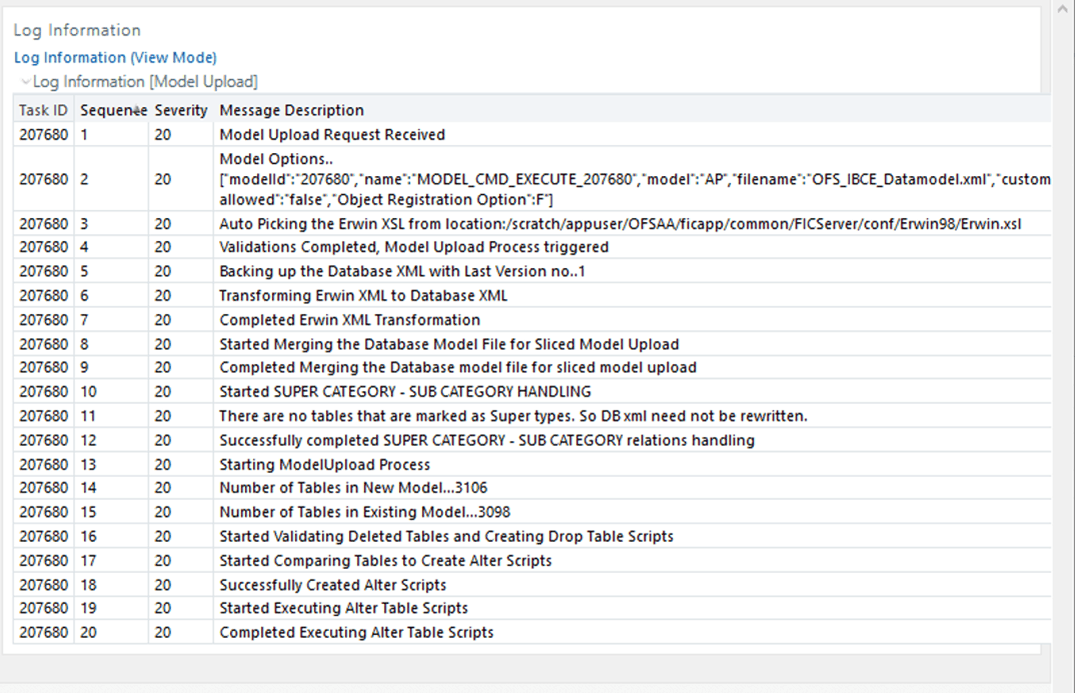
4. The Log Information page is displayed, which contains all the log information related to the selected component and Task ID.
Figure 14: Log Information Page
5. After verifying the log information, close the page.
Object Administration is an integral part of the Infrastructure system and facilitates the system administrators to define the security framework with the capacity to restrict access to the data and metadata in the warehouse, based on a flexible, fine-grained access control mechanism. These activities are mainly done at the initial stage and then on need basis.
The document deals with the information related to the workflow of Infrastructure Administration Process with related procedures to assist, configure, and manage the administrative tasks effectively.
You (System Administrator or System Authorizer) need to have SYSATH, SYSADM, and METAAUTH function roles mapped to access the Object Administration Framework within the Infrastructure system.
Object Administration consists of the following sections:
NOTE:
For latest information about the Object Administration and Prerequisites, see the Object Administration section in the Oracle Financial Services Advanced Analytical Applications Infrastructure User Guide Release 8.1.1.0.0.
Object Migration is the process of migrating or moving objects from one environment to another environment. You may need to do the migration of objects for several reasons. You may have multiple environments to handle a global deployment or you may need to create multiple environments to separate development, testing, and production activities.
Object Migration consists of the following sections:
· Object Migration Summary
· Export Objects
· Import Objects
This section consists of Object Migration Summary and Object Migration Details information.
You (BCE System Administrator) need to have FU_MIG_HP function role mapped to access the Object Migration Framework within OFSBCE.
To navigate to the Object Migration Summary Page, from OFSAA Home, select Financial Services Balance Computation Engine, select Administration, select Object Administration, select Object Migration, and select Object Migration.
Figure 15: Object Migration Summary Page
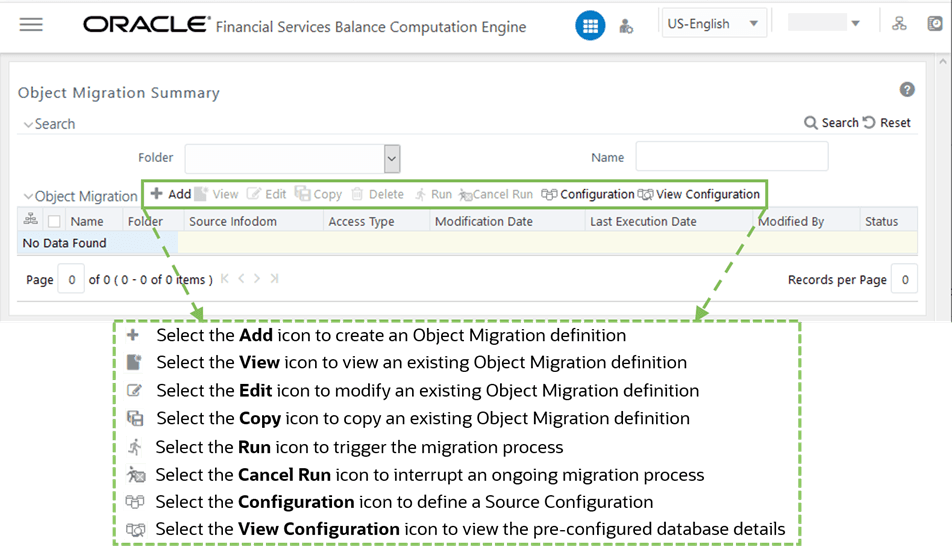
To perform different actions related to the Object Migration, see the following sub-sections in the Online Object Migration section of the Oracle Financial Services Advanced Analytical Applications Infrastructure User Guide Release 8.1.1.0.0:
· Creating Object Migration Definition section to create an Object Migration Definition
· Viewing Object Migration Definition section to view an existing Object Migration Definition
· Modifying Object Migration Definition section to edit an existing Object Migration Definition
· Copying Migration Rules section to copy an existing Object Migration Definition
· Migrating Stored Object Definition section to trigger or to interrupt a Migration Process
· Defining Source Configuration section to define a source configuration or to view the pre-configured Database Details
To create an Object Migration definition, go to the Object Migration Details section. To navigate to the Object Migration page with Object Migration Details, from OFSAA Home, select Financial Services Balance Computation Engine, select Administration, select Object Administration, select Object Migration, select Object Migration, and select Add.
Figure 16: Creating Object Migration Definition
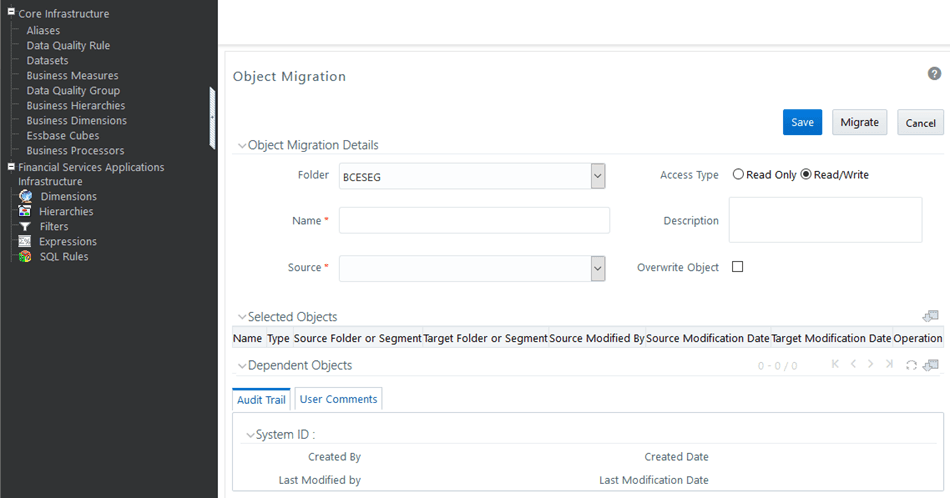
Enter or select the required details in the Object Migration Details section. For more information, see the Creating Object Migration Definition section in the Oracle Financial Services Advanced Analytical Applications Infrastructure User Guide Release 8.1.1.0.0.
Exporting Objects allows you to export a set of objects to migrate across Information Domains within the same setup or across different setups. You can select one or more objects within an object type or within multiple object types and migrate the same along with or without the dependent objects.
To navigate to the Export Objects Page, from OFSAA Home, select Financial Services Balance Computation Engine, select Administration, select Object Administration, select Object Migration, and select Export Objects.
Figure 17: Export Objects Page
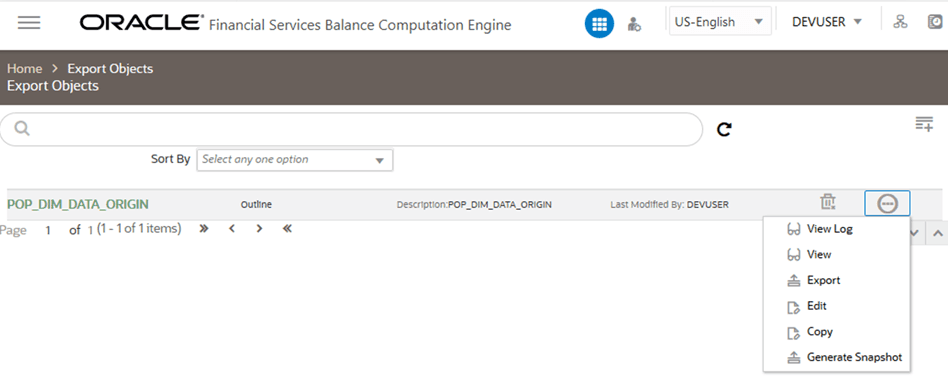
To perform different actions related to the Export Objects, see the following sub-sections in the Exporting Objects section of the Oracle Financial Services Advanced Analytical Applications Infrastructure User Guide Release 8.1.1.0.0:
· Creating an Export Definition
· Viewing an Export Definition
· Editing an Export Definition
· Copying an Export Definition
· Deleting an Export Definition
Additionally, see the sections Outline Definition of Objects and Snapshot Definition of Objects, and for information about the mapped roles, see the Oracle Financial Services Advanced Analytical Applications Infrastructure User Guide Release 8.1.1.0.0.
The Import Objects feature allows you to import objects to your target environment from the archived dump file. The dump file from source environment should be downloaded and moved into /ftpshare/ObjectMigration/metadata/restore folder in the target system. This folder structure needs to be created manually.
To navigate to the Import Objects Page, from OFSAA Home, select Financial Services Balance Computation Engine, select Administration, select Object Administration, select Object Migration, and select Import Objects.
To perform different actions related to the Import Objects, see the following sub-sections in the Importing Objects section of the Oracle Financial Services Advanced Analytical Applications Infrastructure User Guide Release 8.1.1.0.0:
· Creating Import Definition from an Archive
· Creating Import Definition from a Snapshot Archive
· Viewing an Import Definition
· Editing an Import Definition
· Copying an Import Definition
· Deleting an Import Definition
For information about the Mapped Roles, see the Oracle Financial Services Advanced Analytical Applications Infrastructure User Guide Release 8.1.1.0.0.
Object Security framework is based on a waterfall model for determining rights of the user to perform an action on an object in the system. That is, if you do not have the top level of object access type, there is no need to check the second level, whereas if you have the top level, then the next level down is checked.
Object Security sub module consists of the following sections, and for more information, see the Oracle Financial Services Advanced Analytical Applications Infrastructure User Guide Release 8.1.1.0.0:
· Metadata Segment Mapping
· Batch Execution Rights