This chapter provides an overview of the Data Integration Hub (DIH), its benefits, and the structure of the remaining chapters in this User Guide.
Topics:
· Overview of Data Integration Hub
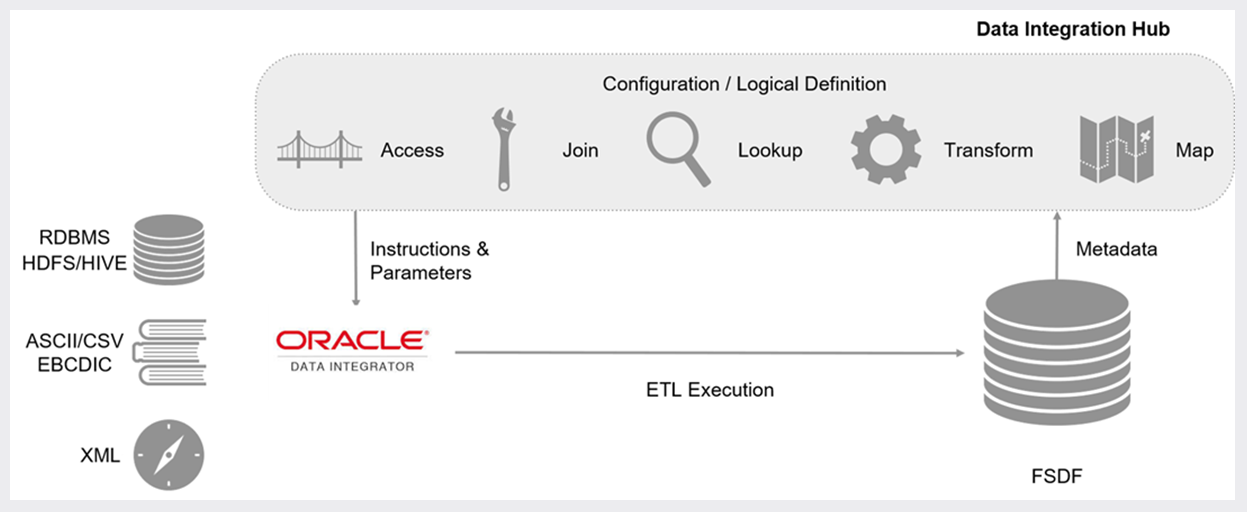
The Data Integration Hub enables data exchange between OFSAA and external systems. This is facilitated through logical abstraction of the OFSAA Data Foundation (Financial Services Data Foundation and Insurance Data Foundation) exposed as Application Data Interfaces (ADI). External Data Sources (EDS) and External Data Descriptors (EDD) are defined through the DIH user interface, which also facilitates the mapping of EDDs to ADIs, forming Connectors.
DIH publishes information on ADI, EDS, EDD, and Connectors, alongside other relevant metadata, to Oracle Data Integrator (ODI), which delivers high-performance data movement and transformation among enterprise platforms with its open and integrated E-LT architecture and extended support for Big Data.
DIH does not supplant ETL tools or processes. Instead, it provides a logical abstraction of physical attributes in FSDF and OIDF, allowing user interaction in business terms while defining data exchange tasks, without adding any additional overhead or hops upon execution of data movement. DIH also shields users from modeling complexities of Data Foundation, especially when it comes to handling data around slowly changing dimensions (SCD).
Factory integration between select Oracle applications and OFSAA is also rendered over DIH. Such applications currently include banking platforms (FLEXCUBE and OBP), change management solutions (DRM), and accounting platforms (FAH and FAHC). Note that, such factory integration is rendered through additional modules, the details of which are available from respective user guides.
Figure 1: DIH Overview
DIH provides the following benefits:
· Provides a level of abstraction and insulates upstream ETL processes from staging model changes.
· Supports Big Data.
· Provides a simplified mapping window for loading data into OFSAA staging/result through an abstract layer.
· Removes ETL technicalities by prepackaging and predefining ODI parameters based on different use cases.
· Supports Download Specification which is a system managed meta object for upstream data mapping.
· Process/execution optimization for OFSAA data and known use cases. For example, in a direct one-to-one mapping, there will not be any hopping.
· Hosts pre-defined integration with Oracle Products that play the role of data providers to Analytical Applications.
· Helps in getting lineage directly from source data to staging till results.
This user guide provides information on the mapping of an External Data Descriptor (EDD) with Application Data Interface (ADI). It begins with information on how a Parameter is defined, how a Source System is defined in DIH, how an EDD and ADI are set, and how they are connected. The metadata is then published to ODI. Execution depends on batches that are scheduled in the Financial Services Institutions and does not happen in DIH. The Execution process is discussed in the last chapter.
The guide has the following chapters:
· Data Flow in DIH: This chapter explains the flow of data in DIH.
· Logging in to DIH: This chapter explains how to log in to DIH.
· Configuring DIH: This chapter explains how to manage:
§ Information on connectivity with ODI instance.
§ Data model validation and post-update refresh of ADI.
§ Constant-value, run-time, and current date variables for use with DIH.
§ External data stores that you interact with for data movement
· Map: This chapter explains how to manage External Data Descriptors and Connectors.
· Publish: This chapter explains how to manage the following:
§ Refresh of Target Datastore information, post model upload/update, and ADI refresh.
§ Publishing and un-publishing Connectors.
· Executing DIH Metadata: This chapter explains how the scheduled batches are executed after publishing.
· Analyze: This chapter explains how to analyze the following:
§ Information on the execution of Connectors.
§ Utilization of data model, ADI, and Connectors.
§ Activities are undertaken through DIH.
· Object Migration: This chapter explains how to perform Object Migration.
· Metadata Browser: This chapter details the metadata browser.