Understanding the Activity Guide Composer
PeopleTools Fluid Activity Guides provide your workers with a simplified and streamlined approach to completing a business process, such as an employee's OnBoarding process or life event change. Activity guides allow you to define guided procedures for a user or group of users to complete and will track and maintain the user's progress as he or she completes the steps.
Defining a fluid activity guide requires a number of components that need to be configured by a technical resource who becomes responsible for managing and maintaining the activity guide configuration. The Activity Guide Composer framework is designed to improve the deployment and management of fluid activity guides by separating the technical and functional configuration. The benefits of this is a reduction in technical resources and enabling your functional process owners to manage and maintain their activity guides. In addition, the Activity Guide Composer framework also provides utilities and configurable steps that are commonly utilized in activity guides.
The following videos provide demonstrations of features and how to use the Activity Guide Composer:
Image Highlights, PeopleSoft HCM Update Image 23: Activity Guide Composer
Image Highlights, PeopleSoft HCM Update Image 31: Activity Guide Composer-Multi User Guides
Image: Example of the OnBoarding feature Using an Activity Guide
This example illustrates one of the layouts of an activity guide using the OnBoarding feature.

Image: Setting Up and Using the Activity Guide Composer Features
To fully utilize the benefits of the Activity Guide Composer, you will want to perform the following tasks to support your activity guide needs:
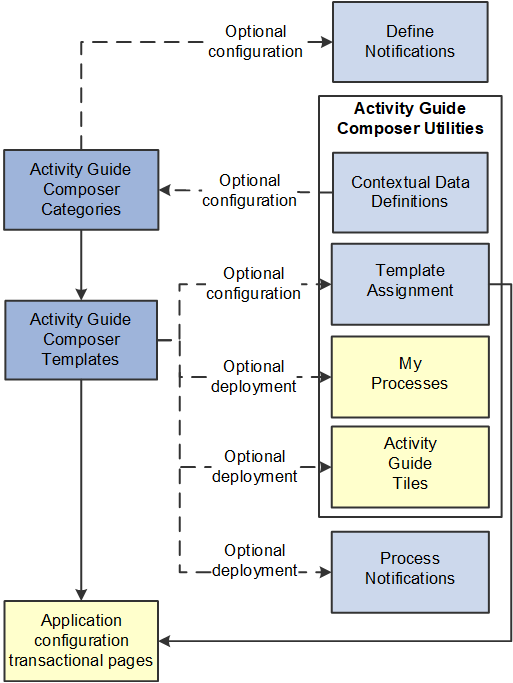
Set up Activity Guide Categories using the Categories (AGC_CAT_TBL) component.
Categories contain the technical configuration managed by technical resources and consist of one time technical setup. Here you will define the context records and fields, actions the user may take, images the activity guide may display in the fluid sub banner, and the steps that may be pulled into a template.
For more information, see the Setting Up Activity Guide Categories topic.
Create Activity Guide Templates using the Templates (AGC_TMPL_SRCH_FL) component.
Activity guide templates are created and managed by template administrators—functional personnel who are very familiar with your organization's HR transaction processes. Using this component, administrators will create and maintain activity guide templates using the data established in the activity guide category. They can also clone existing activity guided templates that can then be reconfigured for a different business process.
For more information, see the Managing Activity Guide Templates topic.
(Optional) Define notifications using the Define Notifications (AGC_CAT_NOTIF_TBL) component.
Notifications define push or email content that is sent to assignees when a template is configured to notify participants that an activity guide process needs their attention. If you enable notifications for your templates, use Process Notifications to sent activity guide notifications to your assignees.
For more information, see the Working with Activity Guide Notifications topic.
(Optional) Define Contextual Data for a Category using the Contextual Data (AGC_CTXDTA_TBL) component.
Contextual data is data that can be derived from the context data defined for an activity guide category. The derived contextual data can be utilized in the sub banner of the fluid activity guide, in page text, or in a date field to configure the start and due date for a step.
Note: This setup is optional. However, if you choose to use contextual data in your categories and templates, this step should be completed prior to setting up your categories.
For more information, see the Setting Up Activity Guide Utilities for Contextual Data topic.
(Optional) Configure the following Activity Guide Utilities tables and define rules to assign templates to your workers using Template Assignment:
Search Key Source Tables (AGC_SRCHREC_TBL):
View the criteria fields that retrieve data from the source table.
Search Key (AGC_SRCHKEY_TBL)
Identity source tables and fields to be used in the search keys prompt configuration when you define a Template Assignment definition.
Template Assignment (AGC_TMA_TBL)
Determine the search keys and values that will be used to determine which template the system should assign to a worker.
Test Template Assignment (AGC_TMA_TEST)
Test to validate that a template assignment is set up correctly.
The PeopleSoft features, such as HCM OnBoarding, take advantage of this functionality by enabling you to select to have the system assign templates to individuals based on the rules you configured using these Template Assignment tables.
For more information on setting up template assignment rules, see the Setting Up Activity Guide Utilities for Template Assignment topic.
(Optional) Deploy activity guides or create tiles from which individuals can access activity guides using the My Processes (AGC_MYAG_FL) or Activity Guide Tiles (AGC_TILE_TBL) components.
For more information, see the Deploying and Managing Activity Guide Processes topic.
PeopleSoft Enterprise Components provides your organization with various means to deploy activity guides to your workers. The following are examples of end user transactional pages or utilities that use the Activity Guide Composer templates as their structure:
Customize tiles using the Activity Guide Tiles page (AGC_TILE_TBL1) — Allows administrators to create tiles where users or assignees can work on activity guide processes. See also Activity Guide Tiles Page
My Processes (AGC_MYAG_FL) — Provides a component where users can initiate activity guide processes, outside of the delivered pages, which guide the users through business transactions while displaying contextual information. See also Deploying and Managing Activity Guide Processes.
Product transactional pages — Depending on the PeopleSoft application, some business process deliver pages from which users can access activity guides. For instance, some examples available in HCM include:
OnBoarding — Grants new workers a central location to provide personal information needed to complete the employment process. .
Fluid Life Events — Enables employees to quickly enter life event changes that may impact their benefits offerings.
Open Enrollment — Enables employees to enroll or review their benefit plans annually during the Open Enrollment period.
Position Management — Allows administrators access to view, update, and create positions using the fluid pages.