Configuring Position Management for Fluid
To configure Position Management for fluid and enable primary incumbent functionality, use the Position Data Installation (INSTALLATION_POSN) component.
This topic discusses how to configure installation settings for Position Management for fluid.
|
Page Name |
Definition Name |
Usage |
|---|---|---|
|
INSTALLATION_POS |
Define installation settings for Position Management for fluid. |
Use the Position Management Installation page (INSTALLATION_POS) to define installation settings for Position Management for fluid.
Navigation
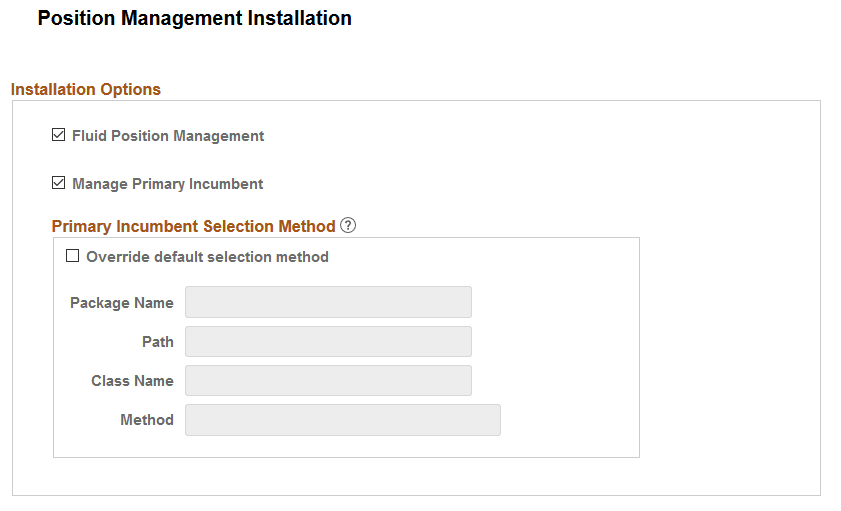
Image: Position Management Installation Page
This example illustrates the fields and controls on the Position Management Installation page.
|
Field or Control |
Definition |
|---|---|
| Fluid Position Management |
Select to enable the Manage Position pages to view, update, or create positions using fluid. If this option is deselected, when a user clicks the Manage Position Tile, the system will issue a warning to enable Fluid Position Management. Note: In order for users to access the Manage Position pages in fluid, you must also assign the Manage Positions Fluid (HCCPHRFL3100) permission list to the administrator role managing positions. |
| Manage Primary Incumbent |
Select to identify and track primary incumbents for your positions. This option is deselected (off) by default. If this option is deselect, when a user clicks the Manage Primary Incumbents Tile, the system will issue a warning that the user is not authorized to access the component and to enable Manage Primary Incumbent on this Installation table. Note: To track primary incumbent information, you must enable Fluid Position Management by selecting the Fluid Position Management check box on this page. When you select this check box, the page displays the Primary Incumbent Selection Method section on this page. The primary incumbent selection method allows you to use the delivered selection method, or override the delivered method and use a method that suits your organization requirements to identify primary incumbents. Note: To grant users Manage Primary Incumbent functionality in fluid, you must assign the Primary Incumbent Admin role to the administrator managing primary incumbents. Important! When you first enable the Manage Primary Incumbent functionality, you will need to run the one-time Sync Incumbents (POSN_PRI_SYNC) process by submitting a process scheduler request () to bring data from classic position management and have the system assign a primary incumbent for every position in the database wherever an incumbent is available for a position. |
Primary Incumbent Selection Method
This section is available when you select the Manage Primary Incumbent check box.
PeopleSoft Position Management delivers logic to auto assign a primary incumbent when the current primary incumbent leaves the position. You can accept the delivered logic, or use this section to enter your own custom app class method to define the selection logic.
|
Field or Control |
Definition |
|---|---|
| Override default section method |
Select this check box to override the delivered logic of auto assigning a primary Incumbent. This opens up the remaining fields in this section. Deselect to use the system delivered logic. Note: PeopleSoft selects the primary incumbent based on the same logic used in Job Data to show the Reports To manager information on the Job Data - Job Information Page, which selects the top most employee in the list of current incumbents. |
| Package Name |
Select the ID of the application package that contains the method selection logic. |
| Path |
Enter a path that uses a specific class within the package. |
| Class Name |
Enter the name of the application class that contains the selection logic. Note: This application class method should retrieve an Empl ID that assigns this employee as the primary incumbent. |
| Method |
Enter the method name of the application class ID that identifies the selection logic. |
Running the Nightly Refresh Primary Incumbent Process
Important! You will need to run the Nightly Refresh Primary Incumb (POSN_PRI_AE) process on a regularly scheduled basis, or manually as needed, to maintain the current primary and incumbent information.