
The maintenance has a list of seeded parameters that are dependent on the Data Quality Framework of OFSAAI. The outputs associated with these parameters are derived at the run time based on the Data Quality Profiling information within the Data Governance Studio. The screen also enables a user to define new Assessment Parameters that can participate in the Score and Rating calculation of the Assessment. The assessments for a particular control depends on the Parameter Type and Score Methodology.
Topics:
· Configuring Control Assessment Parameters
All the users are required to be mapped to the DGSAUTHGRP, DGSADMINGRP, and DGSANALYSTGRP groups along with their respective following groups.
The following is the user role for control assessment parameters:
· DG Administration: Permits the user to view and edit the control assessment parameters.
To Control the Assessment Parameters, follow these steps:
1. From Financial Services Data Governance for US Regulatory Reporting window navigate to Administration and select Control Assessment Parameters.
Figure 22: Administration
The Control Assessment Parameters window is displayed.
Figure 23: Control Assessment Parameters
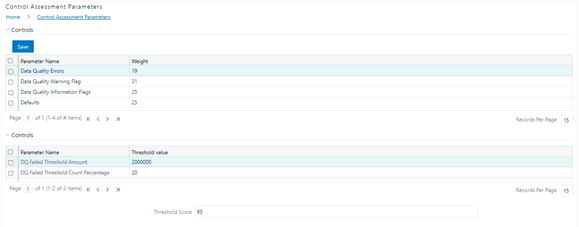
2. In the Controls section, to edit the Weight of the Parameters, run the Control Assessment Parameters.sql script in the atomic schema.
3. The weight is altered in the Control Assessment Parameters window.