In the Oracle Financial Services Accounting Foundation Cloud Service (AFCS), users have roles through which they gain access to functions and data. Users can have any number of roles.
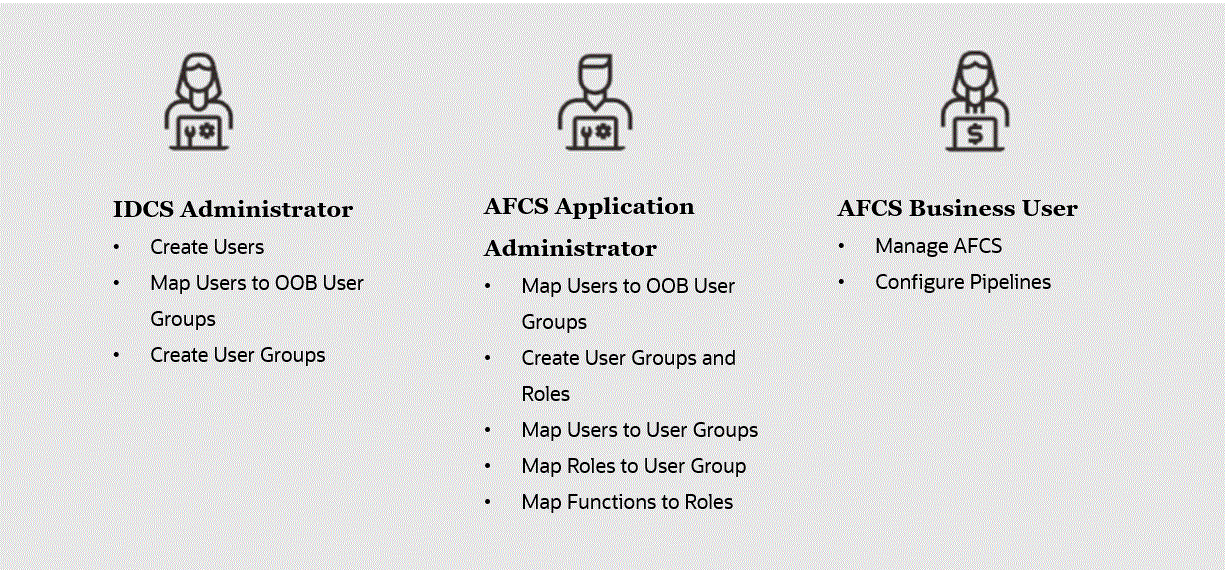
The following figure shows the User Persona Details:
NOTE:
· Modifications to the User-Group Mapping from the IDCS will take a few minutes to take effect in the system. If the modifications are made during an active user session, then it will be reflected on the User's next login.
· You can create and manage Application users as required.
For example,
you can map both the Pipeline Admin Group and AFCS
Admin Group to a user.
Topics:
· User Group and User Role Mapping
Role-based security in Oracle Financial Services Accounting Foundation Cloud Service controls who can do what and which data.
The following table provides examples of role-based access.
Role Assigned to a User |
Functions which Users with the Role can Perform |
Set of Data which Users with the Role can Access when performing the Function |
Application Administrators |
Perform Application Administrator activities |
User Group with Administration Roles across all Service Features |
Business Users |
Access to the Application to perform tasks |
User Group with Business Tasks' Roles across all Service Features |
The following table provides the User Group and User Role Mapping:
User Groups |
Activities |
Identity Administrator |
· View Reports · View Object Storage · View OAuth Credentials · Perform Identity and Access Management Operations |
IDCS Administrator |
· Create Users · Map Users to the Instance |
Accounting Foundation Administrator Group |
· User Group with Setup Roles · View all content · AFCS Service Administration Activities |
AFCS-BIAdministrator |
Administer Data Visualization Content |
AFCS-BIContentAuthor |
Author Data Visualization Content |
AFCS-BIConsumer |
Access Data Visualization Content |
Accounting Foundation Business User Group |
· Use the AFCS Service · Register, modify, or delete Entity-maps, Rules, Look-up, Adjustments, Corrections and so on · Register, modify, or delete EDD, Connector and so on · Register, modify or delete SLA, Source Registration, Event Grouping, Segment Code - Dimension Mapping and so on · Configure and Manage Pipelines · Execute Pipelines |