Creating a UI with Siebel Open Integration
Overview
This recipe describes how to create modern edge applications using Oracle Visual Builder Cloud Service (VBCS) and Siebel Open Integration. In this example, we decouple the traditional Siebel UI layer from the Siebel business layer and securely expose Siebel capabilities (data, UI metadata, business services, and workflows) via Siebel Open Integration REST APIs. Oracle VBCS is the application to be the consumer of these APIs enabling a developer to build an edge application that generates screens dynamically based on Siebel metadata.
Introduction
Siebel CRM remains a core system for critical customer and order processes, but in certain cases customers prefer a completely unique and bespoke UI. Oracle VBCS is an example of a rapid web application development solution and is well-suited for building targeted edge applications that leverage existing Siebel logic without directly exposing the underlying database.
Objectives
- Expose Siebel business logic securely through REST (data + metadata + actions).
- Render a responsive UI in VBCS driven by Siebel view/applet metadata.
- Invoke Siebel workflows and business services from VBCS via REST for end-to-end processes.
- Enable new digital business scenarios (e.g., Telco retention experiences) with minimal core changes.
Example Use Case (Telco Retention)
When a customer initiates a disconnect scenario, the VBCS front-end retrieves real-time context (e.g., CLTV) from Siebel and dynamically presents targeted retention offers. Actions taken in the UI can trigger Siebel workflows to complete fulfillment steps-without rebuilding the core Siebel process logic.
More details are available in the Siebel Open Integration webinar.
Download the Siebel Open Integration whitepaper here.
Solution
This solution uses a strict API boundary between the UI and Siebel: VBCS communicates with Siebel only through HTTPS REST calls provided by Siebel Open Integration. Siebel returns both business data and UI metadata, enabling VBCS to build pages dynamically (lists, forms, cards) and invoke actions (workflows/services) on demand.
Architecture
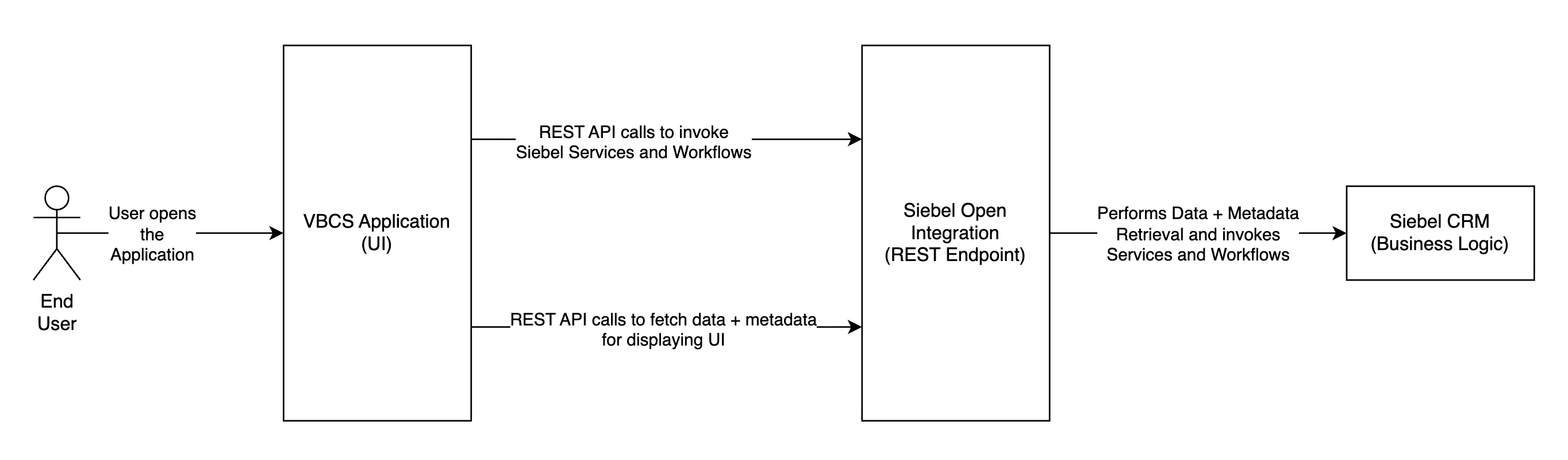
- User → VBCS Edge Application access Siebel through the VBCS Application UI.
- VBCS → Siebel Open Integration Data/Applet endpoints via REST for data + metadata.
- VBCS → Siebel Open Integration Workflow/Service endpoints for button-driven actions.
- Siebel Open Integration → Siebel CRM retrieves Data + Metadata and invokes Services/Workflows.
Pre-requisites
The following pre-requisities apply for this solution:
For Development
- Siebel CRM 25.6 Update or higher for both the Application Interface (AI) and Siebel Enterprise Server.
- Oracle VBCS instance.
- Test user configured for REST access and mapped to required Siebel responsibilities.
- Customers can deploy Siebel Open Integration on-premises, either on Windows or Linux
platforms, based on the deployment choice.
- If using Siebel Open Integration on a Windows platform, Install Powershell for Windows
- For Linux operating system, use wget command for Linux
- Ensure to configure Siebel SSO, before going ahead with the Open Integration configurations. In your Identity Provider, either manually provision the required Siebel user identities or federate them from your directory/IdP.
- Update the Open Integration settings in the config.json file located in <INSTALL_DIR>/openint-deploy folder.
- To use the cache configuration feature in Siebel Open Integration, you must have Siebel CRM 25.10 Update or later.
For Production Readiness
- Use trusted TLS certificates (recommended) to prevent browser security bypasses; the workaround command should be used only for testing to bypass CORS/SSL errors.
- Use a strong authentication method - typically OAuth 2.0 and/or SSO through the enterprise IdP (for example, Oracle IDCS), in line with organizational standards.
- Apply least-privilege access for workflows and services, and ensure appropriate auditing and logging are enabled.
Note: Ensure all security/authentication choices align with Oracle and customer security/compliance policies.
Implementation
Note: a detailed implementation walkthrough is available in the whitepaper.
A) Siebel Open Integration Configuration
Update the Open Integration config.json to expose the required UI views/applets,
data resources,
workflows, and business services under your API groups (example below shows a Telco-oriented
setup).
{
  "app": {
    "siebel": {
      "useCG": false,
      "profile-path": "profile.json",
      "connect-string": "siebel.tcpip.none.none://<SIEBEL_HOST>:<SIEBEL_PORT>/siebel",
      "loginpath": "/siebel/app/ecommunications/enu"
    },
    "context": "oracle",
    "port": 8433
  },
  "apigen": {
    "resources": {
      "openintegration/v1.0/ui": [
        "All Account List View/SIS Account List Applet",
        "Activity List View/Activity List Applet With Navigation"
      ],
      "openintegration/v1.0/data": [
        "Account/Account"
      ],
      "openintegration/v1.0/workflow": [
        "SISOMSuspendWebService-Order",
        "SISOMDisconnectWebService-Order",
        "SWIOrderUpsert"
      ],
      "openintegration/v1.0/service": [
        "Asset Management/QueryPage",
        "getAssetNumber/Invoke",
        "SWI Order Upsert/QueryById"
      ]
    }
  }
}
Sample profile.json for setting up OpenIntegration : profile.json.
B) Siebel Configurations (Business Service + Workflow + Access)
You can use the Siebel archive files for setting up a Siebel environment for this demo : OpenInt_Siebel_sif_files.zip.
1) Create a Business Service: getAssetNumber
Create a Siebel business service getAssetNumber with method Invoke
to return an asset number based on an input asset Id.
function Invoke(Inputs, Outputs)
{
  var assetId = Inputs.GetProperty("Id");
  var bc = TheApplication().GetBusObject("Account")
    .GetBusComp("Asset Mgmt - Asset (Order Mgmt)");

  with (bc) {
    SetViewMode(AllView);
    ActivateField("Asset Number");
    ClearToQuery();
    SetSearchSpec("Id", assetId);
    ExecuteQuery(ForwardOnly);

    if (FirstRecord()) {
      Outputs.SetProperty("AssetNumber", GetFieldValue("Asset Number"));
    } else {
      Outputs.SetProperty("Error", "No asset found with the given Id.");
    }
  }
  return (ContinueOperation);
}
2) Enable the method via Service_PreInvokeMethod
function Service_PreInvokeMethod (MethodName, Inputs, Outputs)
{
  if (MethodName === "Invoke") {
    Invoke(Inputs, Outputs);
    return (CancelOperation);
  }
  return (ContinueOperation);
}
3) Workflow mode adjustment (testing only)
For testing the edge application, set workflow SWIOrderUpsert to Service
Flow
(from Interactive Flow). Validate this change against your environment standards before
production usage.
4) Configure REST access using Responsibilities
Assign the necessary responsibilities (for the REST user configured in Open Integration) to the exposed:
- Workflows:
SISOMSuspendWebService-Order,SISOMDisconnectWebService-Order,SWIOrderUpsert - Business Service:
getAssetNumber
C) VBCS Setup
- Import the VBCS project (e.g., Openint_story_quickstart.zip).
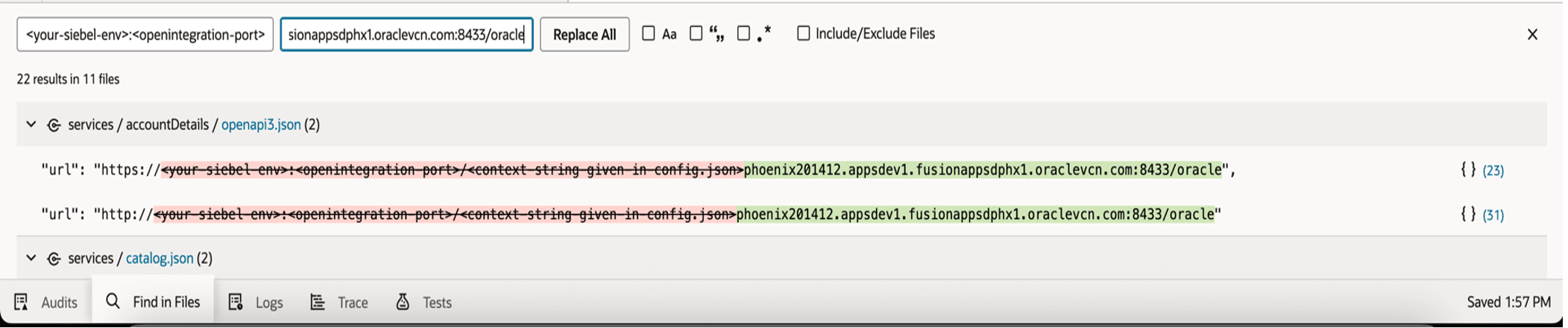
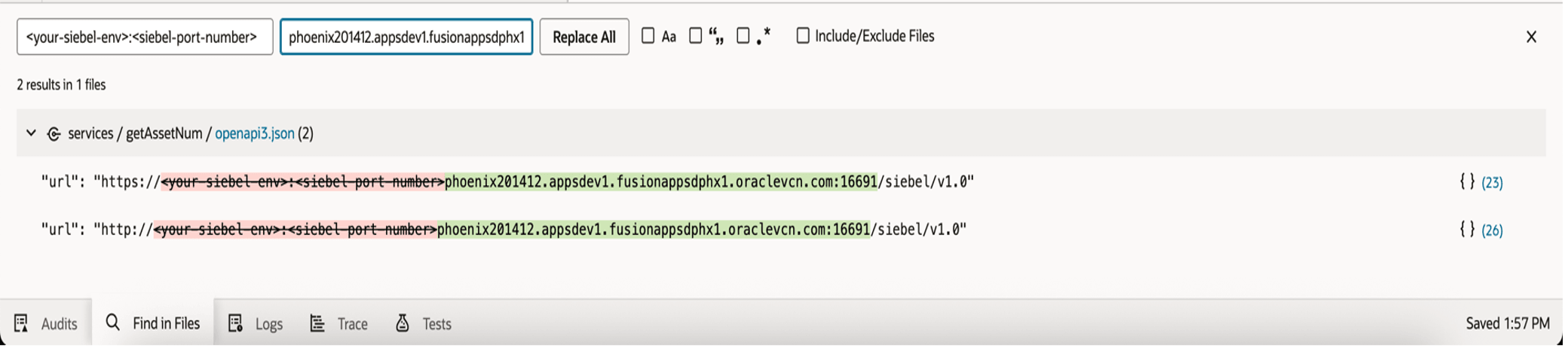
- Edit existing instances of Service Connections by replacing placeholder host/port/context
with your Open Integration endpoints and any required Siebel endpoints:
- Siebel Open Integration endpoints (placeholder string :
"<your-siebel-env>:<openintegration-port>/<context-string-given-in-config.json>"
)
- Siebel endpoints (placeholder string :
"<your-siebel-env>:<siebel-port-number>")
- Siebel Open Integration endpoints (placeholder string :
"<your-siebel-env>:<openintegration-port>/<context-string-given-in-config.json>"
)
- Configure authentication for each Service Connection according to your Open Integration security setup.
- Test Service Connections and validate UI rendering via metadata responses.
Security Notes
- Expose REST endpoints over HTTPS only.
- Apply least privilege via responsibilities for each workflow/service.
- Avoid browser security bypass approaches outside of isolated development testing.
Development-only troubleshooting note: Disabling browser web security is not recommended and must never be used in production.
/Applications/Google\ Chrome.app/Contents/MacOS/Google\ Chrome \
  --disable-web-security --ignore-certificate-errors \
  --user-data-dir="/tmp/chrome-dev"
How to Test
1) Validate Open Integration APIs
- Start/verify the Open Integration service using your configured
config.json. - Confirm HTTPS connectivity from the VBCS environment to the Open Integration endpoint.
- Test UI/data endpoints (e.g., UI metadata and Account data) using a REST client (Postman/curl) from an approved environment.
- Confirm authorization is enforced.
2) Validate VBCS Service Connections
- In VBCS, open Service Connections and update host/ports/context to your environment.
- Configure authentication.
- Run the “Test” operation for each connection and verify responses.
3) Validate Dynamic UI Rendering
- Launch the VBCS application. Verify the Account List page gets loaded with data.
- From the Account List page, choose an Account and view its details in the Account Details page.
- Confirm fields/labels/layout are rendered based on metadata response.
4) Validate Actions (Workflows / Business Services)
- Trigger a UI action such as a button click that calls a workflow or business service endpoint.
- Verify the REST payload is formed correctly by VBCS.
- Confirm Siebel executes the workflow/service and returns a response.
Suggested Test Scenario (Telco Retention Flow)
- Select a customer/account.
- Initiate a disconnect action in the edge UI.
- The Application retrieves CLTV/context from Siebel and display targeted offers (The demo uses Mock Data for displaying the suggestions).
- Verify the flow gets executed correctly.
Benefits
- Increase flexibility for Siebel without rewriting core logic: New web experiences built on top of existing workflows and business services.
- Faster delivery of targeted edge apps: VBCS accelerates UI development and iteration.
- Metadata-driven scalability: Reduced effort to add screens—UI is driven by Siebel metadata rather than Siebel GUI redevelopment.
- Security and control: HTTPS + responsibility-based access; no direct database exposure.
- New business scenarios: Real-time decision experiences (e.g., retention offers based on CLTV).
Conclusion
In this example, integrating Siebel Open Integration REST APIs with Oracle VBCS, enabled teams to create bespoke user experiences while preserving Siebel’s proven business logic and data model. The approach future-proofs Siebel by separating presentation from execution, enabling faster changes, and secure API-driven extensibility.
For more insights or design partnerships, reach out to us at siebel_coe_grp@oracle.com