統合での更新済アーティファクトの再生成
マッピングの数を増やすと、統合を再生成する必要があります。 たとえば、Oracle Service Cloud (RightNow)に新しいフィールドを使用してカスタム・オブジェクトを作成するとします。 その後、フィールドを更新しようとする既存のマッパーに新しいフィールドを追加すると、次の実行時エラーが発生します。
suppDetail " Fault:\n<soap-env:Fault
xmlns:soap-env=\"http://schemas.xmlsoap.org/soap/envelope/"><faultcode
xmlns:soap=\"http://schemas.xmlsoap.org/soap/envelope/">soap:Server</faultcode><faultstring>
Data element in the Message is
NULL</faultstring><detail><ICSfaultVar>
<fault>RightNowSyncService|urn:wsdl.ws.rightnow.com/v1_4 failed Found
out-of-order or unrecognized node work_document_status|CO while parsing node
of type GenericObject|urn:generic.ws.rightnow.com/v1_4 NULL value is set to a
non-nillable element RNObjects of object UpdateMsg Failed in setting value
for element RNObjects array position 0 of object UpdateMsg NULL value is set
to a non-nillable element Update of object Update NULL returned from the
Update deserializer due to missing or invalid XML</fault>
</ICSfaultVar><reason>CASDK-0033: Received a SOAP fault while invoking
endpoint target:
https://myinstance--tst1.custhelp.com/services/soap/connect/soap. This
indicates a processing exception on the service endpoint side. Please check service
side logs to further diagnose the problem <![CDATA[ Fault Code :
soapenv:Sender Fault String : Data element in the Message is NULL Fault
Details : <fault>RightNowSyncService|urn:wsdl.ws.rightnow.com/v1_4 failed
Found out-of-order or unrecognized node work_document_status|CO while parsing
node of type GenericObject|urn:generic.ws.rightnow.com/v1_4 NULL value is set
to a non-nillable element RNObjects of object UpdateMsg Failed in setting
value for element RNObjects array position 0 of object UpdateMsg NULL value
is set to a non-nillable element Update of object Update NULL returned from
the Update deserializer due to missing or invalid XML</fault> ]]>
:Application
Error</reason><operation>Update</operation><request_payload/></detail></soap-e
nv:Fault>"
解答1 (通常実行可能) - 統合の再生成
- 統合を編集モードで開きます。
- 失敗した「Oracle Service Cloud (RightNow)アダプタ」を編集モードで開きます。
- 変更を行わずにアダプタ・エンドポイント構成ウィザードの各ページで「次」をクリックし、最後のページで「完了」をクリックします。
構成を更新してアーティファクトを再生成するように求められます。
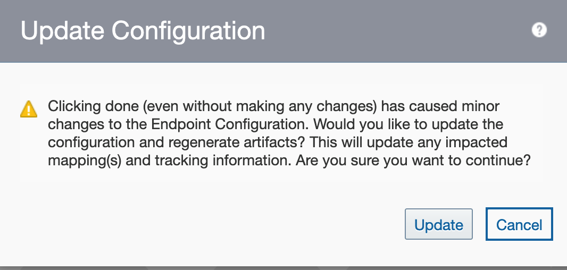
- 「更新」をクリックします。
- 統合を保存します。
- 統合をアクティブ化してテストします。
解決策2 - 新規エンドポイントの作成
既存のマッピングでは何も実行しないでください。 かわりに、更新操作を使用して新しいエンドポイントを作成し、必要なマッピングを実行します。