Integrating with Tuition Reimbursement
|
Page Name |
Definition Name |
Usage |
|---|---|---|
|
Load Paysheet Transactions Page |
RUNCTL_PSHUP |
Load tuition reimbursement data into paysheets after receiving and validating data from the Manage Tuition Reimbursement business process. |
|
RUNCTL_PYTR_NOTIFY |
Notify the HR system that tuition reimbursement payments have been processed successfully in Payroll for North America. |
Tuition Reimbursement is a self-service transaction that allows employees to request reimbursement for courses, certifications, or degrees they pursue to enhance their job skills or advance their careers.
For more information about the tuition reimbursement process, refer to the Understanding Tuition Reimbursement topic.
After tuition reimbursement requests are submitted and subsequently approved, HR administrators can launch the HRTR_PROCESS application engine (AE) process on the Process Tuition Reimbursement Page to prepare tuition reimbursement requests for payroll processing.
When the HRTR_PROCESS process completes successfully, it triggers the PAYMENT_TR_MESSAGE integration message, which in turn initiates the PY_TR_VALIDT AE process. This process validates the tuition reimbursement self-service transactions:
Transactions that pass validation are loaded into the PSHUP table in Payroll for North America.
When employees view their tuition reimbursement transactions in Self-Service, their status is displayed as Payment Pending.
Invalid transactions are rejected and sent back to the HR system with service operation messages.
After data is loaded into the PSHUP table, payroll administrators:
Load data into paysheets using the Load Paysheet Transactions process. Use Tuition Reimbursement as the paysheet update source.
Run the rest of the payroll process and issue checks or advices.
Publish a verification of payment to the HR system using the Tuition Reimbursement Payment Notification Page.
When employees view their tuition reimbursement transactions in Self-Service, their status is displayed as Paid.
Notification of Payment
The Notify Tuition Reimbursement Application Engine process (PYTR_PNTF_AE) publishes the following information to the HR system when reimbursement payments have been processed:
Employee ID and employee record number.
Reimbursement ID.
Payment date.
Total amount.
Currency code.
Paycheck status.
Check number.
Check date.
Form ID.
Audit action.
Process instance.
Before using the integration between Payroll for North America and the Manage Tuition Reimbursement business process, configure the Integration Broker node and activate the appropriate queues, handlers, and routings for these service operations:
|
Service Operation |
Description |
|---|---|
|
PAYMENT_TR_ACKNOWLEDGE |
Payroll for North America publishes acknowledgment messages (upon receipt of tuition reimbursement transactions) to the PS_PAY_ACKNLDGE_TR table for subscription by HR. If transaction details are rejected, the status in ACCEPTANCE_STATUS is set to R (Rejected), along with the corresponding REJECTED_REASON code. If the details are accepted, the status in ACCEPTANCE_STATUS is set to T (Taken). |
|
PAYMENT_TR_ISSUE |
Payroll for North
America publishes acknowledgment messages (after tuition
reimbursement payments are processed and confirmed for
employees) to the PS_PYTR_ACK_PUB table for subscription by
HR.
|
|
PAYMENT_TR_REQUEST |
HR publishes tuition reimbursement data to the PS_PAY_REQUEST_TR table for subscription by Payroll for North America. |
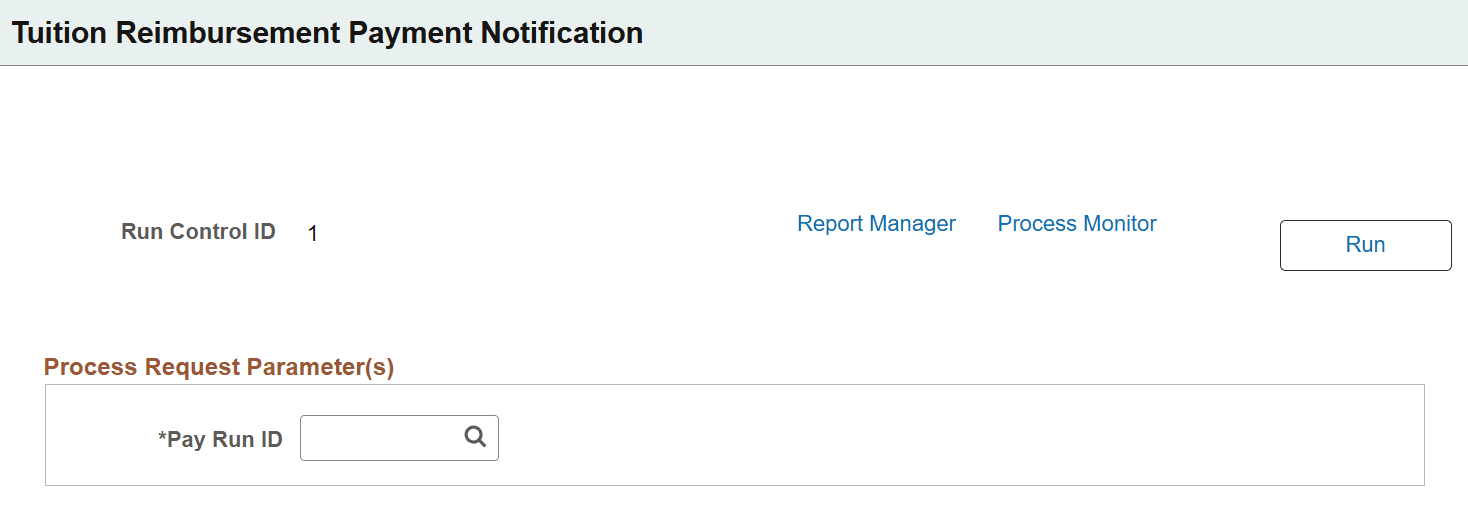
Use the Tuition Reimbursement Payment Notification page (RUNCTL_PYTR_NOTIFY) to notify the HR system that tuition reimbursement payments have been processed successfully in Payroll for North America.
Navigation:
This example illustrates the fields and controls on the Tuition Reimbursement Payment Notification page.
|
Field or Control |
Description |
|---|---|
|
Pay Run ID |
Select the pay run ID that is associated with tuition reimbursement data that you want to send to the HR system. This process runs successfully only if on-cycle and off-cycle are confirmed for the selected pay run ID. If necessary, you can run this process more than once for the same pay run ID. |