「Update License Type」ダイアログ
「Update License Type」を使用すると、Autonomous Transaction ProcessingデータベースまたはAutonomous Data Warehouseのライセンス・タイプを更新できます。
「Update License Type」ダイアログのオープン
「Update License Type」ダイアログは、「Autonomous Transaction Processing Database」/「Autonomous Data Warehouse」/「Autonomous JSON Database」ノードの「Update License Type」メニュー項目から開くことができます。
「Update License Type」ダイアログの使用
「Update License Type」ダイアログは次のように表示されます:
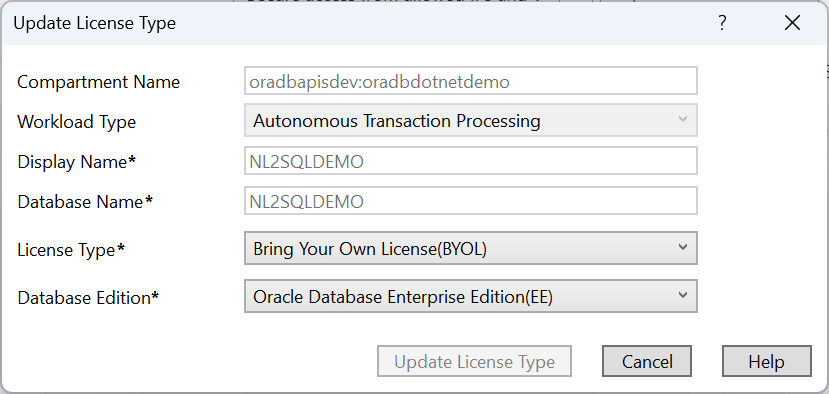
「Update License Type」ダイアログには、次のコントロールがあります:
| コントロール | 説明 |
|---|---|
|
Compartment Name |
データベースが作成されるコンパートメント |
|
Workload Type |
自動トランザクション処理、自動データ・ウェアハウスまたは自動JSONデータベースのワークロード・タイプを表示します |
|
Display Name |
このデータベースを表すためにサーバー・エクスプローラで使用される名前 |
|
Database Name |
データベースの名前 |
|
License Type |
「Bring your own license」を選択して、すでにあるライセンスを使用します。新しいライセンスを取得するには、「License Included」を選択します |
|
Database Edition |
ライセンスを持つデータベースのエディションを選択します。 |
|
Update License Type |
ライセンス・タイプを更新し、成功した場合はダイアログを閉じます |
|
Cancel |
操作全体を終了し、ダイアログを閉じます |
|
ヘルプ |
このヘルプ・ページを開きます |