9.2.2 Upgrade SOAM

The following procedure details how to upgrade SDS SOAM sites.

Note:

When upgrading an SDS topology, it is permissible to upgrade multiple SOAM sites in parallel. However, every attempt should be made to avoid upgrading mated SOAM sites in the same maintenance window.
  1. In the SDS NOAM GUI, log in using the VIP address to access the primary SDS NOAM GUI as described in access-oam-gui-using-vip-noamsoam.html#GUID-FA5B2F0E-069F-4C52-99A4-1B05C9FAF6E9__GUID-FA5B2F0E-069F-4C52-99A4-1B05C9FAF6E9
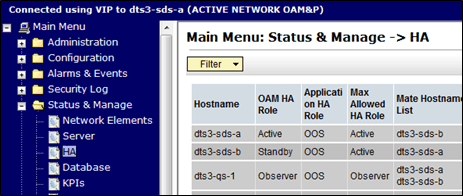
  2. In the Primary SDS NOAM VIP (GUI), record name of the SOAM NE site. Expand Status & Manage click HA. Click Filter.

    Figure 9-9 Filter

    Filter

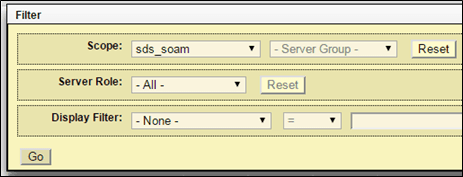
  3. In the Primary SDS NOAM VIP, list servers. Using the information provided in section logins-passwords-site-information.html#GUID-CCE8D7F5-9E19-4F82-B343-622722BDD7C3__GUID-CCE8D7F5-9E19-4F82-B343-622722BDD7C3 select the primary SDS SOAM Network Element from the Scope field. Click Go.

    Figure 9-10 Scope

    Scope

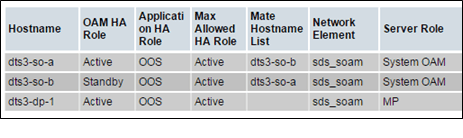
  4. Identify each server by Host name, Server Role, and OAM HA Role and record the name of each server.

    Figure 9-11 Identify Servers

    Identify Servers

    Record the names of the following SOAM NE site servers:

    • Active SOAM Server
    • Standby SOAM Server
    • DP 1 Server
    • DP 2 Server
    • DP 3 Server
    • DP 4 Server
    • DP 5 Server
    • DP 6 Server
    • DP 7 Server
    • DP 8 Server
    • DP 9 Server
    • DP 10 Server
  5. Upgrade the Standby SOAM server (as identified and recorded in step 4 of this procedure) using upgrade-server-administration-sds.html#GUID-97AD59AA-540D-41D5-8D2B-F87B033E5B2C__GUID-97AD59AA-540D-41D5-8D2B-F87B033E5B2C.

    Note:

    If using the Auto Upgrade option, SOAM servers are upgraded serially (standby then active).
  6. Upgrade the Standby SOAM server (as identified and recorded in step 4 of this procedure) using upgrade-server-administration-sds.html#GUID-97AD59AA-540D-41D5-8D2B-F87B033E5B2C__GUID-97AD59AA-540D-41D5-8D2B-F87B033E5B2C.

    Note:

    Half of the installed DP servers at a SOAM site may be upgraded in parallel using the Upgrade Server option for each individual DP server as described in upgrade-server-administration-sds.html#GUID-97AD59AA-540D-41D5-8D2B-F87B033E5B2C__GUID-97AD59AA-540D-41D5-8D2B-F87B033E5B2C
  7. In the Primary SDS NOAM VIP, upgrade up to half of the installed DP servers in parallel. Upgrade up to half (for example, 1 of 2, 2 of 4, etc.) of the DP server(s) (as identified and recorded in step 4 of this procedure) in parallel using the Upgrade Server option for each DP server as described in upgrade-server-administration-sds.html#GUID-97AD59AA-540D-41D5-8D2B-F87B033E5B2C__GUID-97AD59AA-540D-41D5-8D2B-F87B033E5B2C.
  8. Upgrade all remaining DP Servers in this SOAM NE site (as identified and recorded in step 4 of this procedure) in parallel using the Upgrade Server option for each DP server as described in upgrade-server-administration-sds.html#GUID-97AD59AA-540D-41D5-8D2B-F87B033E5B2C__GUID-97AD59AA-540D-41D5-8D2B-F87B033E5B2C.