1 Overview of Offline Mediation Controller
This chapter provides an introduction to Oracle Communications Offline Mediation Controller.
About Offline Mediation Controller
Offline Mediation Controller is a mediation application for communications services; such as wireless voice and data, content downloads, and voice over IP (VoIP). Offline Mediation Controller receives data from network devices, normalizes and transforms it, and sends it to systems and applications such as BRM Elastic Charging Engine (ECE).
Offline Mediation Controller processes data to support services such as:
-
Wireless: GSM, GPRS, CDMA
-
VoIP
-
IP
Offline Mediation Controller typically sends data to systems and applications such as:
-
Charging and billing systems
-
Performance Management and Service Quality Management systems
-
Inventory systems
To process data, Offline Mediation Controller receives input from a network device and translates the data into a network access records (NARs). A NAR uses an internal format that is used by all of the Offline Mediation Controller components. A NAR typically represents an event, such as a phone call. A NAR contains information used for charging; for example, the calling number, called number, origin, event start and and time, amount of data downloaded, IP address, and so on.
To process the data, Offline Mediation Controller and normalize data, aggregate data, and prepare for the system that needs it. When Offline Mediation Controller is finished, the data is transformed into a format the the external system can read. For example, when sending data to BRM Elastic Charging Engine, the data is transformed into a file that ECE can turn into a usage request.
Figure 1-1 shows the Offline Mediation Controller work flow.
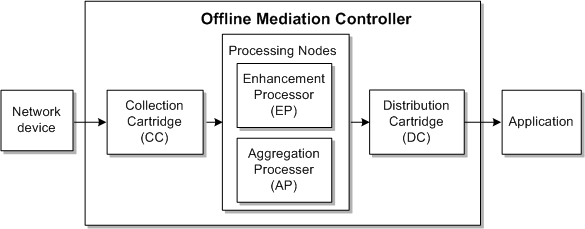
Processing is performed by four types of nodes:
-
Collection cartridge (CC). CC nodes collects raw data from devices outside the Offline Mediation Controller system and transforms the data into network accounting records (NARs) that can be processed by Offline Mediation Controller.
-
Enhancement processor (EP). EP nodes add, modify, or delete data in NARs. For example, an EP node can add data based on IP ports or source and destination IP addresses detected in incoming NARs. You can also use the EP node to enhance NARs with information located outside the Offline Mediation Controller system.
-
Aggregation processor (AP). AP nodes aggregate data and records. For example, long-duration sessions can be received in multiple call detail records (CDRs). You can use the AP node to aggregate the CDRs into one NAR file.
-
Distribution cartridge (DC). DC nodes distribute the network data collected and processed by other functional nodes. The DC node converts NAR files to a specified output format and moves the resulting files to its output queue.
You configure nodes in a node chain. The first node is always a CC node, and the last node is always a DC node. The processing nodes (EP and AP) are optional, and can be in any order. You typically use multiple EP nodes for different types of processing; such as mapping, normalizing, and so on.
Figure 1-2 shows a sample node chain that processes GPRS events for Elastic Charging Engine.

In this example:
-
The CC node reads GPRS records and transforms them into NARs.
-
The EP nodes perform normalization and record sequencing to ensure that events are processed correctly.
-
The AP node aggregates partial records into a single record.
-
The DC node sends the NARs to the Elastic Charging Engine.
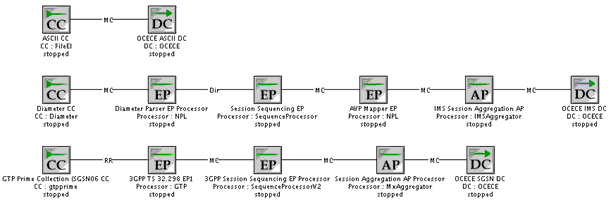
Depending on your service offerings, you can create multiple node chains that handle different types of input, and provide output to the same system. Figure 1-3 shows a typical configuration for receiving input from ASCII, IMS, and SGSN, and providing output to Elastic Charging Engine.
To create a node chain, you configure the nodes that are required to process events for a particular input and output; for example, a node chain that processes wireless events to send to ECE. When you configure each node, you work with two aspects of the node; the node configuration, and the rule file.
-
The node configuration specifies how the node functions in the node chain. For example, when defining the node configuration for an EP node that checks for duplicate records, you specify the directory that holds duplicate records, the number of records in a duplicate-record file, and the next node in the node chain.
-
The rule file defines how the node handles each record and carries out its work. For example, when defining the rule file for an EP node that checks for duplicate records, you define the field in the record that is used for detecting duplicate records; such as the calling number or session ID.
Offline Mediation Controller includes predefined nodes and rule files to support specific communication services: wireless, IP, and VoIP. When you create a node, you start by choosing the solution you are delivering (as shown in Figure 1-4), or you can choose a cartridge kit that is independent of a solution.
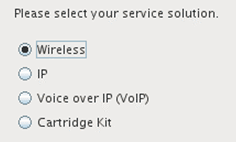
Each solution includes a set of solution-specific nodes and rule files to choose from. For example, to configure a node chain for wireless events, you can use predefined EP nodes for processing ASN data, CDR sequence management, and record filtering.
-
For wireless services, Offline Mediation Controller delivers the Charging Gateway Functionality (CGF) as specified by the 3GPP for wireless GSM/GPRS/UMTS networks, plus goes beyond the basic CGF by supporting numerous applications and services.
-
For IP services, Offline Mediation Controller includes pre-integrated support for numerous industry-leading routers, switches and IP service platforms. Raw service and network usage data is collected, aggregated and enhanced with QoS and customer-specific information.
-
For VoIP services, Offline Mediation Controller supports next generation VoIP telephony platforms as well as legacy protocols and record formats, enabling migration from legacy voice networks to VoIP.
In addition to solution-based nodes and rule files, you can use application-specific cartridges. Cartridges include specialized nodes and rule file. For example:
-
Use the Oracle CDR Format cartridge to configure a CC node when you integrate Offline Mediation Controller with Billing and Revenue Management (BRM).
-
Use the suspense and recycle nodes to integrate Offline Mediation Controller with BRM Suspense Manager.
After you install a cartridge, the nodes in the cartridge are available in the Administration client. Figure 1-5 shows how node types are organized by domain (wireless, and so on) and by type (CC, EP, and so on). In this figure, the OCECE DC node is present, indicating that the ECE Cartridge Pack has been installed.
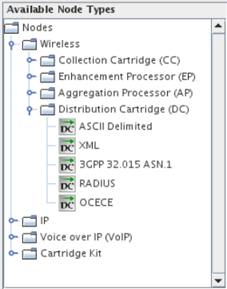
Cartridges are installed as JAR files. Each cartridge supports a specific domain of functional area. You can use the Cartridge Development Kit (CDK) to create custom cartridges that support input from new network elements, or can output records to custom systems and applications.
Offline Mediation Controller System Architecture
Offline Mediation Controller include three main components:
-
Node managers run the nodes in node chains.
-
The administration server runs the node managers, and manages all of the Offline Mediation Controller processes.
-
You configure node chains and administer the system by using the Administration Client.
To run Offline Mediation Controller, you start all three components. You can also start and run individual nodes.
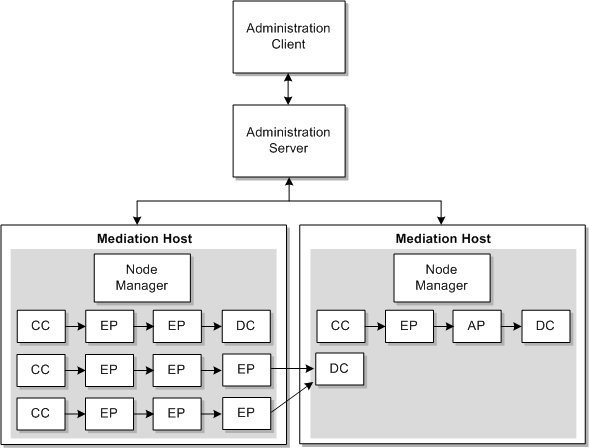
Figure 1-6 shows the Offline Mediation Controller system architecture.
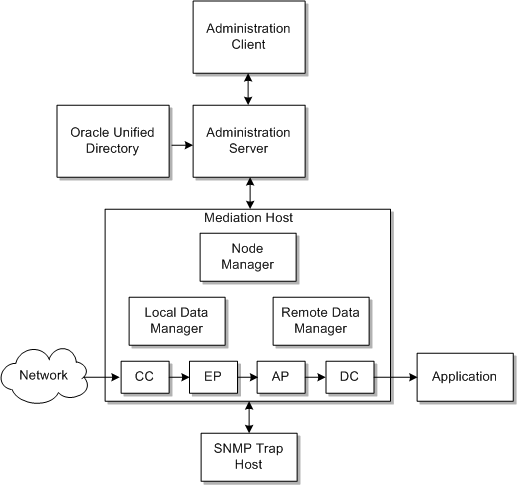
In Figure 1-6:
-
The Administration client is a GUI application that you use for creating node chains and editing rule files. You also use the Administration client for administrating Offline Mediation Controller; for example, managing users, and defining instances of system components.
-
The administration server is a process that passes commands between the Administration client and the node managers, which in turn control the nodes. The administration server manages log files, and manages the data flow in the entire Offline Mediation Controller system. You can run one primary administration server and one backup administration server.
-
A mediation host is a server on which nodes and node managers run:
-
Node managers run the nodes in a node chain. You send commands to a node manager to stop and start nodes.
-
Local data managers pass data from one node to another on the same mediation host.
-
Remote data managers pass data from a node on one mediation host to a node on a different mediation host.
A mediation host is not a component that runs; you do not stop and start a mediation host. Instead, it provides a location on the system where nodes and node managers can run. You typically configure multiple mediation hosts to distribute processing.
-
-
Oracle Unified Directory (OUD) manages Offline Mediation Controller users.
-
The optional SNMP trap host is an IP host that receives SNMP trap messages from the Offline Mediation Controller system. Offline Mediation Controller issues SNMP trap messages to send alarms to network management systems.
Offline Mediation Controller is typically distributed on multiple systems. You can run one or more administration server, and each administration server connects to node managers hosted on multiple meditation host systems. Figure 1-7 shows a configuration with multiple mediation hosts and node managers. Using multiple mediation hosts enables more efficient use of system resources and improves performance.