Working with Access Review Campaigns in Oracle Access Governance
Use Campaigns to initiate an access review process. To use Access Reviews effectively, understand the campaign lifecycle, along with crucial concepts, such as self-certification of accesses and fallback mechanism when an invalid reviewer or owner is detected. Use guidelines or best practices while working with campaigns to ensure effective review process is conducted.
Access Review Campaign Stages
As an Administrator or Campaign Administrator, to certify access privileges, first set up and schedule Access Review Campaigns. During its lifecycle, a campaign courses through various access review states. The tasks that you can perform depend on the state or the status of a campaign.
As an Administrator or Campaign Administrator, initiate the access review process by creating a Campaign from the Access Reviews section. You can set up either an ad-hoc campaign or schedule a periodic campaign, forming a campaign series. A campaign proceeds through various stages or states in its lifecycle. This involves defining the scope, setting approval workflows, selecting campaign owners, and scheduling campaigns. Once launched, reviewers can accept or revoke access privileges. The decisions taken are fulfilled as part of the closed-loop remediation process.
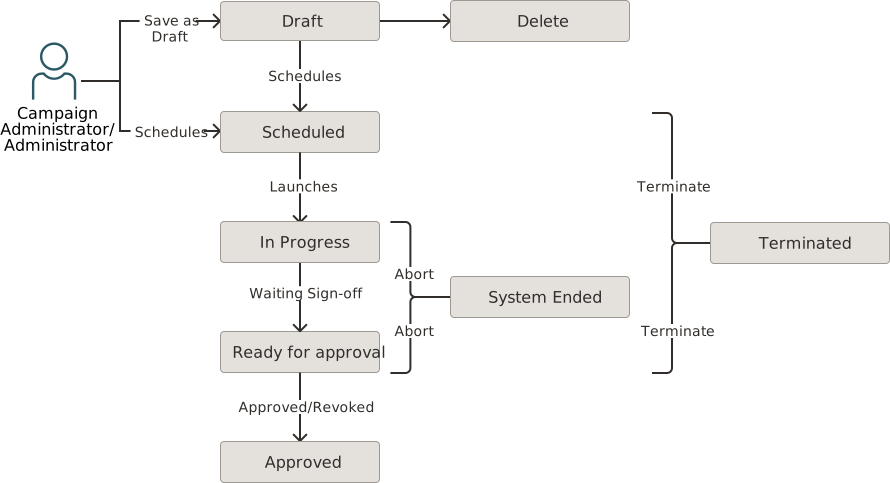
-
Draft: When a new Access Review Campaign is created or added but
not yet launched. In the Draft state, you can:
- View campaign details
- Edit a campaign
- Delete a campaign
-
Scheduled: When an access review campaign is created to be
launched at a specific time in future. In the Scheduled state, you can:
- View campaign details
- Edit a campaign
- Clone a campaign
- Terminate a campaign
- Terminate Campaign Series
-
In Progress: When an access review campaign is launched.
Campaign reviewers are notified about the campaign over email. Reviewers can make
decisions on the assigned review tasks by accepting or revoking access privileges to
finally fulfilling the decision as part of the closed-loop remediation process. In
an In Progress state, you can:
- View campaign details
- Clone a campaign
- Terminate a campaign
- Terminate Campaign Series
- View report
- Change campaign ownership
- Download CSV data
-
Ready for Approval: When the review tasks have been completed or the campaign due date has elapsed, the campaign moves to the Ready for Approval state. In case, there are pending review items, the suggested actions given in the approval workflow are automatically considered. For example, approve all un-reviewed access review tasks. In the Ready for Approval state, you can:
- View campaign details
- Clone a campaign
- Terminate a campaign
- Terminate Campaign Series
- View report
- Download CSV data
- Change campaign ownership
-
Approved: When a campaign owner approves and sign-off a campaign
from the Actions option, it is marked as Approved. The campaign moves
from the my ongoing campaigns queue to the my previous campaigns
queue. In the Approved state, you can:
- View campaign details
- Clone a campaign
- View report
- Download CSV data
-
System Ended: When an unexpected error occurs, the campaign may
be aborted leading to the System Ended status. In the System Ended
status, you can view campaign details, clone a campaign, view report, or download
the CSV report. A few possible causes are:
- When an internal system error occurs, such as failure in validating campaign criteria.
-
All Draft and Scheduled campaigns created before June 2023 release are automatically aborted and marked as System ended.
- When an Oracle Access Governance service instance is deleted, all the campaigns in that service instance are aborted and marked as System Ended.
- When a system failure occurs during termination of a campaign, the campaign is aborted and results in the System Ended state.
-
Terminated: When a campaign is terminated by a Campaign
Administrator or a Campaign owner. You can terminate a campaign when it is
in the Scheduled, In Progress, or Ready for Approval state. A
campaign is also terminated when the:
- Reviewer is inactive and managerial hierarchy does not have an active user, or the campaign owner is inactive.
- Fallback process fails to assign an appropriate campaign owner or reviewer, the campaign is Terminated by the system.
- Number of members in the Identity Collection is fewer than the defined reviewers for the Identity Collection approval worlflow.
- View campaign details
- Clone
- View report
- Download CSV data
Understanding Self-Certification Guardrails
Self-certification is a process of approving or certifying your own access rights without the intervention of an external reviewer. It is a valid business process established to reduce the administrative burden or for other appropriate business justifications. However, self-certification is usually not recommended for high-risk accesses involving critical data, or where a potential personal benefit is involved. Oracle Access Governance gives you the option to either enable or disable the self-approval process.
- If you select Custom User, Identity Collection, or Owner workflow, then you can select to enable or disable the self-certification process. If you select the Beneficiary workflow, then also, you can self-approve the accesses.
- If you select any other workflow or select to disable the self-approval process, then system starts an appropriate fallback mechanism to auto-assign the review task to the next available valid reviewer.
Understanding Fallback Mechanism: Methods to Prevent Campaign Termination
While working with Campaigns, you select the intended reviewer by selecting one of the approval templates defined in the Oracle Access Governance Approval Workflows feature. The Campaigns service would start a fallback mechanism in case an invalid reviewer or an invalid campaign owner is detected to prevent termination of a campaign.
- When an Inactive Oracle Access Governance identity is selected as a reviewer.
- When an active identity with the Consumer user type is selected as a reviewer.
- When the termination flag is set to true for a reviewer.
- When self-approval is disabled in the selected approval template, and the reviewer is same as the beneficiary whose accesses are being reviewed or certified.
Fallback Mechanism for an Invalid Reviewer
If the intended reviewer is invalid, then Oracle Access Governance starts the following fallback mechanism, in the order listed, to assign a valid reviewer:
Intended Reviewer → Management Chain of the intended reviewer → Campaign owner → Any user, randomly selected having the Access Governance Campaign Administrator role.
- Intended Reviewer
- Immediate manager of the reviewer, up to the defined management chain until a valid reviewer is found.
- If no active managers are found, then the reviewer is set as Campaign owner.
- If self-approval isn't allowed, no active managers are found, campaign owner is the beneficiary, then any one user, chosen randomly, with the Access Governance Campaign Administrator role roles is automatically assigned as an access review reviewer.
Fallback Mechanism for an Invalid Primary Owner for a Campaign
Invalid owners can be inactive users, consumer users, users with termination flag set to true, or users not part of the approval workflow.
If the intended owner is invalid, then Oracle Access Governance starts the following fallback mechanism to assign a valid campaign owner:
Primary Owner → one of (Secondary Campaign Owners) → Any user having the Access Governance Campaign Administrator role.
Example 1 - Understanding Fallback Mechanism when Self-Certification is Selected
- Beneficiary: John Doe and Account owner as Sarah
- Beneficiary: Sarah and Account owner as Sarah
- Beneficiary as John Doe and Reviewer as Sarah
- Beneficiary as Sarah and Reviewer as Sarah
Example 2 - Understanding Fallback Mechanism when Self-Certification is NOT Selected
- Beneficiary: John Doe and Permission owner as Sarah
- Beneficiary: Sarah and Permission owner as Sarah
Intended Campaign Owner → one of (Secondary Owners) → Any user, randomly selected, having the Campaign Administrator role.
In this example, primary owner is same as the beneficiary with self-certification disabled, then the first user with Campaign Administrator role is selected, having the Administrator role, which in this example is Carol Beck. So access reviewers would be as follows:
- Beneficiary as John Doe and Reviewer as Sarah
- Beneficiary as Sarah and Reviewer as Carol Beck
Best Practices: Guidelines to consider while working with Campaigns
While running campaigns, you must adhere to a few best practices and guidelines to ensure effective access review process.
- Campaigns can only be created by Oracle Access Governance Administrator or Campaign Administrator .
- All campaigns can only be managed by Oracle Access Governance Administrator. Campaign Administrator can manage the campaigns that they created. Campaign owners can manage the campaign they own.
- You can run identity reviews based on permissions granted directly in the Managed Systems (also known as reconciled permissions) without the need to provision it from Oracle Access Governance. However, to manage the accesses at a granular level, use Access Bundles and provision the permissions from Oracle Access Governance.
- You can quickly certify privileges by running identity access reviews from the Oracle Access Governance system based on the permissions assigned directly. Permissions or accounts provisioned through policy, or Oracle Identity Governance (OIG) and Oracle Cloud Infrastructure (OCI) identity accounts aren't covered in this review. For more information on running reviews based on reconciled permissions, see Identity Access Reviews for Permissions Assigned Directly in Managed Systems.
- In a single campaign, you can't combine two different types of access reviews. For example, if you create a campaign to review policies, criteria for identity access reviews or identity collection reviews are no longer applicable and are disabled.
- Campaigns can be certified by any active user associated with a specific approval workflow. Reviewers can view only their associated review tasks. A reviewer who isn't associated with any approval workflow can't perform tasks against any reviews.
- If no reviews are generated, it would automatically proceed to Ready for approval state.
- Campaign Owner:
- must be an Oracle Access Governance active Workforce user with termination flag set to false.
- can receive email notifications whenever a campaign progresses through various campaign states.
- can be an access review reviewer based on the fallback mechanism if the original intended reviewer is invalid.
- Can manage a campaign that they own.
- You can self-approve or self-certify the accesses using the Custom user, Identity Collection, Business Approvers, or Owner template. You can also self- approve the accesses when using the Beneficiary approval template.
- You can certify access privileges for consumer users, but a consumer user can't be an access reviewer.
- For policy reviews, you must not change the policy after the campaigns have been scheduled. It would result in failure of completing the remediation request. The policy statements must be consistent throughout the campaign process.
- For identity collection reviews, you must not change members after the campaigns have been scheduled. It would result in failure of completing the remediation request. The list of members must be consistent throughout the campaign process.