Reference for Multicloud
This guide lists the predefined objects in OCI Resource Analytics for the Multicloud service. You can find information about views, entity relationships, subject areas and sample queries.
Views
This section provides information about views within OCI Resource Analytics Multicloud and their columns, data types, keys, and the referred view and column names. The following views are available:
| Name | Description |
|---|---|
| MULTICLOUD_NETWORK_ANCHOR_DIM_V | This view stores information about the details of a Network Anchor. |
| MULTICLOUD_RESOURCE_ANCHOR_DIM_V | This view stores information about the details of a Resource Anchor, which represents an OCI anchor for a linked multicloud resource. |
| MULTICLOUD_NETWORK_ANCHOR_FACT_V | Fact table for multicloud service at the network anchor grain. |
| MULTICLOUD_RESOURCE_ANCHOR_FACT_V | Fact table for multicloud service at the resource anchor grain. |
The suffixes in the view names designate the view type:
- FACT_V: Fact
- DIM_V: Dimension
The contents of each view and their relationships are listed in the following file: Multicloud views.
Each tab in the Excel spreadsheet contains the details of a view.
Relationship Diagram
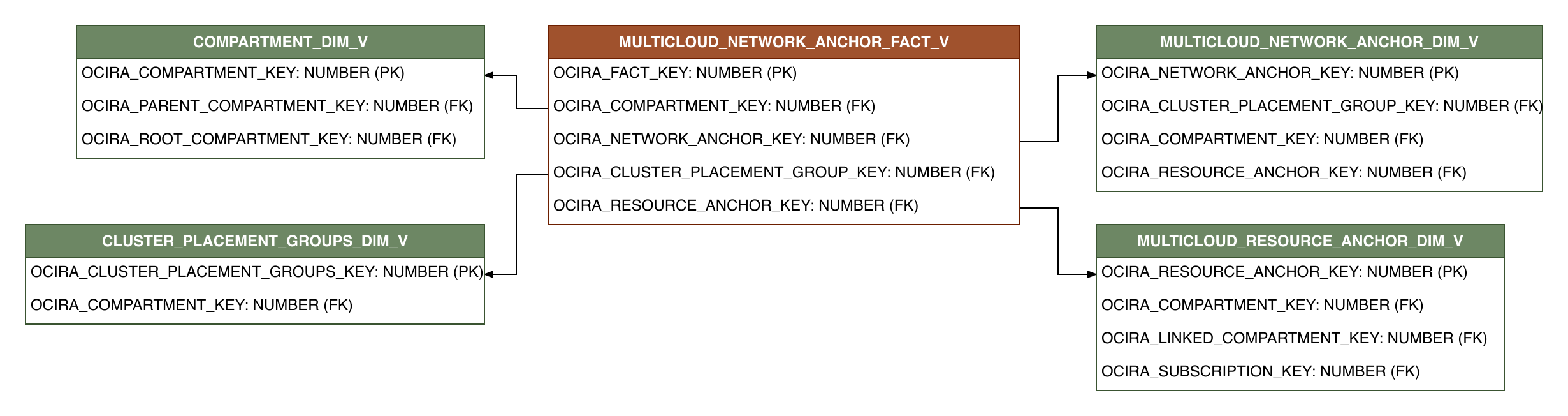
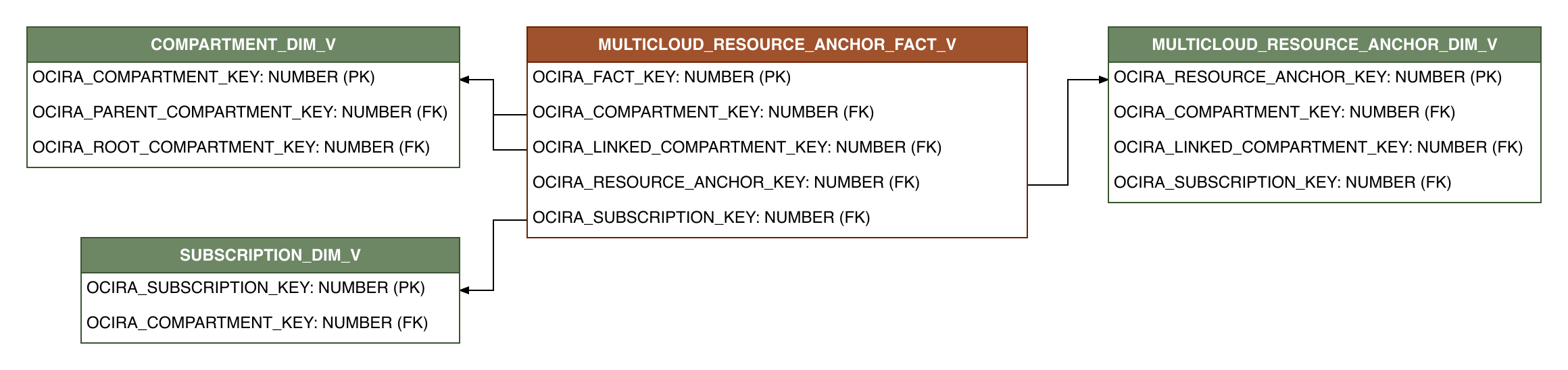
This section provides diagrams that define the logical relationship of a fact table with different dimension tables.
These diagrams show the relationship of the Multicloud fact view with different dimension views.
Sample Queries
Sample queries for Multicloud.
List the number of network anchors associated with each cluster placement group ID.
SELECT
    CLUSTER_PLACEMENT_GROUP_ID,
    COUNT(NETWORK_ANCHOR_ID) AS NETWORK_ANCHOR_COUNT
FROM OCIRA.MULTICLOUD_NETWORK_ANCHOR_FACT_V F
GROUP BY CLUSTER_PLACEMENT_GROUP_ID;
List the number of resource anchors associated with each linked compartment ID.
SELECT
    LINKED_COMPARTMENT_ID,
    COUNT(RESOURCE_ANCHOR_ID) AS RESOURCE_ANCHOR_COUNT
FROM OCIRA.MULTICLOUD_RESOURCE_ANCHOR_FACT_V F
GROUP BY LINKED_COMPARTMENT_ID;
Data Lineage
The Customer Experience Semantic Model Lineage spreadsheet and Metric Calculation Logic spreadsheet for Multicloud provide an end-to-end data lineage summary report for physical and logical relationships in your data.
For more information, see Data Lineage.
Subject Areas
This section provides information on the subject areas with data you maintain in Multicloud. These subject areas, with their corresponding data, are available for you to use when creating and editing analyses and reports. The information for each subject area includes:
Description of the subject area.
Business questions that can be answered by data in the subject area, with a link to more detailed information about each business question.
Job-specific groups and duty roles that can be used to secure access to the subject area, with a link to more detailed information about each job role and duty role.
Primary navigation to the work area that's represented by the subject area.
Time reporting considerations in using the subject area, such as whether the subject area reports historical data or only the current data. Historical reporting refers to reporting on historical transactional data in a subject area. With a few exceptions, all dimensional data are current as of the primary transaction dates or system date.
The lowest grain of transactional data in a subject area. The lowest transactional data grain decides how data are joined in a report.
Special considerations, tips, and things to look out for in using the subject area to create analyses and reports.
Useful Resources
Oracle Cloud Infrastructure Documentation / API Reference