Oracle Data Safe Overview
Oracle Data Safe is a unified control center for Oracle databases that helps organizations discover sensitive data, evaluate security risks, protect regulated information, create smaller, targeted datasets for nonproduction use with Data Subsetting, monitor database activity, manage audit data, and improve compliance posture across their database environments.
Oracle Data Safe is fully integrated with Oracle Cloud Infrastructure (OCI) and provides centralized database security management through a single interface.
Features of Oracle Data Safe
Oracle Data Safe provides a comprehensive set of database security capabilities for protecting sensitive and regulated data.
Security Assessment
Security Assessment evaluates the security posture of database configurations by examining database settings, user accounts, and security controls. It generates findings and remediation recommendations based on industry standards and Oracle best practices, including:
- Security Technical Implementation Guides (STIG)
- Center for Internet Security (CIS) benchmarks
- EU GDPR recommendations
- Oracle security best practices
This helps organizations identify vulnerabilities and reduce security risks.
User Assessment
User Assessment identifies highly privileged or potentially risky accounts by analyzing user information stored in the database data dictionary. It evaluates factors such as:
- User types
- Schema access
- Authentication methods
- Password policies
- Password change frequency
It also provides direct links to related audit records so administrators can investigate suspicious behavior and apply appropriate controls.
Data Discovery
Data Discovery identifies sensitive data stored in Oracle databases by scanning both actual data and metadata. It detects sensitive columns based on predefined or custom sensitive data types.
Built-in sensitive data categories include:
- Identification information
- Biographic information
- IT information
- Financial information
- Healthcare information
- Employment information
- Academic information
This capability helps organizations understand where sensitive data resides and supports regulatory compliance efforts.
Data Masking
Data Masking protects sensitive information in non-production environments by replacing real data with fictitious but realistic values. This capability is commonly used when production databases are copied for development, testing, analytics, or training purposes.
Oracle Data Safe provides predefined masking formats and supports custom masking logic.
Data Subsetting
Data Subsetting creates smaller, targeted datasets for nonproduction use by applying percentage rules, filter conditions, or both, preserving relevant table relationships where supported. Data Subsetting can be combined with Data Masking.
Activity Auditing
Activity Auditing captures and monitors database activity to help organizations track usage, investigate incidents, and meet auditing requirements. Oracle Data Safe can also centralize audit records and manage audit policies across target databases.
Alerts
Alerts provide near real-time notifications about unusual or suspicious database activities based on audit events and alert policies.
SQL Firewall
SQL Firewall protects Oracle databases against threats such as SQL injection attacks and compromised accounts.
Built into the Oracle AI Database 26ai kernel, SQL Firewall enables administrators to:
- Collect authorized SQL activity
- Generate allowlists of approved SQL statements
- Control approved database connection paths
- Monitor SQL Firewall violations across database fleets
Oracle Data Safe centrally manages and monitors SQL Firewall policies for target databases.
Key Concepts and Terminology
It's useful for you to become familiar with the following terms when working in Oracle Data Safe.
Oracle Cloud Infrastructure (OCI) Terms
OCI provides highly available cloud services for compute, storage, networking, and application hosting. Oracle Data Safe is integrated directly into OCI.
OCI Console
The OCI Console is the web-based interface used to access and manage OCI services, including Oracle Data Safe.
Tenancy
A tenancy is a secure and isolated partition within OCI where cloud resources are created and managed.
Regions and Availability Domains
OCI is hosted in geographic regions and availability domains. Regions contain one or more availability domains, each consisting of one or more data centers.
Compartments
Compartments organize and control access to OCI resources. They function as logical groupings for resources such as databases, networks, and storage.
Identity and Access Management (IAM) Terms
OCI IAM
OCI IAM controls authentication, authorization, and resource access across OCI services. Oracle Data Safe uses OCI IAM for access control and identity integration.
IAM Identity Domains
Identity domains manage users, groups, authentication settings, SSO integration, and federation configurations.
Each tenancy includes a default identity domain, and organizations can create additional domains for separation of environments or applications such as Oracle Data Safe.
IAM User Groups
IAM user groups are collections of users requiring similar access privileges. Administrators assign permissions to groups through IAM policies.
IAM Policies
IAM policies define which groups can access specific OCI resources and what actions they can perform. Only tenancy administrators can create policies.
Oracle Data Safe Terms
Alert Policies
Alert policies define rule-based events that Oracle Data Safe monitors using collected audit data.
Alerts
Alerts notify administrators when monitored audit events occur on target databases.
Audit Data Retrieval
Audit data retrieval enables archived audit data to be restored online for analysis and investigation.
Audit Profiles
Audit profiles define audit settings and help estimate audit data volume collected by Oracle Data Safe.
Audit Trails
Audit trails represent the source of audit records that document activities occurring within target databases.
Masking Formats
Masking formats define the transformation logic used to obfuscate sensitive data.
Oracle Data Safe includes many predefined masking formats such as:
- Shuffle
- Email Address
- Randomized replacement values
Custom masking formats can also be created.
Masking Policies
Masking policies map sensitive columns to masking formats and define how data masking is performed on target databases.
Policies can be generated from sensitive data models.
Oracle Data Safe Repository
The Oracle Data Safe repository is an Oracle AI Database used to store audit data and metadata collected by Oracle Data Safe.
Security Policies
Security policies allow you to assign and manage unified audit policies on target database groups and target databases. Note that security policies replaced audit policies in Oracle Data Safe.
Sensitive Data Models
Sensitive data models store collections of sensitive columns and referential relationships identified during Data Discovery scans.
Oracle Data Safe can discover both dictionary-based and application-level referential relationships.
Sensitive Types
Sensitive types define classifications of sensitive data used during Data Discovery scans. Examples include Social Security numbers, financial identifiers, healthcare data, and other regulated information.
Sensitive types are grouped into categories such as:
- Identification Information
- Biographic Information
- IT Information
- Financial Information
- Healthcare Information
- Employment Information
- Academic Information
Oracle Data Safe includes predefined sensitive types and also supports custom definitions.
Target Database
A target database is an Oracle database registered with Oracle Data Safe for monitoring and security management.
Supported capabilities include:
- Security Assessment
- User Assessment
- Data Discovery
- Data Masking
- Data Subsetting
- Activity Auditing
- Alerts
- SQL Firewall management
Oracle Data Safe Architecture
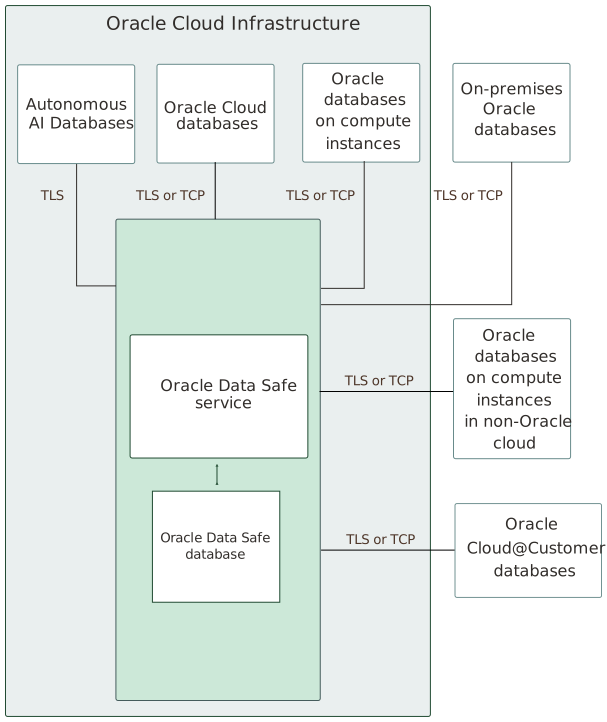
The main components of Oracle Data Safe are the Oracle Data Safe service in Oracle Cloud Infrastructure, a back-end Oracle AI Database repository, and target databases.
Oracle Data Safe Service
Oracle Data Safe is a multi-tenant service running in a service tenancy owned by Oracle. Service data associated with the instance is stored in a back-end Oracle Autonomous AI Database Serverless database that’s dedicated to the customer and region and is isolated from other customers’ instances. For more information, refer to the Privacy and Security Feature Guidance for Oracle Autonomous AI Database Serverless available on My Oracle Support (Doc ID 114.2).
You can access the Oracle Data Safe service in Oracle Cloud Infrastructure. The features provided in the service are categorized into sections in the user interface. See the left navigation bar in the following picture.
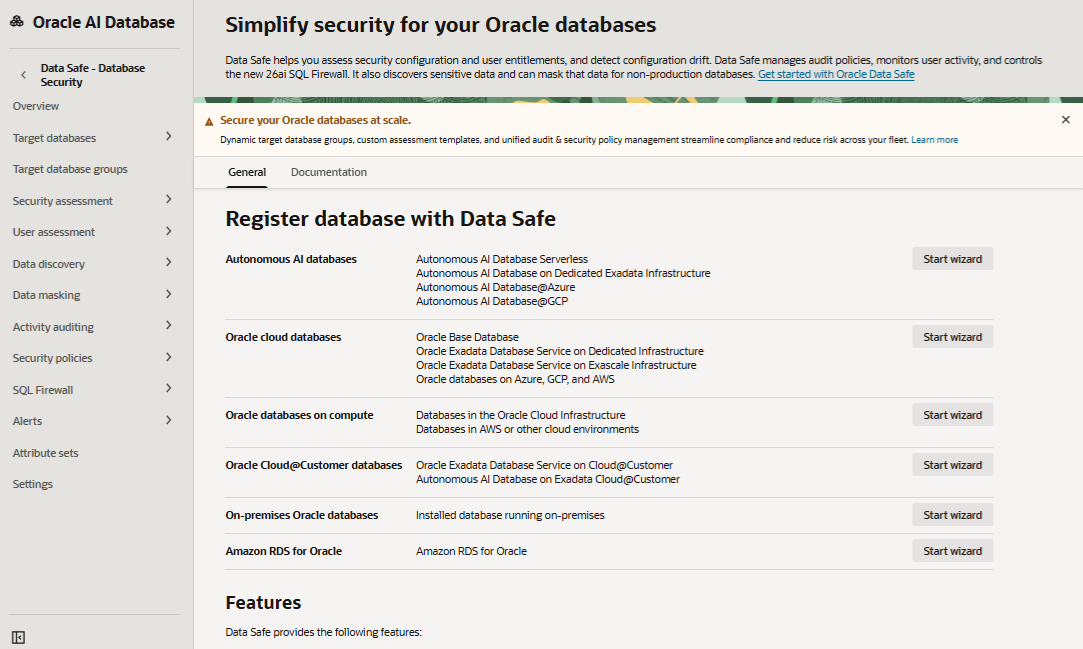
Description of the illustration data-safe-ui.png
You can do the following in each section:
-
Overview: Register target databases with Oracle Data Safe by using a wizard, access documentation, and learn about Oracle Data Safe private endpoints and on-premises connectors.
-
Target databases: View details for target databases to which you have access, register new target databases (manually or by using a wizard), and manually create and manage Oracle Data Safe private endpoints and on-premises connectors.
-
Target database groups: View details for target databases groups to which you have access and create new target database groups.
-
Security assessment: Evaluate the security posture of your databases, receive recommendations on how to mitigate the identified risks, and work with assessment reports, assessment templates, baseline templates, assessment history, and schedules.
-
User assessment: Identify potential risk inherent in database accounts, assess the potential risk a compromised or misused account would pose, and work with user profiles, assessment history, and schedules.
-
Crypto Posture assessment: Evaluate the overall state of an organization’s cryptographic protections, including its algorithms, key lengths, certificates, protocols, and compliance settings, to help identify weaknesses and assess whether systems are using strong, current, and appropriate security controls.
-
Data discovery: Analyze schemas in your databases to understand which tables and columns are likely to contain sensitive data, and work with sensitive types, sensitive data models, and sensitive type exports.
-
Data masking: Mask data to safely share it for non-production purposes (such as development and data analytics) and work with masking formats, masking policies, and pre-masking reports.
-
Data subsetting: Create and manage subsetting policies, run readiness checks, subset a registered nonproduction target database, and review subsetting reports.” Link “subset a registered nonproduction target database” to the Data Subsetting Overview.
-
Activity auditing: Collect and store database audit data from all your target databases centrally in Data Safe and identify anomalous behavior with pre-defined audit policies, alerts and reports. Work with auditing reports, audit report history, audit policies, audit profiles, archive data retrievals, audit trails, and audit insights.
-
Security policies: View and manage Oracle predefined and custom security policies for target databases or target database groups. Work with security policy deployments and unified audit policies.
-
SQL firewall: Restrict database access to only authorized SQL statements/connections to provide real-time protection against common database attacks. Work with violation reports, SQL Firewall policies, SQL collections, and violation report history.
-
Alerts: Stay informed of unusual database activities as they happen and ensure you have configured appropriate audit policies to track those activities in the database. Work with alert reports, alert report history, alert policies, and target policy associations.
-
Attribute sets: View details for attribute sets to which you have access and create new attribute sets.
-
Settings: Set global paid usage and global audit record retention policy settings for the regional Oracle Data Safe service.
Oracle Data Safe Database Repository
Oracle Data Safe uses its own Oracle Autonomous AI Database to store your service information, such as audit data (trails), masking settings, reports, alerts, and many other things. However, only your Oracle Data Safe information is stored in this database and your information is not stored alongside other Oracle Data Safe information.
There is a dedicated database for each tenancy’s Oracle Data Safe instance per region and the databases are automatically provisioned and included with the Oracle Data Safe service. The databases are secure and highly available in the Oracle Cloud.
Target Databases
Oracle Data Safe can connect to your Oracle databases, including Oracle Autonomous AI Databases, Oracle Cloud Databases (Bare Metal, Virtual Machine, and Exadata on Oracle Public Cloud), on-premises Oracle databases, Oracle Cloud@Customer databases (Oracle Exadata Database Service on Cloud@Customer and Oracle Autonomous AI Database on Exadata Cloud@Customer), and Oracle databases on compute instances in both Oracle Cloud Infrastructure and non-Oracle cloud environments.
You can choose to use all Oracle Data Safe features with a target database or just certain ones. For example, you may want to use Activity Auditing with one target database and use Data Discovery and Data Masking with another.
Two different protocols are supported for connecting Oracle Data Safe to your target databases:
-
TCP with network encryption, where your target database has to have network encryption enabled.
-
TCPS, where your target database has to be configured with TLS version 1.2.
Oracle recommends that you back up your target databases when using features like Data Masking. You can use services in Oracle Cloud Infrastructure, such as Oracle Storage Cloud Service or Oracle Cloud Infrastructure Storage Service to back up your target databases.
The following diagram illustrates the Oracle Data Safe components, including the Oracle Data Safe service, Oracle Data Safe’s back-end database, and target databases.