Securing the Device Data FHIR Service
Use these recommendations to configure and operate Oracle Cloud Infrastructure Device Data FHIR Service securely.
Security Responsibilities
Security in Oracle Cloud Infrastructure (OCI) is a shared responsibility. Oracle protects the cloud infrastructure and operates the managed DDFS service. You are responsible for securely configuring the OCI resources and applications that you control, including compartments, IAM policies, OCI Identity Domains applications and OAuth scopes, network access, OCI Vault secrets, notification endpoints, metrics, events, and user access.
Use compartments and policies as logical administrative and governance boundaries. Plan separation according to your access-control, compliance, and operational requirements; compartment placement does not change the service's managed operating model.
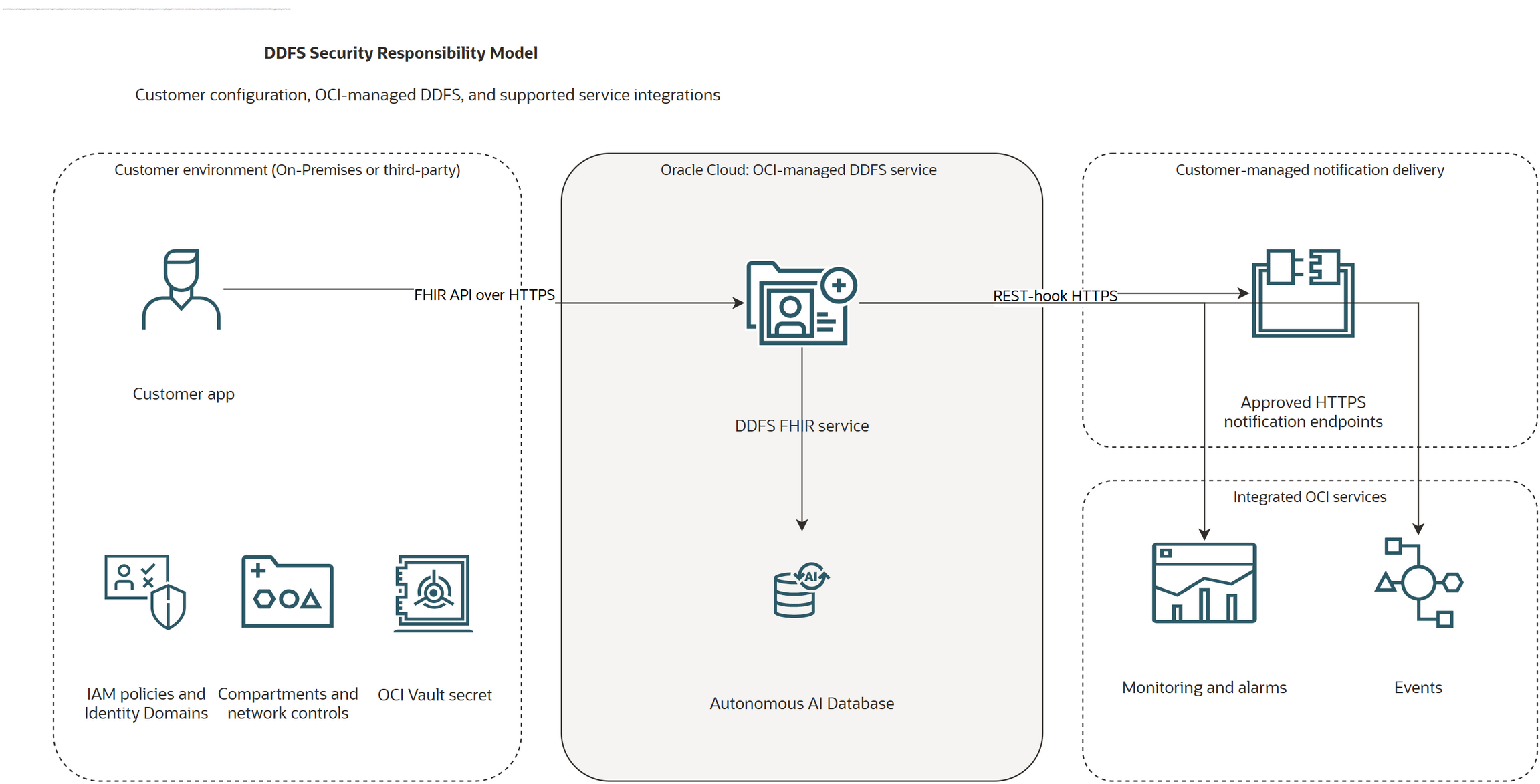
The diagram is a logical responsibility model. It does not represent the physical DDFS deployment or imply that OCI-managed service components are customer-managed resources.
Initial Security Tasks
Complete these tasks before you use a DDFS instance for production workloads:
- Define security boundaries: Place DDFS instances in the approved compartments and separate production from development and test environments according to your governance model.
- Grant minimum access: Create OCI IAM policies for DDFS control-plane resources and grant each application only the DDFS OAuth scopes required for its FHIR operations.
- Protect integrations: Allow client and notification traffic only over HTTPS. Validate notification destinations and restrict customer-managed ingress and egress to approved sources and endpoints.
- Protect authorization values: Store the complete outbound
Authorizationvalue for an authenticated REST-hook Subscription in an OCI Vault secret. Store only the secret OCID in the Subscription extension. - Enable operational visibility: Configure DDFS metrics, alarms, events, and OCI Audit review before onboarding sensitive FHIR data.
Routine Security Tasks
Perform these tasks regularly and after material changes to the environment:
- Review IAM group membership, DDFS policies, integrated applications, client grants, and OAuth scopes. Remove access that is no longer required.
- Review Audit events, DDFS metrics, alarms, Events rules, and Cloud Guard findings. Investigate unexpected access, configuration changes, delivery failures, and authorization failures.
- Review network rules and approved notification endpoints. Remove unused ingress and egress paths.
- Rotate keys, secret contents, and application credentials according to your organization's security and compliance policy, and immediately after suspected exposure.
- Test authenticated Subscription handshakes and notification delivery after changing an endpoint, secret, policy, or network rule.
- Review service-limit usage before creating instances or expanding an environment.
IAM and Access Control
DDFS uses separate authorization models for the control plane and FHIR data plane:
- Control plane: OCI IAM policies authorize management of DDFS instances and work requests. Use the narrowest applicable verb and resource type, and scope policies to the required compartment. See Details for the Device Data FHIR Service.
- FHIR data plane: OCI Identity Domains OAuth access tokens and DDFS scopes authorize FHIR API operations. Grant only the resource operations that a client needs. See Reference: Authentication and Scopes and Creating an Integrated Application.
Restrict destructive permissions, including DDFS instance deletion and FHIR delete or hard-delete scopes, to the smallest practical set of administrators and applications. Review wildcard and manage grants carefully.
Parameterized-scope support depends on the DDFS resource and search parameter. Use only combinations documented in the authentication reference; do not assume that every supported FHIR search parameter is also supported as an authorization constraint.
Network Security
- Use HTTPS for DDFS FHIR API requests and Subscription notification delivery.
- Restrict customer-managed network paths with network security groups, security lists, routing rules, firewalls, or equivalent controls appropriate to your deployment.
- Allow outbound notification traffic only to approved destinations and ports. Use port
443for HTTPS endpoints. - Validate the notification endpoint's TLS certificate and authorization requirements before creating or enabling a Subscription.
- Review DNS, proxy, firewall, and allowlist changes whenever notification handshakes or deliveries begin to fail.
Data Protection and Secret Rotation
Use the Subscription OCI Vault secret extension for an outbound Authorization header. The extension contains an OCI Vault secret OCID, not the authorization value itself. See Grant DDFS Access to a Subscription Authorization Secret to grant DDFS least-privilege access to read only the required secret.
Never place credentials, bearer tokens, or other secret values in Subscription parameters, application source code, deployment scripts, logs, or examples.
Choose a rotation frequency that satisfies your organization's security and compliance policy. Rotate immediately after suspected disclosure or unauthorized access.
- New version of the same secret: Update the secret contents to create a secret version under the existing secret OCID. The Subscription extension can continue to reference that OCID. After the new version becomes active, verify the REST-hook handshake and notification authorization.
- Replacement secret: Create a secret with a new OCID when you need a separate lifecycle, ownership boundary, or emergency replacement. Update the Subscription extension to the new secret OCID, verify delivery, and then retire the old secret according to your retention policy.
- Vault key rotation: If a customer-managed Vault key protects the secret, rotate key versions according to your cryptographic policy and validate secret retrieval afterward.
Monitoring and Auditing
Use OCI Audit to review DDFS control-plane API activity. Use DDFS service telemetry to monitor service and data-plane behavior:
- DDFS metrics and alarms for availability, errors, and resource behavior.
- DDFS events for state changes and automated response workflows.
Route security-relevant signals to the monitoring, alerting, or SIEM process used by your organization. Review changes to IAM policies, integrated applications, OAuth grants, Vault secrets, network controls, DDFS instances, and Subscription endpoints.
Limits, Quotas, and Environment Separation
The DDFS max-instance-count service limit is regional and applies per tenancy. The documented limit is 5 DDFS instances for Oracle Universal Credits and 5 for Pay As You Go. See Limits on DDFS Resources.
Review current values on the Console Limits, Quotas and Usage page before deployment because a tenancy can have approved limit increases. For general information, see Limits by Service.
Use compartment quotas and budgets to constrain resource use and detect unexpected spending. Account for limits of dependent services such as Identity Domains, Vault, Monitoring, Events, and networking.
Use separate compartments, IAM policies, integrated applications, Vault secrets, notification endpoints, and operational controls for production and non-production environments when your governance model requires that separation.
Subscription Notification Security
FHIR R6 Subscription notifications can transmit sensitive healthcare data to customer-managed endpoints. Apply these controls:
- Use an approved HTTPS endpoint and verify its ownership, TLS configuration, authentication requirements, and authorization behavior.
- Limit each notification receiver to the healthcare data that it is approved to receive.
- Store outbound authorization in an OCI Vault secret and grant DDFS access only to that secret.
- Do not use
Subscription.parameterto supply restricted headers such asAuthorization. - Monitor handshake failures, Subscription error states, and unsuccessful event delivery.
For the supported extension, restricted headers, and operational behavior, see FHIR R6 Subscription OCI Vault Secret Extension and Subscription.
Cross-Tenancy Access
Configure cross-tenancy access only for a supported DDFS scenario, such as a Subscription authorization secret stored in another tenancy. Administrators in both tenancies must create explicit policies that identify the trusted tenancy and precisely limit the principal, resource, permission, and compartment. For the Subscription extension that references the secret, see Subscription with an OCI Vault secret.
OCI cross-tenancy policies use Define, Endorse, and Admit statements. Do not copy policy statements from another OCI service because its principal type, resource types, and permissions can differ. See Cross-Tenancy Access Policies.
Administrators
Limit routine use of the tenancy Administrators group. Create role-specific groups for DDFS administration, security review, application administration, monitoring, and Vault management. Require multifactor authentication or an approved equivalent, manage user lifecycle centrally, and review privileged group membership regularly.
For more information, see IAM Security.