Overview
The Device Data FHIR Service is a managed Oracle Cloud Infrastructure service. Use Fast Healthcare Interoperability Resources (FHIR) APIs to work with health data from healthcare devices, applications, and third-party systems.
High-level Architecture
The Device Data FHIR Service provides a managed FHIR server on OCI for developers and administrators who need to integrate healthcare device data with applications, middleware, and operational systems.
- Developers: Use FHIR R4 and FHIR R6 6.0.0-ballot4 REST APIs to build client applications, device gateways, EHR extensions, and middleware integrations.
Use the FHIR server to:
- Store FHIR resources and use lifecycle features such as versioning, history, logical delete, and purge operations.
- Validate payloads against supported FHIR schemas and implemented DDFS constraints.
- Use supported search parameters, modifiers, and chained search parameters to query resources.
- Configure FHIR R6 6.0.0-ballot4 Subscriptions that use an OCI Vault secret for outbound notification authorization.
- Administrators: Use OCI controls to manage authentication, authorization, networking, IAM policies, metrics, events, and service operations.
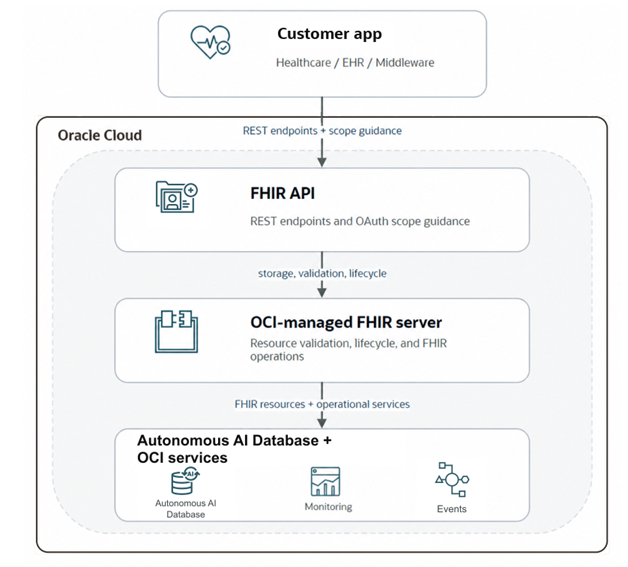
How the Device Data FHIR Service Works
The service stores and exposes healthcare device data as FHIR resources. Clients use standard FHIR REST interactions to create, read, update, delete, and search FHIR resources.
- Use version-specific base paths for FHIR R4 and FHIR R6 6.0.0-ballot4 resources.
- Use resource-specific search parameters to query data instead of list-style collection APIs.
- Use CapabilityStatement resources to understand supported resources, interactions, operations, and search parameters for a deployment.
- Use OCI operational features such as work requests, metrics, events, and IAM policies to administer the service.
Data Flow
FHIR clients send REST requests to the versioned FHIR API. The service validates the request, applies lifecycle and authorization controls, stores or retrieves the resource, and returns a FHIR resource, Bundle, or OperationOutcome response.
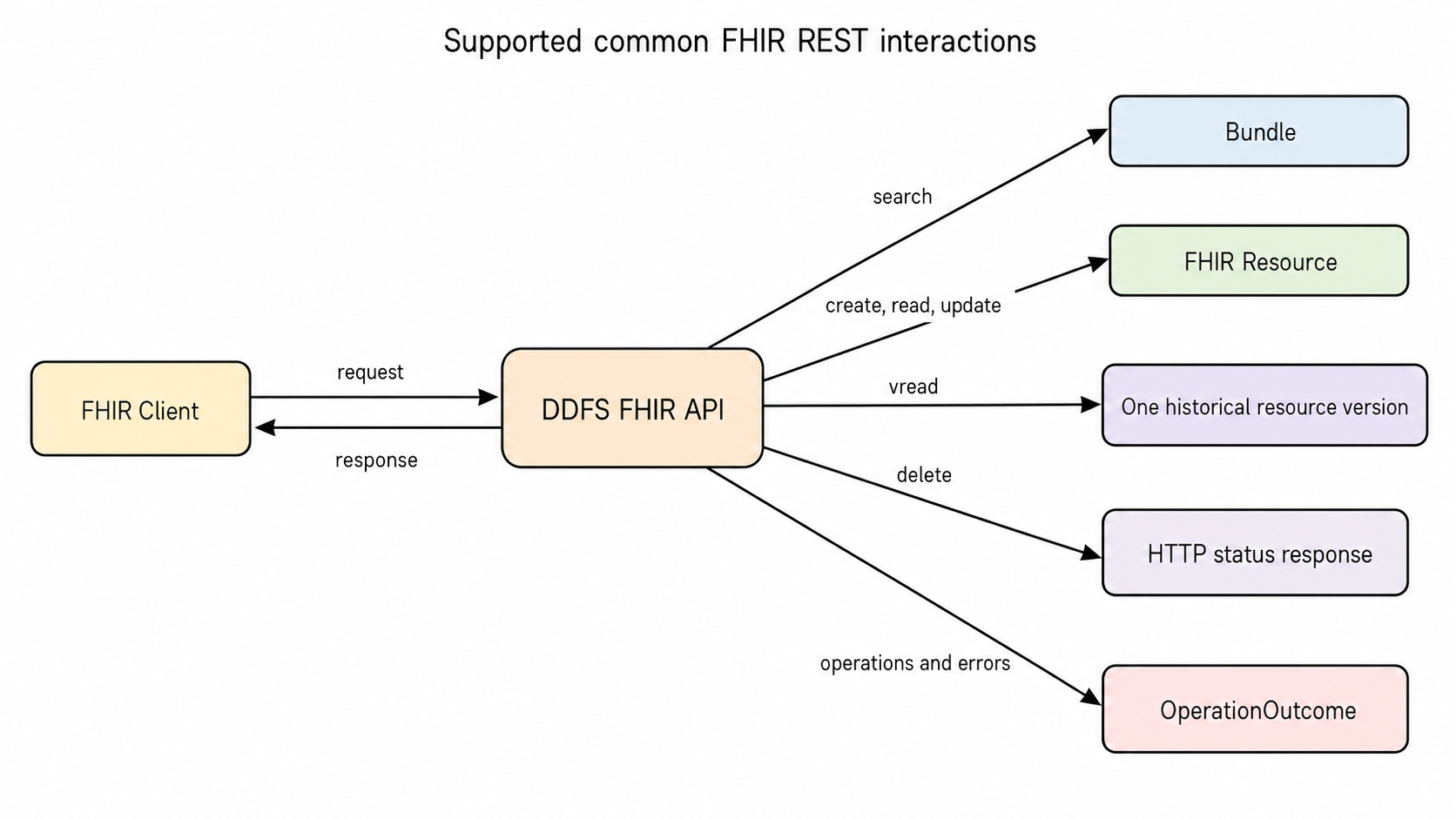
Supported FHIR REST Interactions
The interaction diagram shows a FHIR client sending requests to the DDFS FHIR API. Search returns a Bundle; create, read, and update return a FHIR resource; versioned read (vread) returns one historical resource version; and delete returns an HTTP status response. Operations and errors can return an OperationOutcome.
Concepts
Oracle Cloud Infrastructure Resources: Create a DDFS Instance to create the FHIR endpoints and server. Use work requests to monitor instance operations.
FHIR resource: A structured healthcare data type such as Patient, Device, Observation, or Subscription.
FHIR Resource instance: One record of a resource type, identified by its logical id. For example, Patient/{rid}.
Logical id: The {rid} value used in FHIR resource instance paths.
Version id: The {vid} value used by FHIR versioned read paths such as /Resource/{rid}/_history/{vid}.
Bundle: A FHIR container used for search results and some operations. Search endpoints return a Bundle with type set to searchset.
OperationOutcome: The FHIR response resource used to describe operation results and many error conditions. See OperationOutcome Reference.
HTTP media type: Use application/fhir+json for FHIR request and response payloads.
DDFS search result controls: Use _count to limit results. To retrieve more results, follow the server-provided Bundle.link URL whose relation is next. Common advertised controls also include _total, _id, _lastUpdated, _profile, and _tag. See Supported Search and Control Parameters.
Resource-specific search parameters: Parameters such as patient, status, code, category, date, name, identifier, topic, and url vary by resource and FHIR version.
Administrative delete operations: Collection-level $purgeDeleted permanently purges deleted resources before a specified date and can be limited by count. Instance-level $hardDelete permanently removes one deleted resource instance. See Scenario: Delete, Purge Deleted, and Hard Delete.
FHIR and OCI resources: FHIR resources represent healthcare data and server behavior. OCI resources represent service infrastructure such as instances, work requests, logs, metrics, and events.
FHIR Resources and Supported Versions
The Device Data FHIR REST API provides versioned FHIR R4 and FHIR R6 6.0.0-ballot4 endpoints. FHIR R6 6.0.0-ballot4 is an HL7 Ballot 4 version, not a final HL7 release. HL7 identifies FHIR R5 5.0.0 as the current published version. See FHIR R6 6.0.0-ballot4 version history. Resource pages include the endpoint, supported interactions, search parameters, request and response examples, status codes, and related FHIR references.
Use the grouped resource pages for a quick inventory, or use the direct links to open a specific resource page.
FHIR Resources
FHIR R4 Resources
FHIR R6 6.0.0-ballot4 Resources
FHIR R6 6.0.0-ballot4 Operation Results
SubscriptionStatus: Returned by the FHIR R6 6.0.0-ballot4 Subscription status operations.SubscriptionStatusis an operation result, not an ordinary CRUD resource in the DDFS CapabilityStatement. Configure the OAuth scopes approved for the Subscription status workflow in your deployment, and grant only the access required by the client. See Subscription status operations.
FHIR Interactions
Resource pages follow the FHIR REST interaction model. The supported interaction set depends on the resource and FHIR version, common patterns include:
| Interaction | Endpoint pattern | Customer use |
|---|---|---|
| Search | GET /api/fhir/{r4|r6-ballot4}/{Resource} |
Find resources using FHIR search parameters. |
| Create | POST /api/fhir/{r4|r6-ballot4}/{Resource} |
Create one resource instance. |
| Read | GET /api/fhir/{r4|r6-ballot4}/{Resource}/{rid} |
Retrieve one resource instance by logical id. |
| Versioned read | GET /api/fhir/{r4|r6-ballot4}/{Resource}/{rid}/_history/{vid} |
Retrieve a specific resource version. |
| Update | PUT /api/fhir/{r4|r6-ballot4}/{Resource}/{rid} |
Replace or update one resource instance. |
| Delete | DELETE /api/fhir/{r4|r6-ballot4}/{Resource}/{rid} |
Logically delete one resource instance. |
| Administrative delete | $hardDelete, $purgeDeleted |
Permanently remove deleted resources using purge-deleted guidance and hard-delete operations according to service policy. |
FHIR Resource Interoperability
FHIR interoperability depends on predictable, version-aware behavior. FHIR R4 and FHIR R6 6.0.0-ballot4 endpoints can differ in supported resources, operations, and search parameters.
- Clients should ignore unknown JSON elements when appropriate and avoid hard-coding optional fields.
- Clients should verify deployment capabilities using the server CapabilityStatement and the published capability statement files.
- Use FHIR R6 6.0.0-ballot4 DeviceAssociation when you need to represent device and patient relationships beyond the R4
Device.patientmodel. - Contained resources: For best interoperability, avoid references to contained resources. Use references to separately addressable resources where possible.
For detailed guidance, see FHIR normative content and version compatibility and FHIR R4 and FHIR R6 6.0.0-ballot4 Interoperability.
What's Not Supported
The following FHIR behaviors are not supported:
- Transaction bundles: Transaction bundles are unsupported. Use batch bundles for up to 25 independent requests; entries are not committed or rolled back as a transaction.
- SMART on FHIR authorization: SMART authorize, token, configuration, launch context,
user/..., andpatient/...scopes are not supported for DDFS FHIR resource authorization. Use DDFS OAuth scope guidance.
Regions and Availability Domains
The Device Data FHIR Service is available in specific Oracle Cloud Infrastructure regions, see real time availability on the Device Data FHIR OCI status page. For additional region identifiers and more information about availability domains, see About Regions and Availability Domains.
Resource Identifiers
The service supports OCI resources such as instances and work requests. Most OCI resources have an Oracle Cloud ID (OCID). For more information, see Resource Identifiers.
FHIR resources use FHIR logical ids, not OCIDs.
Ways to Access Oracle Cloud Infrastructure
You can access OCI by using the Console, REST APIs, SDKs, CLI, or Cloud Shell. For general REST API guidance, see Using REST APIs.
Using the Console
- Use a supported browser to sign in to the Console at
https://cloud.oracle.com. - Enter your cloud tenant, user name, and password.
- Open the navigation menu, select Developer Services, and then select Device Data FHIR Service.
Using the API Endpoints for OCI Resources
Use the OCI API endpoints to manage OCI resources such as service instances and work requests. Use the FHIR API endpoints to work with FHIR resources.
Using the CLI
To access the Device Data FHIR Service (DDFS) using the CLI, use the commands in the Command Line Reference documentation.
Using the FHIR API Endpoints
https://<ddfs-instance-id>.ddfs.<region>.oci.oraclecloud.com/api/fhirUse versioned FHIR base paths for healthcare data operations:
/api/fhir/r4for FHIR R4 Resources/api/fhir/r6-ballot4for FHIR R6 6.0.0-ballot4 Resources
For supported resources and operations, see FHIR Capability Statements.
Authentication and Authorization
Access to OCI resources and FHIR endpoints requires the authentication and authorization configuration for your deployment. Contact your administrator if a request returns an unauthorized or forbidden response.
FHIR Resource Authentication and Authorization
DDFS uses OCI Identity Domains for OAuth access tokens and JWT validation. DDFS is not a SMART on FHIR authorization server and does not expose SMART authorize, token, or configuration endpoints.
Use this guidance to plan backend access around DDFS FHIR resource scopes such as system/{Resource}.read, system/{Resource}.write, or operation-letter scopes such as system/Patient.rs. Resource server scope definitions and issued access-token scope claims use the unprefixed system/... form. Client grants and token requests use fixed ddfs-prefixed values, such as ddfssystem/Patient.rs. Token audience validation is independent of this scope mapping.
- System applications: Plan device, service-to-service, automation, and notification workflows around the specific DDFS system scopes required for each resource.
- Minimum permissions: Grant only the read, search, write, delete, or custom hard-delete scopes needed for the workflow being implemented.
- Unsupported SMART forms: DDFS does not support SMART
user/...,patient/...,launch,launch/patient, orfhirUserscopes for FHIR resource authorization. - Deployment-specific setup: Exact scope registration, application setup, and identity-domain configuration can vary by deployment.
Configure the required OCI Identity Domains integrated applications before production rollout. For scope syntax and token validation details, see Reference: Authentication and Scopes.
Configure OAuth Scopes by FHIR Resource
This matrix summarizes DDFS system-scope planning for common backend workflows. The table shows the canonical unprefixed system/... form used for resource server definitions and issued access-token scope claims. Client grants and token requests use the corresponding fixed ddfs-prefixed values, such as ddfssystem/Patient.rs. Exact scope provisioning and identity-domain setup can vary by deployment. For planning details and guidance, see Reference: Authentication and Scopes.
| FHIR Resource Group | Resource Server and Issued Token Scope Guidance |
|---|---|
| Clinical reads (Patient, Observation, Condition, DiagnosticReport, ServiceRequest, Specimen, RelatedPerson, Group) | system/{Resource}.read |
| Clinical and operational writes | system/{Resource}.write for the specific resources your integration updates or deletes. |
| Directory data (Organization, Practitioner, PractitionerRole, Endpoint, Location) | system/{Resource}.read and write when applicable. |
| Device inventory and associations | system/Device.* and, for FHIR R6 6.0.0-ballot4 device-association workflows, system/DeviceAssociation.*. |
| Audit and provenance | system/Provenance.read and system/Provenance.write when applicable. |
| Subscriptions and topics | system/Subscription.* and system/SubscriptionTopic.* for backend notification workflows. |
| Subscription status operation results | Configure the OAuth scopes approved for the Subscription status workflow in your deployment, and grant only the access required by the client. |
Prerequisites
Administrators must configure the required IAM groups, policies, networking, and service access before users and applications can access the FHIR and OCI resources.
IAM User Groups and OAuth Scopes
DDFS uses OCI Identity Domains for OAuth access tokens and JWT validation. Administrators model DDFS as a protected resource server application and authorize client applications to request DDFS scopes. DDFS is not a SMART on FHIR authorization server and does not expose SMART authorize, token, or SMART configuration endpoints.
Use two integrated application concepts when configuring OAuth access:
- DDFS resource server application: Represents the protected DDFS FHIR API and defines the scopes clients may request. Define resource server scopes without the client-facing
ddfsprefix, such assystem/Patient.rs. - Client application: Represents the system calling DDFS. Grant the client only the DDFS resource scopes it needs. Client grants and token requests use the fixed
ddfs-prefixed form, such asddfssystem/Patient.rs. Issued access-tokenscopeclaims use the corresponding canonicalsystem/...form.
Supported operation letters are c for create, r for read, u for update, d for delete, and s for search. DDFS also supports aliases such as read, write, and *. Token audience validation is independent of the fixed scope prefix.
Examples of client-facing scopes include ddfssystem/Patient.rs, ddfssystem/Observation.read, ddfssystem/Device.write, ddfssystem/*.r, and ddfssystem/*.*. DDFS also supports constrained scopes by appending FHIR-style search criteria, for example ddfssystem/Device.rs?manufacturer=Demo.
Hard-delete and purge-deleted routes require both a matching ddfs-prefixed delete grant, such as ddfssystem/Patient.d, and the client-facing DDFS hard-delete scope: ddfshttps://docs.oracle.com/iaas/device-data-fhir/scopes/hard-delete.
For detailed setup guidance, see Create Integrated Applications for DDFS OAuth.
Policies
User Policies
OCI IAM policies control access to DDFS service resources such as instances and work requests. These policies are separate from DDFS FHIR OAuth scopes, which authorize FHIR data-plane calls.
For DDFS service resources, use the aggregate resource type ddfs-instance-family or the individual resource types ddfs-instance and ddfs-work-request. For the complete policy and permission mapping, see Details for the Device Data FHIR Service.
Lets a group of users manage OCI device data FHIR resources in a specific compartment.
allow group <group-name> to manage ddfs-instance-family in compartment <compartment-name>Lets a group of users manage device data FHIR instance in a specific compartment.
allow group <group-name> to manage ddfs-instance in compartment <compartment-name>Lets a group of users manage device data FHIR work requests in a specific compartment.
allow group <group-name> to manage ddfs-work-request in compartment <compartment-name>Depending on your deployment configuration, you may also require dependency policies for Identity Domains application administration including, vault secrets, metrics, or events. Configure policies for the compartments in your deployment.
Lets users query metrics for a specific compartment
Allow group <group-name> to read metrics in compartment <compartment-name>Limits on DDFS Resources
The following DDFS resource limits are regional and per tenancy.
| Resource | Limit Name | Oracle Universal Credits | Pay As You Go |
|---|---|---|---|
| Maximum number of DDFS instances. | max-instance-count | 5 | 5 Contact us to request an exception to increase the paid DDFS instance limit or create a request. |
For a list of applicable limits and instructions for requesting a limit increase, see Service Limits.
Security
Oracle provides security of cloud infrastructure and operations, such as cloud operator access controls and infrastructure security patching. You are responsible for securely configuring your cloud resources. Security in the cloud is a shared responsibility between you and Oracle. See DDFS Security Best Practices.
Your responsibilities include limiting privileges, protecting network access, managing credentials and secrets, and limiting physical access to on-premises healthcare devices.