Getting Started with Device Data FHIR Service
Prepare your tenancy, create a DDFS instance, verify the FHIR capability statement, and test the supported FHIR interactions for your deployment.
Before You Begin
Before client applications can use the FHIR API, an administrator must set up the OCI resources, security controls, and service endpoint for the DDFS deployment.
- Choose the compartment, region, and environment for the DDFS instance. Keep development, test, and production resources separated when your governance model requires it.
- Create the IAM groups and scopes and policies that grant the required access to DDFS instances, work requests, metrics, logs, networking resources, and Vault secrets. See Policies.
- Create the DDFS instance and record the FHIR endpoint. See Creating an Instance.
- Configure client authentication and authorization for the applications that call the FHIR endpoints.
- If you use R6 Subscriptions with authenticated notification delivery, create the OCI Vault secret that stores the outbound authorization value. See FHIR R6 Subscription OCI Vault Secret Extension.
- Use the live capability statement endpoint for the FHIR version you plan to call, then confirm supported resources, interactions, operations, formats, and search parameters.
Verify Server Capabilities
DDFS publishes version-specific FHIR capability statement endpoints. Use the endpoint that matches the FHIR version used by your integration.
GET /api/fhir/r4/metadata
GET /api/fhir/r6-ballot4/metadata
Accept: application/fhir+json
The response is a FHIR CapabilityStatement resource for the deployed server. Use it to confirm the resources, interactions, operations, and formats available in the environment that you are testing. For published files and usage examples, see FHIR Capability Statements.
Search support is version-specific. Before using a search parameter, modifier, chained search, or control parameter, see Supported search and control parameters.
Common FHIR Interactions
The DDFS capability statements advertise these common REST interactions for supported R4 and R6 resources: create, read, vread, search-type, update, and delete. Administrative delete operations are advertised separately as $hardDelete and $purgeDeleted. R6 Subscription also includes the $status operation.
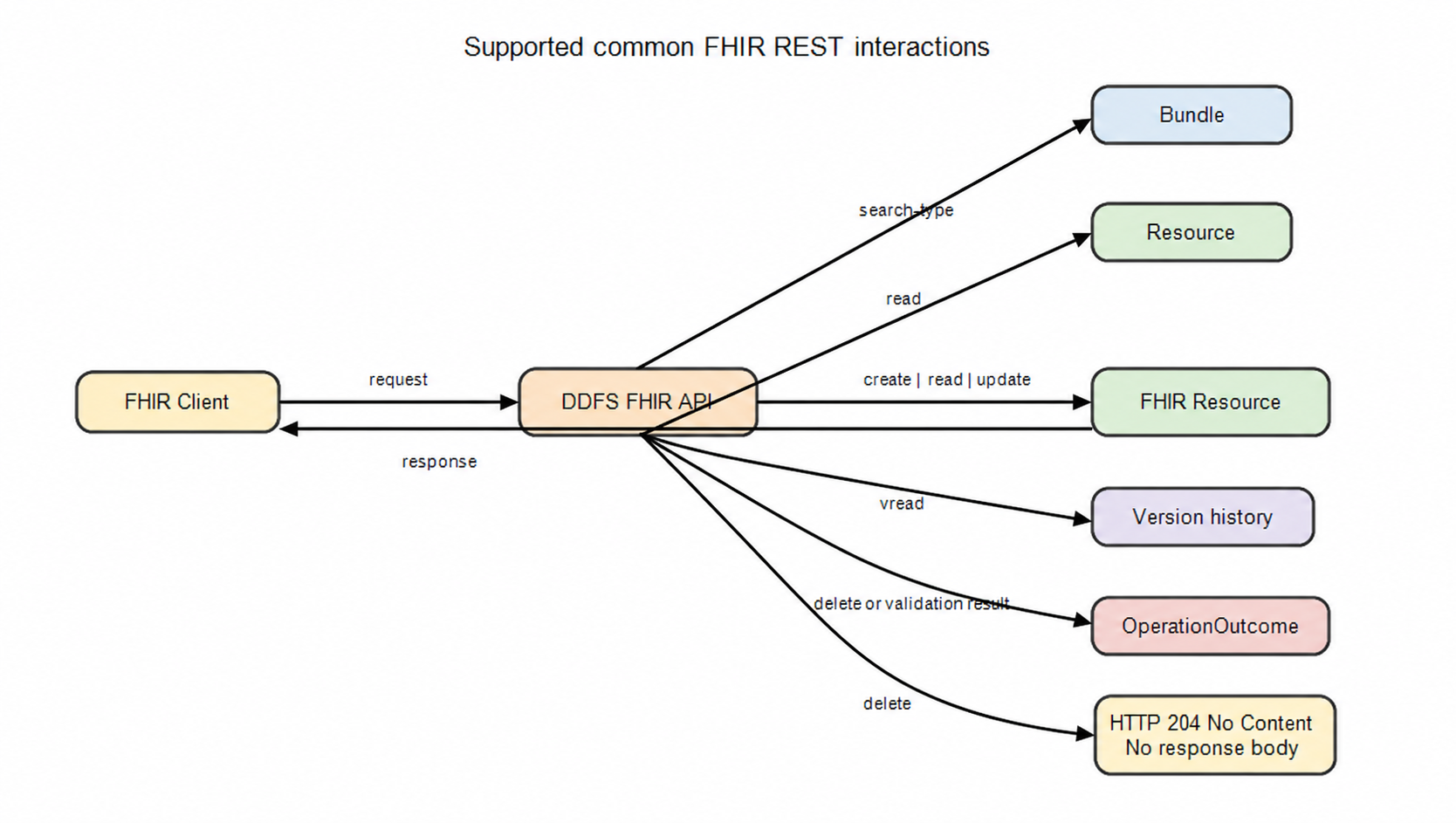
| Interaction | Endpoint pattern | Use |
|---|---|---|
| Search | GET /api/fhir/{r4|r6-ballot4}/{Resource} |
Find resources using supported search parameters. |
| Create | POST /api/fhir/{r4|r6-ballot4}/{Resource} |
Create one resource instance. |
| Read | GET /api/fhir/{r4|r6-ballot4}/{Resource}/{rid} |
Retrieve one resource instance by logical id. |
| Versioned read | GET /api/fhir/{r4|r6-ballot4}/{Resource}/{rid}/_history/{vid} |
Retrieve a specific resource version. |
| Update | PUT /api/fhir/{r4|r6-ballot4}/{Resource}/{rid} |
Replace one resource instance. |
| Delete | DELETE /api/fhir/{r4|r6-ballot4}/{Resource}/{rid} |
Logically delete one resource instance. |
Resource Lifecycle
Use create and update interactions to store resource versions. Use read, versioned read, and search interactions to retrieve resources. Delete performs a logical delete. Use administrative delete operations only when permanent removal is required and authorized for your workflow.
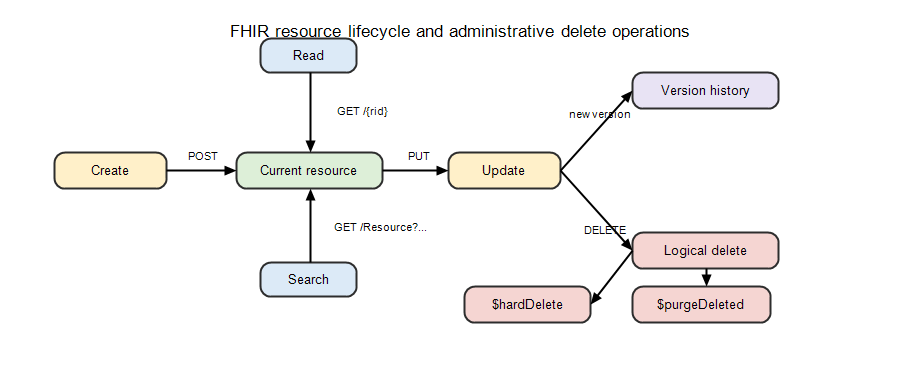
For administrative delete details, see FHIR conformance statement and Data deletion and purge operations.
R6 Subscription Setup
For R6 subscription workflows, configure the Subscription and related SubscriptionTopic resources, validate the receiver HTTPS endpoint, and store outbound authorization values in OCI Vault when authenticated notification delivery is required.
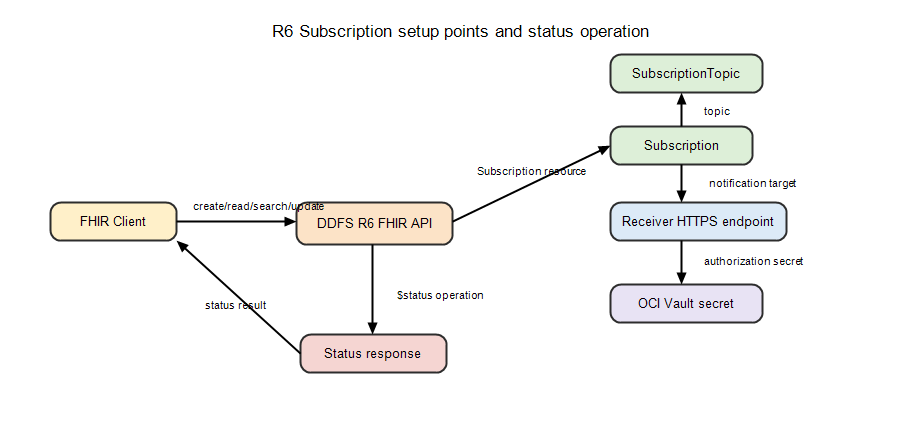
For the resource model and examples, see Subscription, SubscriptionTopic, Subscription Status, and FHIR R6 Subscription OCI Vault Secret Extension.
Validation Checklist
- Confirm the DDFS instance endpoint resolves and uses the expected FHIR version path.
- Fetch the live
/metadataresponse and compare it to the published capability statement file for the same FHIR version. - Configure and activate the client application in OCI Identity Domains, grant the DDFS OAuth scopes required for the intended FHIR interactions, and obtain an access token. OCI IAM permissions for managing instances and work requests are separate from FHIR OAuth authorization. The metadata endpoints do not require an access token.
- Run a read-only request first, such as metadata, read, or search, before testing create, update, delete, or administrative delete operations.
- Validate request and response media types by using
application/fhir+json.