Maintain Failure Setups Using WebADI
Users can maintain failure setups in Oracle Enterprise Asset Management (EAM) using the WebADI (Web Applications Desktop Integrator) to leverage the convenience of spreadsheet-based batch uploads, streamlining the management of failure codes and related configurations.
By using this feature, organizations can increase productivity, reduce data entry errors, and improve agility in responding to changes or new requirements in asset failure management. Bulk edits and updates are especially valuable for organizations managing extensive asset fleets or frequent changes to failure recording practices.
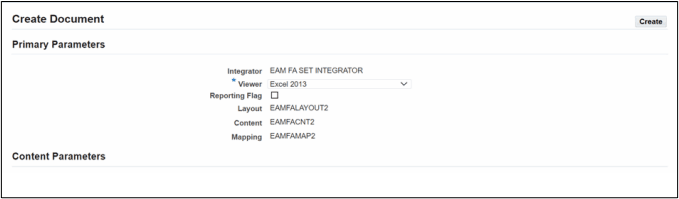
Create Document page to create the WebADI template
Steps to enable and configure
- Perform the required failure setup information.
- Install and configure WebADI if not already available.
Tips and considerations
- Navigate to Maintenance Super User, Failure Analysis, Failure Tracking, Setup, Failure Setup Web ADI, Create Document to create the WebADI template.
- Review the structure of the EAM failure setup template, as customized fields may require attention.
- Ensure that users have appropriate security privileges to access WebADI and perform uploads.
- Prepare and validate data in the spreadsheet template for completeness and accuracy, and execute the upload using the WebADI interface.
Key resources
- Oracle Enterprise Asset Management Implementation Guide
- Setting Up (chapter)
- Oracle Enterprise Asset Management User’s Guide
- Failure Analysis (chapter)