Request Additional Materials for Operations
Technicians can request additional materials for operations from Mobile Maintenance. This helps capture material needs discovered during execution without leaving the mobile workflow. The request flow improves communication between field technicians, planners, and inventory teams when planned material requirements are not sufficient.
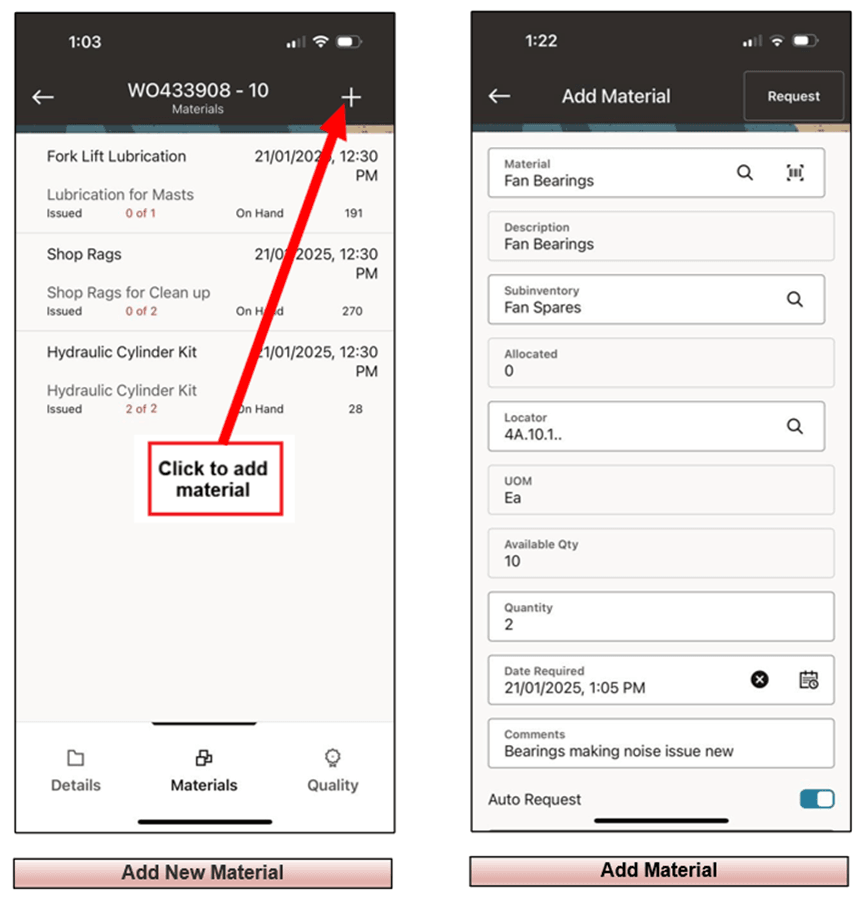
Add material at an operation.
Steps to enable and configure
- Confirm that operation material requirements and mobile material issue setup are enabled for the maintenance organization.
- Review item, subinventory, locator, and security setup for the materials that technicians can request.
- Open the operation in the mobile app and use the material request or issue flow to request the additional item.
- Submit the request and verify that the material requirement or transaction is visible for follow-up in Oracle E-Business Suite.
Tips and considerations
- Use clear item descriptions and units of measure so technicians can select the correct material quickly.
- Coordinate request approval or review responsibilities with storeroom and planning teams.
- Monitor additional material requests to improve preventive maintenance bills of material over time.
Key resources
- My Oracle Support Knowledge Document KB858915, Oracle Mobile Maintenance for Oracle E-Business Suite Release Notes
- Oracle E-Business Suite Mobile Apps Administrator's Guide
- Oracle Inventory User's Guide
- Oracle Enterprise Asset Management Implementation Guide
- Setting Up (chapter)
- Oracle Enterprise Asset Management User's Guide