Add Materials Not in BOM for Operations
Use this feature to add materials that are not already included in the operation bill of material (BOM). This supports unplanned material needs while keeping the material activity associated with the operation. The enhancement reduces delays when field conditions require different parts or consumables than originally planned.
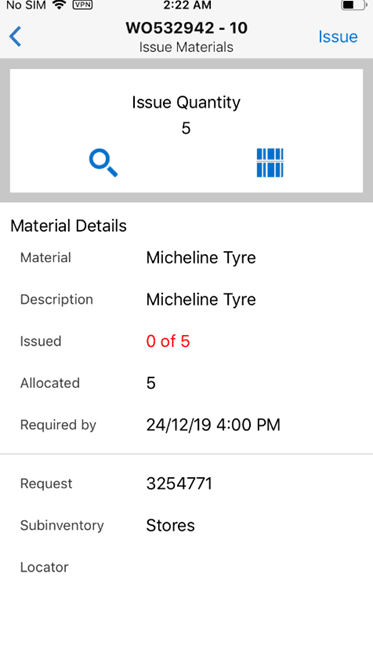
Issue Materials
Steps to enable and configure
- Confirm that users have permission to add or request materials outside the planned BOM.
- Validate item availability and transaction setup for materials that may be added from the mobile app.
- Open the operation material flow and search for the item that is not currently in the operations BOM.
- Add the material, enter the required quantity and source details, then submit and verify the transaction or requirement.
Tips and considerations
- Define scenarios detailing where technicians may add unplanned materials versus requesting planner review.
- Review frequently added items and update standard bills of material where appropriate.
- Test serial, lot, and locator-controlled items before enabling broad use.
Key resources
- My Oracle Support Document KB858915, Oracle Mobile Maintenance for Oracle E-Business Suite Release Notes
- Oracle E-Business Suite Mobile Apps Administrator's Guide
- Oracle Enterprise Asset Management Implementation Guide
- Setting Up (chapter)
- Oracle Enterprise Asset Management User's Guide
- Oracle Inventory User's Guide