Auto-Allocate Serial Numbers to Work Orders
Use Mobile Maintenance to auto-allocate serial numbers to work orders during the material issue process. This feature streamlines the issue transactions for serial-controlled items when eligible serial inventory is available. The feature reduces manual serial selection effort and helps technicians complete material processing more efficiently.
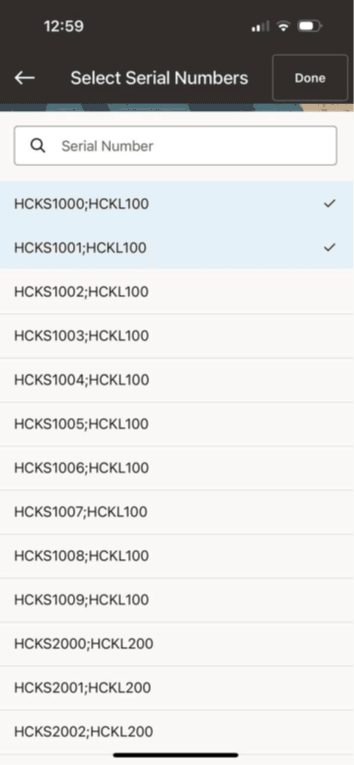
Auto-Allocate Serial Numbers
Steps to enable and configure
- Confirm item serial control, inventory availability, and allocation rules for the maintenance organization.
- Review mobile material issue setup for serial-controlled items.
- Open the material issue flow for a work order that requires a serial-controlled item.
- Issue the material and verify that serial numbers are allocated and recorded correctly on the work order transaction.
Tips and considerations
- Validate allocation behavior with common subinventory and locator combinations before production use.
- Train users on exception handling when available serial numbers are insufficient.
- Review serial traceability reports after pilot transactions to confirm compliance expectations are met.
Key resources
- My Oracle Support Document KB858915, Oracle Mobile Maintenance for Oracle E-Business Suite Release Notes
- Oracle E-Business Suite Mobile Apps Administrator's Guide
- Oracle Enterprise Asset Management Implementation Guide
- Setting Up (chapter)
- Oracle Enterprise Asset Management User's Guide
- Oracle Inventory User's Guide