Process Multiple Material Issues in Offline Mode
Technicians can process multiple material issue transactions while working in a disconnected (offline) mode. The transactions are held on the device and synchronized when connectivity is restored. This improves field productivity where technicians work in areas with intermittent or unavailable network access.
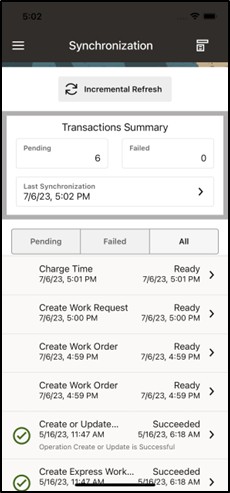
Viewing Disconnected (Offline) transactions before performing an Incremental Refresh.
Steps to enable and configure
- Enable and validate offline mode for the mobile users who issue materials in disconnected work areas.
- Synchronize required work order and material data before the user goes offline.
- Create multiple material issue transactions from the mobile app while in disconnected (offline) mode.
- Reconnect and synchronize the device.
- Verify that each material issue transaction is processed successfully.
Tips and considerations
- Train users to check pending and failed transaction queues after reconnecting.
- Use controlled pilot scenarios for serial, lot, and locator-controlled items before broad offline rollout.
- Align offline material issue rules with inventory reconciliation procedures.
Key resources
- My Oracle Support Knowledge Document KB858915, Oracle Mobile Maintenance for Oracle E-Business Suite Release Notes
- Oracle E-Business Suite Mobile Apps Administrator's Guide
- Oracle Inventory User's Guide
- Oracle Enterprise Asset Management Implementation Guide
- Setting Up (chapter)
- Oracle Enterprise Asset Management User's Guide