Create Work Requests from Menu
Mobile users can create work requests directly from the mobile menu. This makes request creation available even when the user is not already viewing a specific asset or work order. The enhancement helps field users report new work quickly from the main mobile navigation experience.
Note. The Create Work Request action can be personalized.
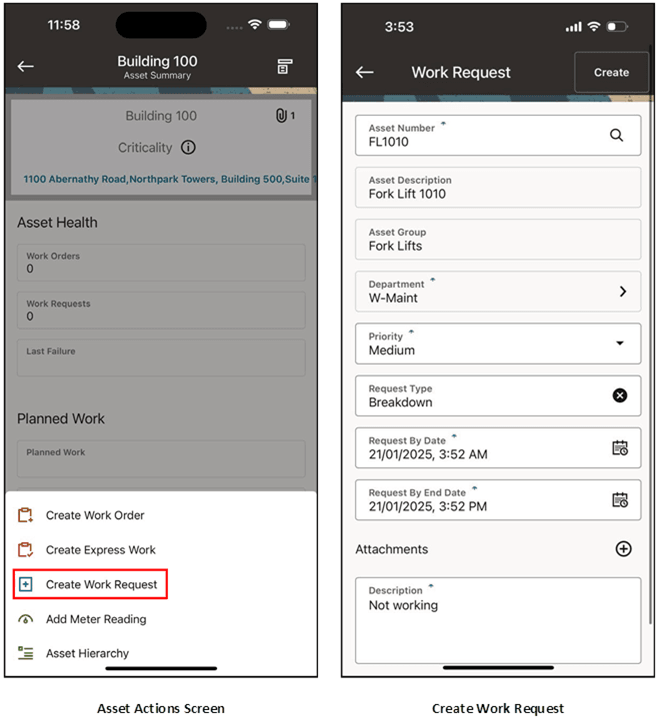
Creating a work request.
Steps to enable and configure
- Confirm that the mobile responsibility has access to create work requests.
- Review required work request fields, statuses, request types, priorities, and attachments setup.
- Open the mobile menu and select Create Work Request.
- Enter the request details, submit the work request, and verify that it is available for review.
Tips and considerations
- Keep required fields easily identifiable so that users can create work requests quickly from the field.
- Use attachments to capture supporting photos or text when they clarify the issue.
- Monitor menu-created work requests for duplicates during early adoption.
Key resources
- My Oracle Support Document KB858915, Oracle Mobile Maintenance for Oracle E-Business Suite Release Notes
- Oracle E-Business Suite Mobile Apps Administrator's Guide
- Oracle Enterprise Asset Management Implementation Guide
- Setting Up (chapter)
- Oracle Enterprise Asset Management User's Guide