Create Follow-up Work Orders
Create follow-up work orders from Mobile Maintenance when additional work is discovered during execution or completion to keep the discovered work connected to the field event that identified it. The feature supports faster capture of follow-up maintenance needs and improves traceability for supervisors reviewing related work.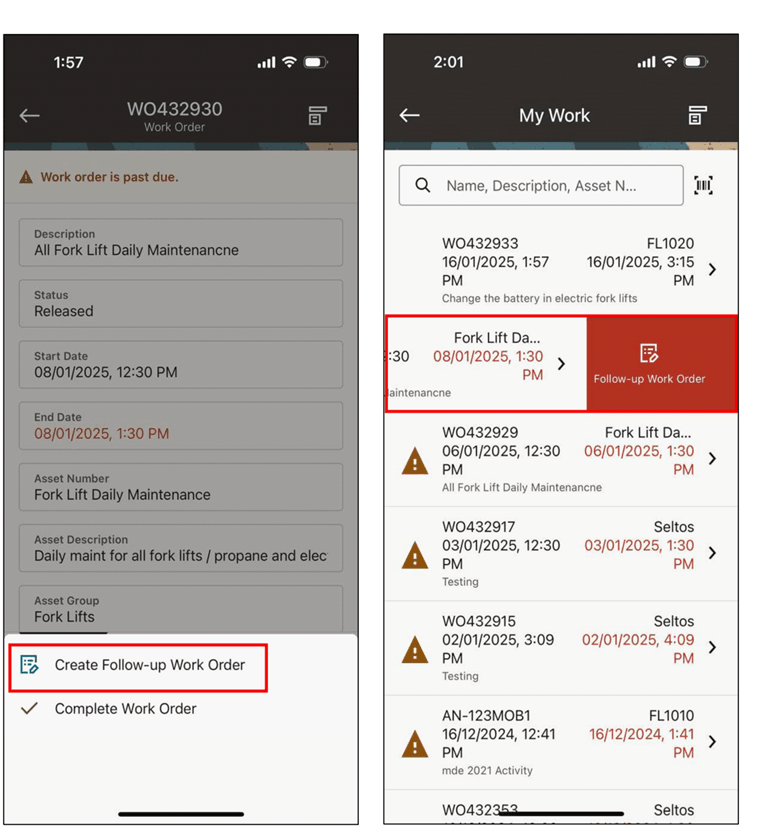
Creating a follow-up work order.
Steps to enable and configure
- Confirm that users have the required security to create work orders from the mobile app.
- Review work order type, status, and numbering setup used for follow-up work.
- Open the applicable work order or completion flow on the mobile device and choose the follow-up work order action.
- Enter the follow-up details, submit the work order, and verify that the related work order is visible in Oracle E-Business Suite.
Tips and considerations
- Use clear naming and descriptions so follow-up work can be reviewed and planned quickly.
- Train technicians on when to create a follow-up work order versus adding completion comments.
- Review supervisor dashboards or work lists for newly created follow-up work so items do not remain unplanned.
Key resources
- My Oracle Support Document KB858915, Oracle Mobile Maintenance for Oracle E-Business Suite Release Notes
- Oracle E-Business Suite Mobile Apps Administrator's Guide
- Oracle Enterprise Asset Management Implementation Guide
- Setting Up (chapter)
- Oracle Enterprise Asset Management User's Guide