Record Work Order Completion Comments up to 2000 Characters
Technicians can enter work order completion comments up to 2000 characters from the mobile app. Longer comments allow more complete repair notes, observations, and closure details to be captured during work completion. The additional comment capacity is useful for regulated maintenance processes, detailed troubleshooting, or handoff notes for supervisors and planners.
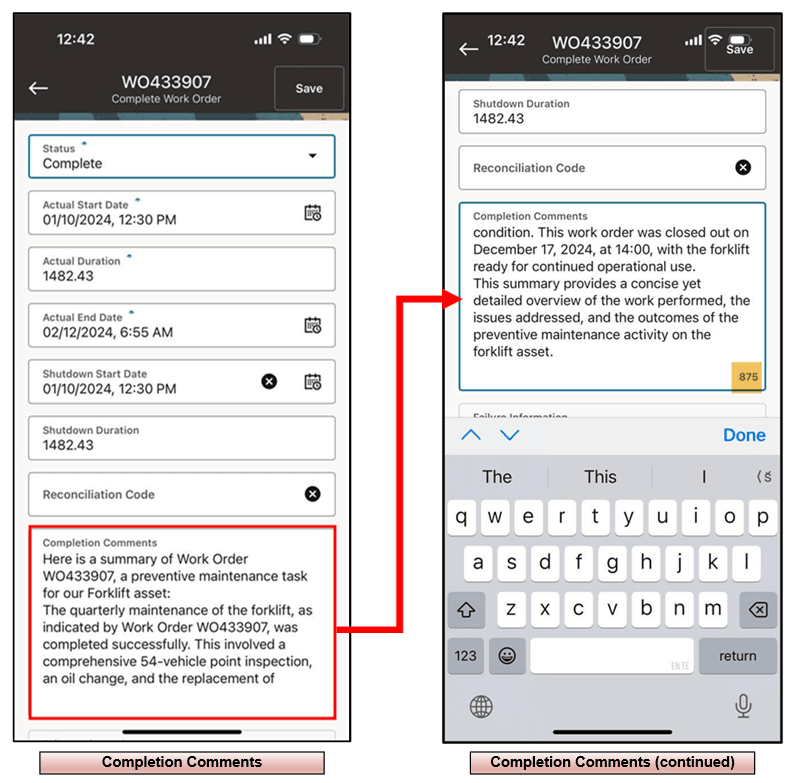
Steps to enable and configure
- Review reconciliation code setup and confirm that descriptions are meaningful for mobile users.
- Open a work order completion flow that requires a reconciliation code.
- Use the reconciliation code list of values and confirm that descriptions display with the available codes.
- Complete the work order and verify that the selected reconciliation code is recorded correctly.
Tips and considerations
- Keep reconciliation descriptions business-friendly so technicians can select values without needing a code sheet.
- Review older or duplicate codes before enabling mobile users to select from a broad list.
- Include reconciliation LOV validation in completion-flow testing.
Key resources
- My Oracle Support Knowledge Document KB858915, Oracle Mobile Maintenance for Oracle E-Business Suite Release Notes
- Oracle E-Business Suite Mobile Apps Administrator's Guide
- Oracle Enterprise Asset Management Implementation Guide
- Setting Up (chapter)
- Oracle Enterprise Asset Management User's Guide