Enter Collection Plan Results for Assets on Asset Route
Enter collection plan results for assets on an asset route at the work order or operation level. Technicians can record inspection or quality-related results while completing route-based maintenance work. This enhancement brings collection plan data capture closer to the field activity and reduces the need to enter data on a desktop at a later time.
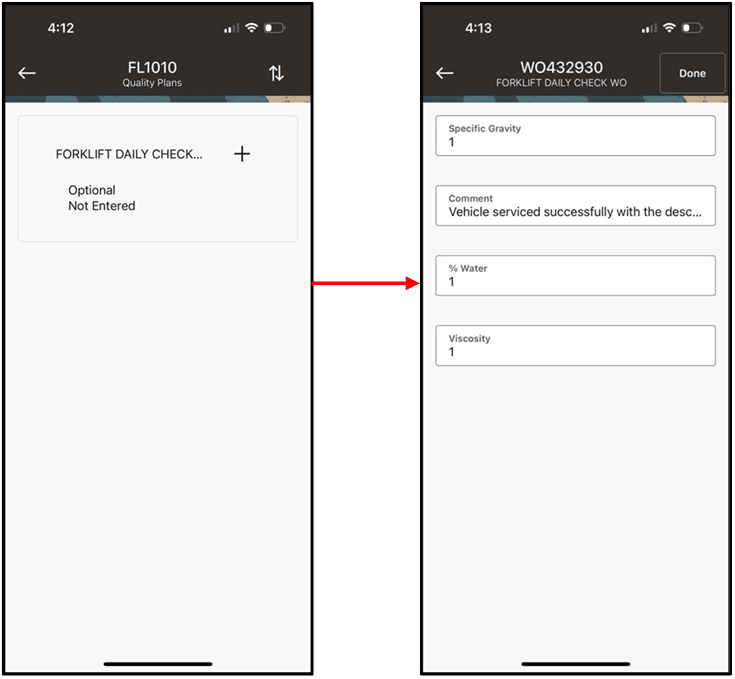
Asset Route Collection Plans
Steps to enable and configure
- Define the applicable asset routes and associate the assets that require route-based inspection or maintenance.
- Configure the Oracle Quality collection plans and associate them with the maintenance flow used for the asset route.
- Synchronize the mobile app and open the route or operation that includes the asset collection plan.
- Enter the collection plan results on the mobile device and confirm that the results are available in Oracle E-Business Suite.
Tips and considerations
- Keep collection plan prompts short and action-oriented for technicians using handheld devices.
- Validate mandatory quality results before enabling route-based work for disconnected (offline) use.
- Coordinate collection plan result actions with maintenance supervisors so exceptions are routed correctly.
Key resources
- My Oracle Support Document KB858915, Oracle Mobile Maintenance for Oracle E-Business Suite Release Notes
- Oracle E-Business Suite Mobile Apps Administrator's Guide
- Oracle Quality User's Guide
- Oracle Enterprise Asset Management Implementation Guide
- Setting Up (chapter)
- Oracle Enterprise Asset Management User's Guide
- EAM Work Management (chapter)
- EAM Quality (chapter)
- Maintenance Super User (chapter)