View Asset Hierarchy for Asset and Perform Asset Actions
View the asset hierarchy for an asset and perform available asset actions from the Mobile Maintenance app. This feature enables technicians to understand parent and child asset relationships while they are already working in the field. The feature improves navigation from an asset to related work, and supports better context when deciding whether to create work, record meter readings, or review related asset information.
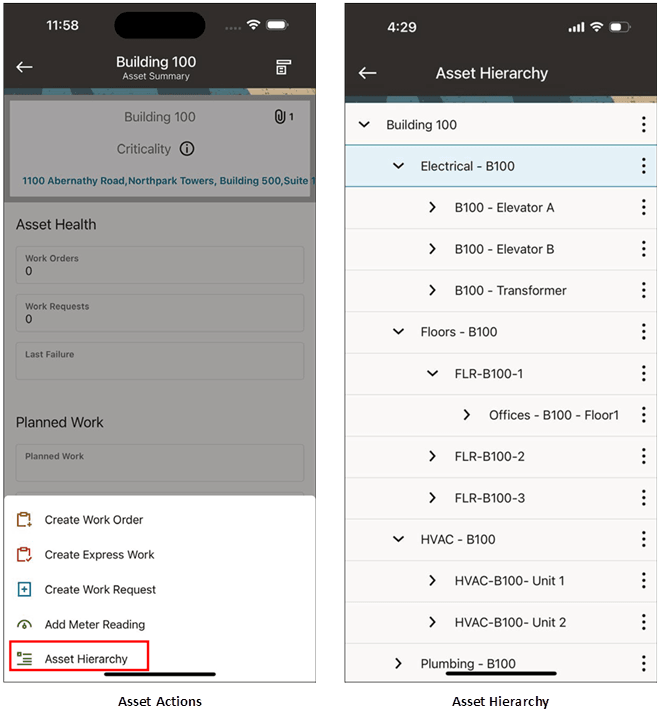
View Asset Hierarchy
Steps to enable and configure
- Confirm that asset hierarchy relationships are defined and active in Oracle Enterprise Asset Management.
- Verify that the mobile user has access to the target assets and the asset actions used by your maintenance process.
- Synchronize the mobile app and open the Asset Summary page for an asset in the hierarchy.
- Use the hierarchy and asset action options to navigate related assets and start the appropriate action.
Tips and considerations
- Review and update hierarchy structures regularly mobile users have access to current valid relationships.
- Validate common asset actions for both online and disconnected (offline) scenarios where applicable.
- Use the hierarchy view to support troubleshooting on complex equipment with related components.
Key resources
- My Oracle Support Document KB858915, Oracle Mobile Maintenance for Oracle E-Business Suite Release Notes
- Oracle E-Business Suite Mobile Apps Administrator's Guide
- Oracle Enterprise Asset Management Implementation Guide
- Setting Up (chapter)
- Oracle Enterprise Asset Management User's Guide