Manage Worklist Notifications
Manage worklist notifications in connected (online) mode, and review notification items from the mobile experience when connected. This brings workflow-driven maintenance actions closer to the technician or supervisor without requiring a separate desktop session for every notification review.
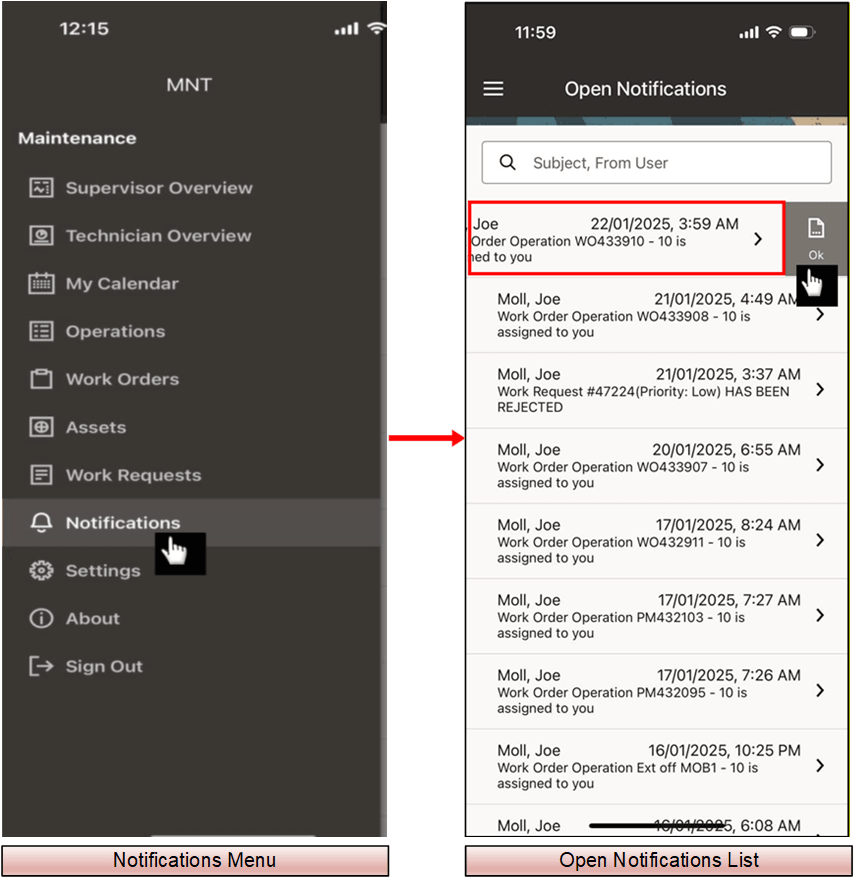
Worklist Notifications for Work Order Operations
Steps to enable and configure
- Confirm workflow notification setup and user responsibilities for the notifications that should be available to mobile users.
- Ensure that the user is online and signed in with a responsibility that can access notifications.
- Open the mobile notification or worklist entry point and review the notification details.
- Take the supported action.
- Verify that the notification status is updated in Oracle E-Business Suite.
Tips and considerations
- Use mobile notifications for actions that fit a mobile decision flow.
- Keep notification subject lines clear because mobile screens have limited space.
- Review notification security so users see only the workflow items they are expected to act on.
Key resources
- My Oracle Support Knowledge Document KB858915, Oracle Mobile Maintenance for Oracle E-Business Suite Release Notes
- Oracle E-Business Suite Mobile Apps Administrator's Guide
- Oracle Workflow User's Guide
- Oracle Enterprise Asset Management Implementation Guide
- Setting Up (chapter)
- Oracle Enterprise Asset Management User's Guide