Analyze Balances by Cost Center Hierarchy in Balances Dashboard
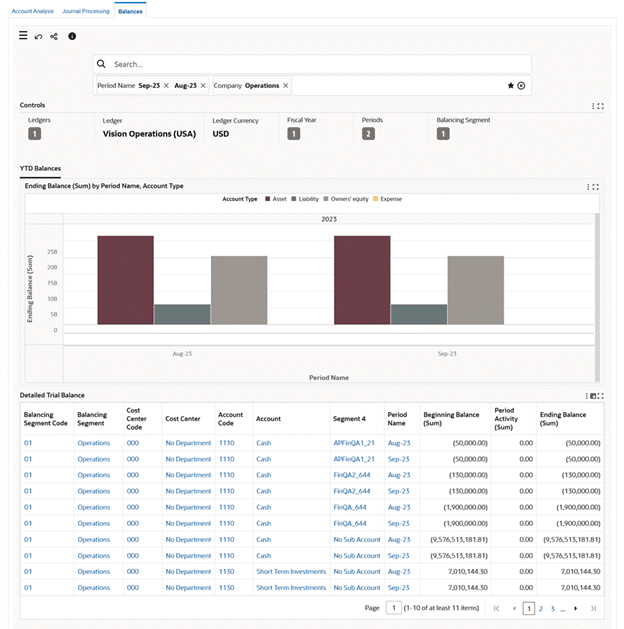
This enhancement applies cost center hierarchy analysis to the Balances Dashboard so users can review year-to-date balances using cost center hierarchy rollups. It supports balance review at both summary and detail levels.
- Review accounts at different levels of the cost center hierarchy.
- Review year-to-date (YTD) balance breakdown by cost center hierarchy.
The enhancement requires Oracle Enterprise Command Center Framework Release 12.2 V12. It uses the accounting flexfield hierarchy setup and the FND: KFF hierarchy Level for ECC profile option.
Steps to enable and configure
- Confirm Oracle Enterprise Command Center Framework Release 12.2 V12 or later.
- Validate cost center hierarchy setup for the accounting flexfield.
- Set or review the FND: KFF hierarchy Level for ECC profile option.
- Run or refresh the Balances Dashboard data load after setup or hierarchy changes.
- Validate YTD balances at parent and child cost center levels.
Tips and considerations
- Use hierarchy views to compare departments or cost centers without manually assembling rollups outside General Ledger.
- Confirm that hierarchy changes are approved before refreshing dashboard data for close reporting.
- Pair balance hierarchy analysis with Account Analysis when users need journal-level activity behind a balance.
Key resources
Oracle General Ledger User's Guide
Oracle General Ledger Implementation Guide
Transfer of Information
R12.2.13+ TOI: Implement and Use General Ledger - Oracle General Ledger Command Center
Access requirements