Cash Application Dashboard
The Cash Application Dashboard helps Receivables professionals monitor and match unapplied cash receipts with outstanding invoices.
The dashboard gives visibility into aged unapplied receipts, open balances, candidate invoices, receipt activity, and application context. It helps cash application users prioritize overdue payments and reconcile unapplied receipts with open customer balances.
Use the Cash Application dashboard to:
- Gain insight into the cash payments of customers.
- Use filters to focus on specific customers.
- Focus on key customers with high open balances and those who require immediate attention.
- Review critical cash application metrics.
- View the total number of unapplied receipts and amount.
- View the total number of open transactions and amount.
- Prioritize aged receipts to avoid delays in applying payments and recognize revenue.
- Identify unmatched and unapplied transactions quickly.
- Drill down to the receipt details for review.
- Resolve unmatched transactions by applying cash receipts to outstanding transactions.
- Apply incoming payments to the correct customer accounts and receivable invoices using the Find Matches feature.
- Apply all or part of a receipt to a single item or several debit items (one-to-one or one-to-many).
- Apply receipts to invoices, debit memos, or deposits.
- Apply a receipt in one currency to one or more transactions in different currencies (cross-currency receipt).
Cash Application Dashboard
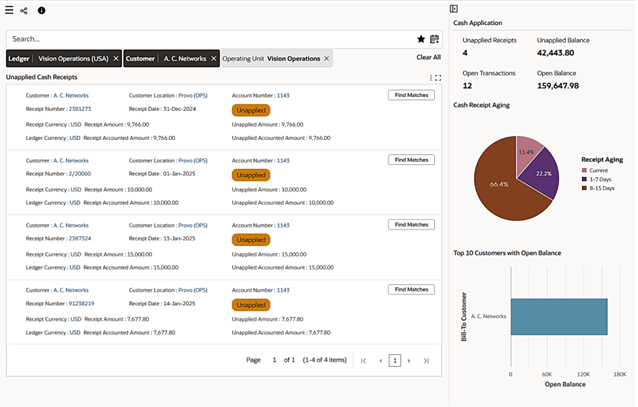
Cash Application Summary
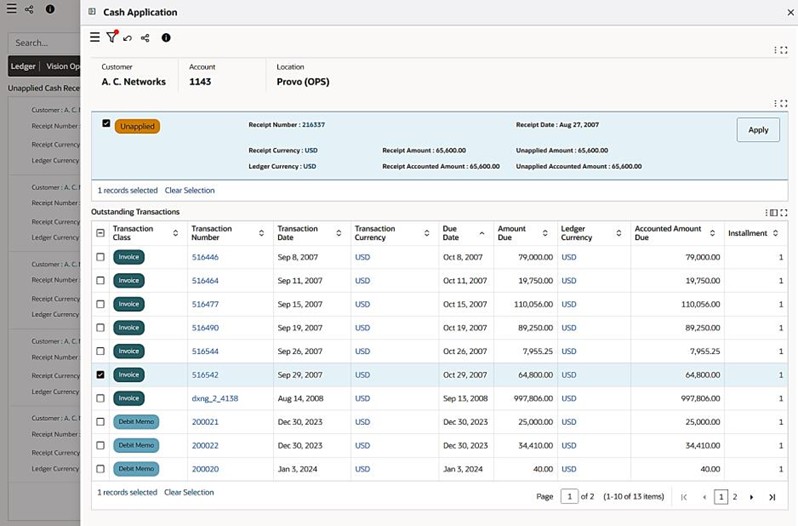
Steps to enable and configure
- Apply the Receivables Command Center update for the feature release and confirm Oracle Enterprise Command Center Framework Release 12.2 V14 is installed and enabled.
- Grant the appropriate Receivables Command Center menus, responsibilities, function security, and data access to the users who will review the dashboard.
- Run the Receivables Command Center initial data load for the applicable data set, then schedule incremental refreshes that match the business review cycle.
- Validate dashboard results, refinements, drilldowns, and navigation paths with representative Receivables users before broad rollout.
- Confirm receipt, unapplied cash, open invoice, customer, and application history data are loaded for the Cash Application Dashboard.
- Validate matching, receipt detail, invoice detail, and activity drilldowns with cash application users.
Tips and considerations
- Use aged unapplied receipt metrics to prioritize cash that has been waiting longest for application.
- Pair dashboard filters with customer and receipt attributes to narrow candidate invoice matches. Validate receipt-to-invoice matching examples before training so users see realistic scenarios.
Key resources
Oracle Receivables Implementation Guide
Oracle Receivables User Guide
Transfer of Information