Drill Down into Journal Errors for Invalid Accounting Events in Period Close Dashboard
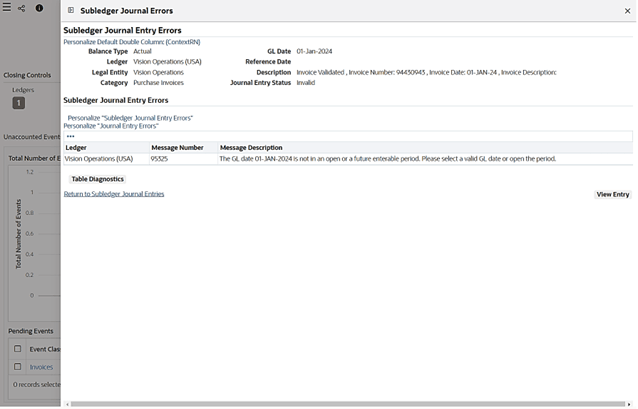
Period Close Dashboard users can drill into journal errors for invalid accounting events. You can drill down to the source transaction to investigate the unaccounted transactions (receipts or invoices). Also, drill down to subledger journal lines and journal errors.
This enhancement gives close users a more direct path from invalid accounting events to the underlying error information needed for resolution. It reduces the need to leave the dashboard and manually search for the associated journal or accounting error.
This enhancement gives close users a more direct path from invalid accounting events to the underlying error information needed for resolution. It reduces the need to leave the dashboard and manually search for the associated journal or accounting error.
Monitor Close Process
- Gain visibility into all subledger accounting events.
- Select the accounting period.
- Drill into draft accounting events.
- Drill into subledger journal.
- Review journal.
- Check accounting errors.
- Drill into journal error.
Pending Accounting Events - Subledger Journal Errors Drilldown
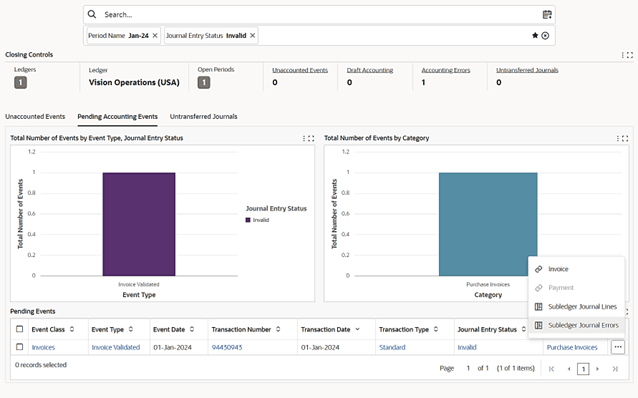
To review subledger journal errors for a pending event, click Subledger Journal Errors. The Subledger Journal Entry Errors page opens in the Subledger Journal Errors drawer. Review the ledger and line errors on this page.
Subledger Journal Errors
Steps to enable and configure
- Apply the Receivables Command Center update for the feature release and confirm Oracle Enterprise Command Center Framework Release 12.2 V12 is installed and enabled.
- Grant the appropriate Receivables Command Center menus, responsibilities, function security, and data access to the users who will review the dashboard.
- Run the Receivables Command Center initial data load for the applicable data set, then schedule incremental refreshes that match the business review cycle.
- Validate dashboard results, refinements, drilldowns, and navigation paths with representative Receivables users before broad rollout.
- Confirm users have the Subledger Accounting and General Ledger access needed to review journal errors and correct invalid accounting events.
Tips and considerations
- Use this drilldown during close exception review so users can move from invalid event counts directly to error detail.
- Error review still depends on the underlying accounting setup and source transaction correction process.
Key resources
Oracle Receivables Implementation Guide
Oracle Receivables User Guide
Transfer of Information
R12.2.13+ TOI: Implement and Use Receivables - Oracle Receivables Command Center - Period Close Dashboard