Route Timed-Out Approvals to Surrogate Approvers Using Approval Management (AME)
HR Self-Service workflow transactions now support enhanced surrogate approver capabilities using Oracle Approvals Management Engine (AME). This enhancement enables organizations to automatically reroute workflow notifications to designated surrogate or alternate approvers when approval notifications time out, ensuring uninterrupted transaction processing and reducing workflow bottlenecks.
Organizations can now:
- Define business rules to assign surrogate approvers based on specific business conditions.
- Designate surrogate approvers using different approver types, including:
- HR employees
- Oracle Applications users (FND Users)
- HR positions
- Configure timeout rules and routing behavior for approval notifications.
- Set timeout durations for up to 20 levels of approvers.
- Ensure workflow transactions are processed in a timely manner through automatic escalation and reassignment logic.
Prior to this release, the supervisor of the current-level approver was automatically assigned as the surrogate approver when notifications timed out. If the highest-level approver in the approval hierarchy failed to respond within the timeout period, the workflow encountered an error because there was no higher-level approver available for escalation.
This enhancement is applicable to every transaction which uses the HRSSA transaction type. For HR Self-Service workflow transactions, use the Approvals Management Engine (AME) surrogate approval and timeout duration capabilities to direct transactions to a surrogate approver based on business conditions in the event there are notification timeouts. Use the pTimeOutRule parameter to configure timeout rules for surrogate approvers to ensure that notifications are processed (approved, rejected, or returned for resubmission) in a timely manner.
This enhancement improves workflow reliability and continuity by enabling organizations to configure flexible surrogate approval rules that automatically reroute transactions when approvals time out. It also reduces approval delays and workflow failures by ensuring that business transactions continue to move through the approval process even when approvers are unavailable or unresponsive.
Feature Description
To implement and use this feature, the following application components are delivered:
- AME: Enhanced Surrogate Approver: This profile option determines whether the enhanced surrogate approver feature is enabled. The profile values are Yes and No. The default value is blank, which is equal to No. For information about this profile option, refer to the "Implementing Surrogate Approver and Timeout Duration Features" topic in the Oracle Approvals Management Implementation Guide.
- Surrogate Approver subtab: This tab is the entry point from which you manage surrogate approver rules.
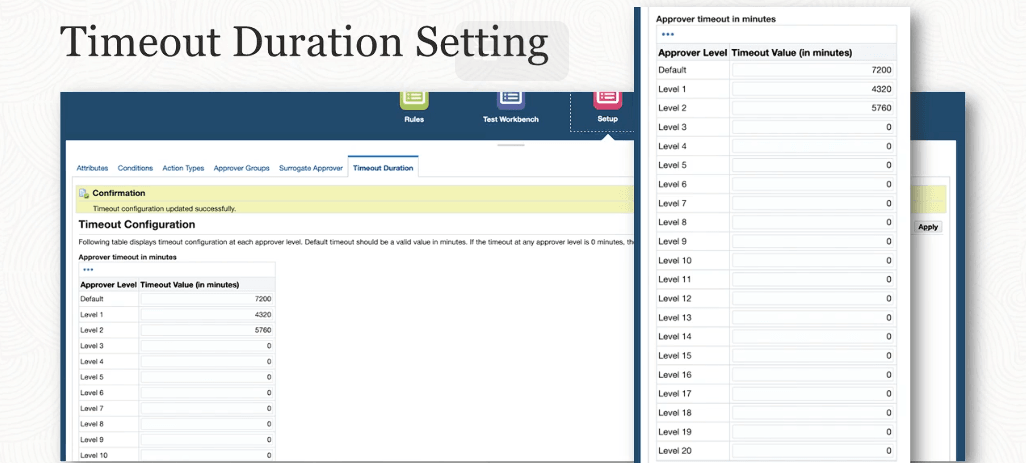
- Timeout Duration: Click this subtab to display the Timeout Configuration page.
- pTimeoutRule: The function parameter, pTimeoutRule, delivered for the Timeout Duration feature is used only in the HRSSA predefined workflow item type (HRSSA.wft). To use the Timeout Duration feature in any other product, you must modify the product’s corresponding transaction type, Workflow WFT, write, and implement the logic accordingly. For the required HRSSA functions, set the pTimeoutRule parameter to define the AME routing behavior for transactions in case of timeout. Refer to the "Configuring Function Parameters for Notification Timeout" topic in the Oracle Approvals Management Implementation Guide.
- Surrogate Approver Rules: This page displays active surrogate rules for the selected transaction type. You can search for a rule using the name of the rule or the start date of the rule. For each rule, you can view or update as required. This page provides a Create Rule button to create surrogate approver rules.
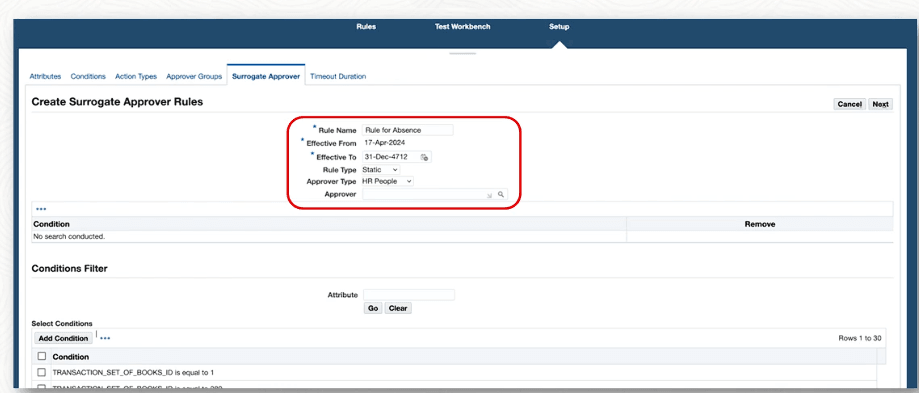
- Create Surrogate Approver Rules: Use this page to create rules for surrogate approvers.
- Update Surrogate Approver Rules: Use this page to update existing rules for surrogate approvers. For a rule on the Surrogate Approver Rules page, click the Update icon to navigate to the Update Surrogate Approver Rules page.
- Surrogate Rules Review: Use this page to review the details of the new rule.
- Rule Summary: To navigate to the Rule Summary page, click the View icon on the Surrogate Approver Rules page. This displays the rule details such as Rule Name, Effective To, Effective From, Rule Type, Approver, Approver Type, and Dynamic Procedure of the rule. The page also displays the conditions associated with the rule.
- Timeout Configuration: Use this page to configure the timeout interval for approval of transactions.
- Timeout Duration: Use this page to configure the timeout interval for approval of transactions.
Create Surrogate Approver Rules Page
Timeout Duration Page
Steps to enable and configure
Prerequisites:
- Before you implement the Surrogate Approver and Timeout Duration features, make sure that the following information is set up:
- Oracle Applications users with responsibilities
- HR employees
- Jobs
- Positions
- Configure the function parameter pTimeoutRule.
To implement the surrogate approver and timeout duration features, complete the following steps:
- Set the AME: Enhanced Surrogate Approver profile option.
- Create rules for surrogate approvers using the Create Surrogate Approver Rules page.
- Configure the timeout duration for approval of transactions.
- Save and validate the AME configuration.
- Test workflow transactions to confirm notifications are rerouted correctly upon timeout.
Tips and considerations
- Carefully design timeout and surrogate approval rules to align with organizational approval policies and escalation requirements.
- Ensure designated surrogate approvers have the necessary responsibilities and authority to process transactions.
- Review multi-level approval chains to avoid routing gaps or unintended escalation paths.
- Test timeout scenarios thoroughly in a non-production environment before enabling the feature in production.
- Schedule "Workflow Background Process" concurrent program with a higher frequency so that timed out notifications can be identified with less of a time lapse.
- Use appropriate timeout durations to balance timely processing with sufficient response time for approvers.
- This enhancement applies specifically to HR Self-Service workflow transactions using AME approval capabilities.
- Set the timeout durations at each level according to your business policy.
Key resources
Oracle HRMS Approvals Management Implementation Guide
- Topic: Introduction to Oracle Approvals Management
- Chapter: Implementing Oracle Approvals Management
- Topic: Implementing Surrogate Approver and Timeout Duration
- Topic: Configuring Function Parameters for Notification Timeout
- Chapter: Surrogate Approver
- Topic: Overview
- Topic: Creating a Surrogate Approver Rule
- Topic: Updating a Surrogate Approver Rule
- Chapter: Timeout Duration
- Topic: Configuring Timeout Duration
Transfer of Information
R12.2.14 TOI: Implement and Use Self-Service Human Resources - AME Surrogate Approver