Create or Use Existing Consolidation Group Name
Streamline the definition of pull sequences with the ability to create or select an existing consolidation group name in Oracle Electronic Kanban. This feature enables you to choose from a list of existing consolidation group names when setting up pull sequences in Kanban Setup, or to create one as needed. Additionally, you can select a consolidation group in the eKanban Consolidate Replenishment Orders concurrent program. Prior to Release 12.2.14, users had to manually track and input consolidation group names, which increased the risk of errors and inconsistencies.
This enhancement delivers value by simplifying the setup process and improving accuracy in Kanban replenishment order consolidation. It addresses the need for efficient supply chain coordination in industries requiring complex replenishment strategies, such as Discrete Manufacturing. Business use cases include grouping replenishment orders for multiple suppliers under a single consolidation group for streamlined processing. Implementation considerations involve ensuring users are familiar with the updated Kanban Setup interface and the concurrent program options to maximize the benefit of this feature.
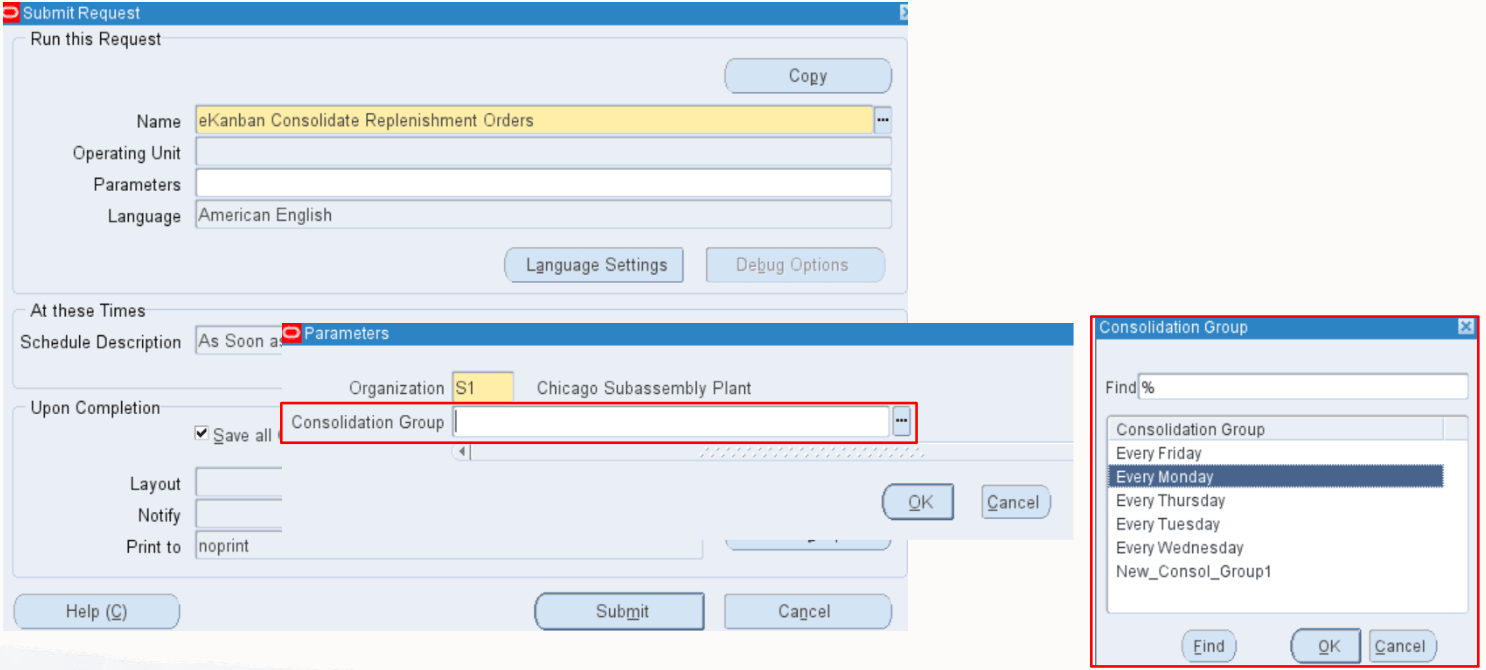
New Consolidation Group Parameter in eKanban Consolidate Replenishment Orders Concurrent Program
Steps to enable and configure
You don't need to do anything to enable this feature.
Tips and considerations
- Maintain a standardized list of consolidation group names to avoid duplication and ensure consistency across pull sequences.
- Utilize the ability to select existing groups to save time during setup, especially for recurring replenishment scenarios.
- Reuse consolidation group names created in an organization when defining pull sequences in other organizations.
Key resources
- Viewing and Editing Pull Sequences, Oracle Electronic Kanban User's Guide
- Electronic Kanban Concurrent Programs, Oracle Electronic Kanban User's Guide