Update Kanban Card Size for Temporary Cards
Adjust Kanban card sizes for temporary cards with flexibility using the new capabilities in Oracle Electronic Kanban. This feature allows planners to increase or decrease the Kanban size for temporary cards based on specific requirements, either through
- Kanban Setup page or
- “eKanban Import Kanban ” API
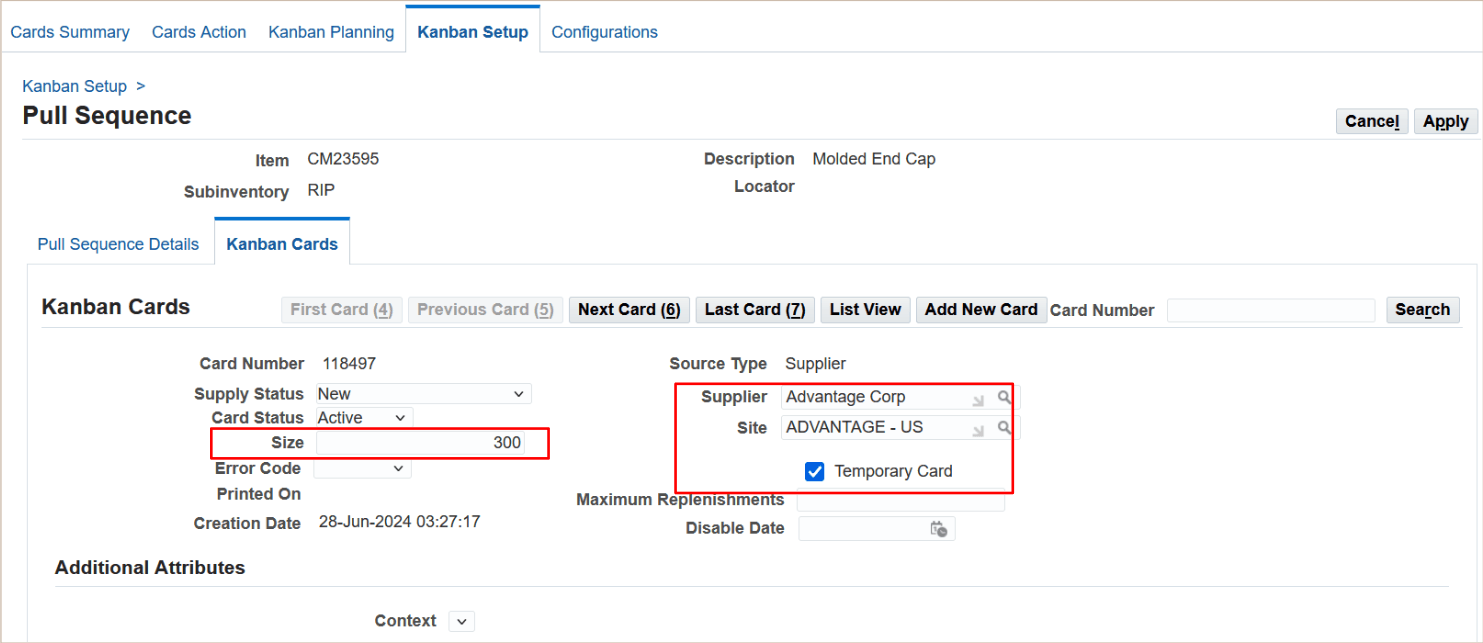
Kanban Setup Page
Before Release 12.2.14, the Kanban size for temporary cards was fixed and derived solely from the pull sequence setup, limiting adaptability to changing demands.
The business benefit of this enhancement lies in its ability to provide greater control over inventory levels during temporary or fluctuating demand scenarios. It supports dynamic inventory management, which is crucial in industries like Manufacturing where production needs can vary unpredictably. This addresses the need for agile supply chain responses, with use cases including scaling up card sizes during seasonal spikes or reducing them for short-term downturns. Implementation considerations include ensuring API integrations are tested for seamless updates and that planners are aware of how to access and modify temporary card sizes in the setup interface.
Steps to enable and configure
You don't need to do anything to enable this feature.
Tips and considerations
- Use APIs for bulk updates to temporary card sizes if managing multiple Kanban configurations simultaneously to save time.
- Ensure that changes to temporary card sizes align with overall inventory strategies to avoid overstocking or shortages.
- Train planners on accessing and updating sizes in the Kanban Setup to ensure smooth adoption of this feature.
Key resources
- Temporary Kanban Cards, Oracle Electronic Kanban User's Guide
- eKanban Import Kanban API, Oracle Integration Repository