Run Inventory Aging Report (XML) for Given Effective Date
Perform efficient inventory analysis by specifying the effective date when requesting the Inventory Aging Report (XML). Before Release 12.2.14, this report defaulted to the current date, restricting your ability to analyze inventory aging as of a past date without additional customization. With this enhancement, you can now set a specific date—such as yesterday—while running the report today, enabling more flexible and historical inventory assessments.
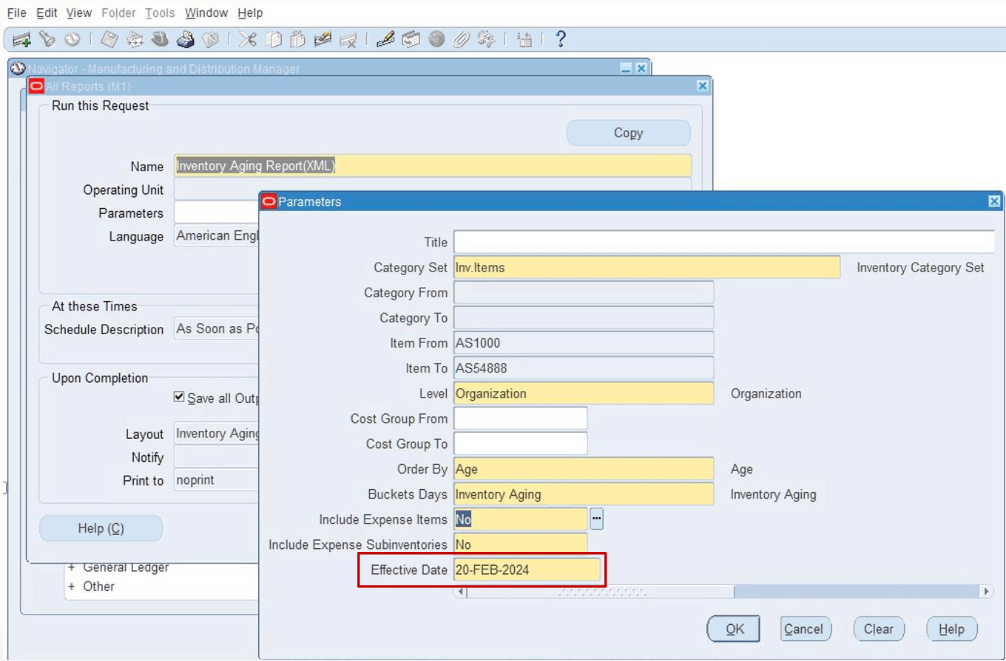
Inventory Aging Report XML
This capability addresses the need for accurate historical inventory analysis in industries where aging data impacts financial reporting, stock rotation policies, or obsolescence planning. It supports use cases such as evaluating inventory status for past financial periods, identifying slow-moving stock as of a specific date, and supporting audit requirements with date-specific data. The business value is in enhanced decision-making through precise inventory insights, reducing the risk of outdated or irrelevant data influencing strategic choices. Implementation considerations include ensuring that historical data is accessible and accurate for the selected effective dates.
Steps to enable and configure
You don't need to do anything to enable this feature.
Tips and considerations
- Verify the availability and accuracy of historical inventory data to ensure meaningful results when specifying past dates.
- Use this feature to align inventory aging reports with financial or operational review cycles for consistent analysis.
- Consider integrating date-specific reporting with inventory optimization strategies to address aging stock proactively.
Key resources
- Inventory Aging Report (XML), Oracle Inventory User’s Guide