Search for Reservations Using Customer Name and Account
Refine your reservation searches with the addition of Customer Name and Account as query criteria in the Find Reservations and Item Reservations windows. Prior to Release 12.2.14, reservation searches were limited to other parameters, making it challenging to locate reservations tied to specific customer data. This enhancement enables you to quickly identify reservations associated with particular customer profiles, improving order fulfillment tracking and inventory allocation precision.
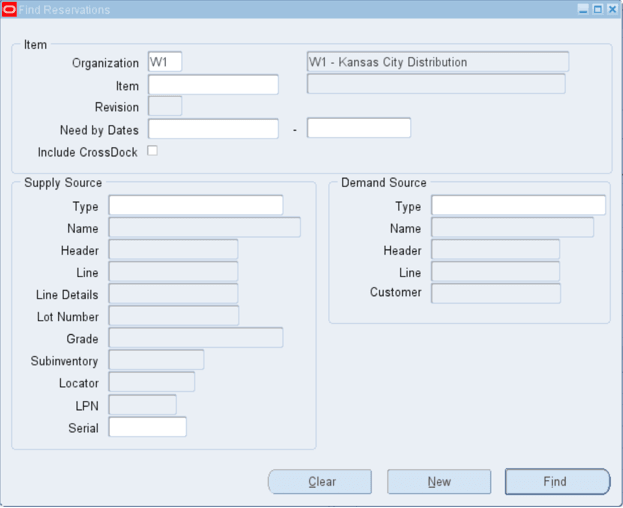
Find Reservations Window with New Customer Field
This feature caters to the need for customer-centric inventory management in industries where reservations are closely tied to customer orders or accounts. It supports use cases such as prioritizing inventory allocation for key accounts, troubleshooting reservation issues for specific customers, and enhancing visibility into customer-specific inventory commitments. The business value lies in better customer service through targeted reservation management and reduced time spent on manual searches. When implementing, consider how this search capability integrates with your customer relationship and order management processes for optimal results.
Steps to enable and configure
You don't need to do anything to enable this feature.
Tips and considerations
- Ensure that customer data is accurately maintained in the system to leverage these search criteria effectively.
- Use this feature in conjunction with customer service workflows to address reservation-related inquiries swiftly.
- Consider setting up automated alerts or reports using these search parameters to proactively manage customer reservations.
Key resources
- Creating Reservations, Oracle Inventory User’s Guide