Transaction Management Dashboard
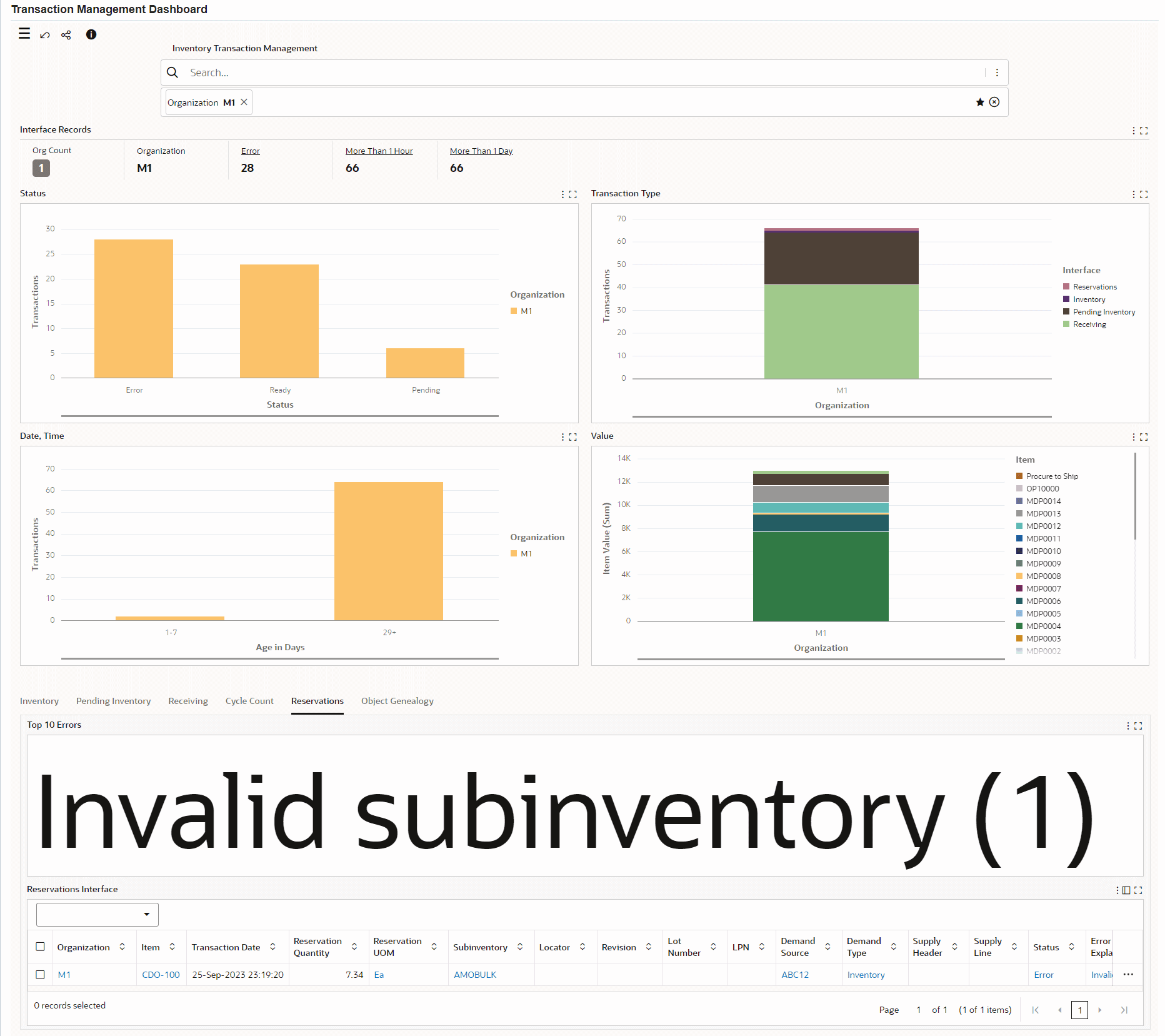
Monitor inventory transactions that have not completed successfully. The Transaction Management Dashboard gives visibility to transactions held by interface transaction processing applications because required data is undefined or inconsistent with current setup.
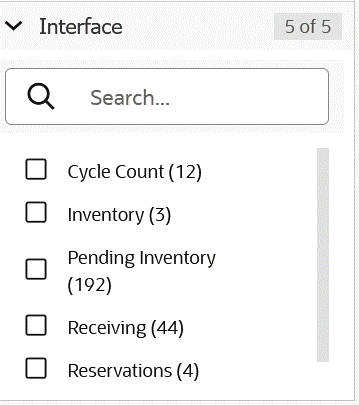
The Transaction Management Dashboard provides complete insight into the unprocessed transactions and transactions with errors in the following interfaces:
- Transaction Open Interface
- Pending Transactions
- Receiving Open Interface
- Cycle Count Open Interface
- Reservations Interface
- Object Genealogy Interface
Use the dashboard to:
- Review and examine transactions in an organization, by status, by transaction type, by age, or by an item value.
- Identify transactions that delay inventory material movement.
- Analyze reasons for errors.
- Drill down to view error details for transactions.
- Take corrective actions such as processing pending and unprocessed transactions.
- Correct errors by navigating to the underlying business processes in Oracle Inventory and resubmit records for processing. For example, you can update the item attributes using the Organization Items window or correct errors related to lots or transactions in the Item Lots window.
Transaction Management Dashboard
Interfaces
Steps to enable and configure
- Apply the Oracle Inventory Management Command Center update that delivers the Transaction Management Dashboard and confirm the required Oracle Enterprise Command Center Framework level is installed and enabled.
- Grant the Inventory Management Command Center pages, actions, function security, and data access to the Logistics users who will use the dashboard.
- Run the applicable Inventory Management Command Center data load as a full load for initial population, then schedule incremental refreshes that match the operational review cycle.
- To process and load data from Oracle E-Business Suite (EBS) to the Transaction Management Dashboard of the Inventory Management Command Center, run the concurrent program Inventory Transaction Management Data Load.
- Validate the dashboard metrics, refinements, result tables, and action links with representative organizations, subinventories, items, orders, and transactions.
- Confirm access to the transaction correction and resubmission pages for Transaction Open Interface, Pending Transactions, Receiving Open Interface, Cycle Count Open Interface, Reservations Interface, and Object Genealogy Interfaces.
- Validate a correction and resubmission path for representative errored transactions before using the dashboard operationally.
Tips and considerations
- Confirm that organization, subinventory, item, and responsibility security match the business audience for the dashboard before broad rollout.
- Use selected refinements and result-table drilldowns during testing so users can move from a summary metric to the transaction or setup page where action is taken.
- Use interface type and error refinements to route exceptions to the team that owns the correction.
- Resubmit transactions only after the underlying data or setup issue has been corrected.
- If the following descriptive flexfields are set up, then you can select the flexfield segments in the Available Refinements component:
- Transaction Interface
- Receiving Transactions Interface
- Cycle Count Entries Interface
- Reservations Interface
Key resources
Oracle Inventory User's Guide
Transfer of Information
R12.2.13 TOI: Implement and Use Inventory Management - Oracle Inventory Management Command Center - Transaction Management Dashboard