Replenishment Dashboard
Monitor and manage replenishment activity with the Replenishment Dashboard to optimize inventory levels and reduce stockout risk. The dashboard includes replenishment-enabled items for Min-Max Planning, Reorder Point, and Replenishment Counting.
The dashboard provides visibility into low-stock items, pending replenishments, and expected supply details such as purchase orders, work in process jobs, production batches, and move orders. Users can process move order transactions directly from the dashboard, improving responsiveness when replenishment action is needed.
Replenishment Dashboard
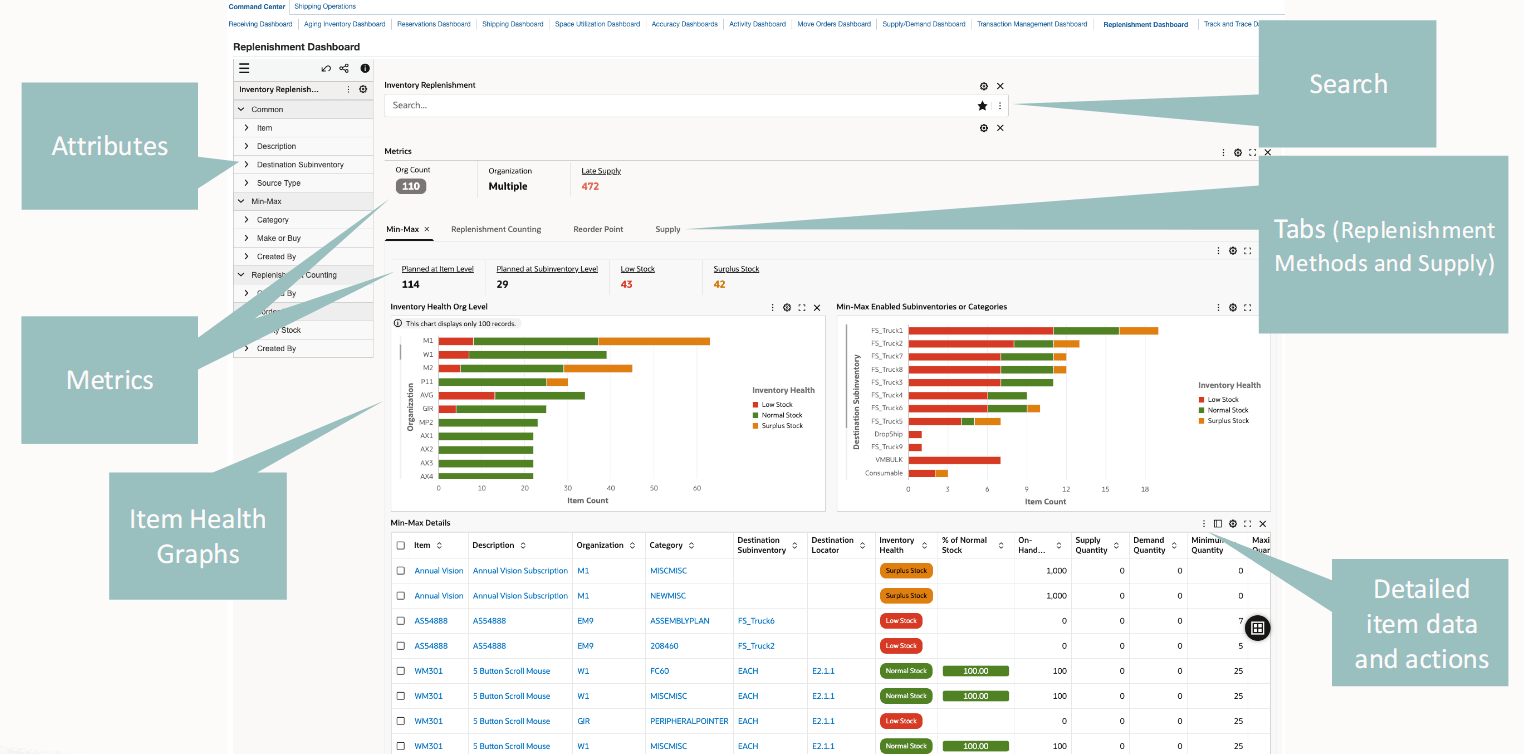
Use the dashboard to:
- Review inventory health of items that are tracked in the following replenishment processes:
- Min-max planning
- Reorder point planning
- Replenishment counting
- Prioritize low stock for replenishment and manage surplus stock for efficient min-max planning.
- Manage inventory replenishment by gaining insight into the replenishment count data for a source type.
- Process replenishment counts to create requisitions for items that need to be ordered or move orders for items to be replenished from a subinventory.
- Review the stock level for an item at a reorder point and analyze the stock status for each source type.
- Monitor supply information in the min-max, reorder point, and replenishment counting replenishment processes.
- Review late supply metric to proactively act on supply issues.
- Analyze the item's supply information.
- Track the supply quantity at each supply status.
Steps to enable and configure
- Apply the Oracle Inventory Management Command Center update that delivers the Replenishment Dashboard and confirm the required Oracle Enterprise Command Center Framework level is installed and enabled.
- Grant the Inventory Management Command Center pages, actions, function security, and data access to the Logistics users who will use the dashboard.
- To process and load data from Oracle E-Business Suite (EBS) to the ECC data store for the Replenishment Dashboard, run the concurrent program Inventory Replenishment Data Load.
- Validate the dashboard metrics, refinements, result tables, and action links with representative organizations, subinventories, items, orders, and transactions.
- Confirm replenishment-enabled items and replenishment methods for Min-Max Planning, Reorder Point, and Replenishment Counting.
- Validate expected supply from purchase orders, work in process jobs, production batches, and move orders.
- Confirm that users can process move order transactions directly from the dashboard.
Tips and considerations
- Confirm that organization, subinventory, item, and responsibility security match the business audience for the dashboard before broad rollout.
- Use selected refinements and result-table drilldowns during testing so users can move from a summary metric to the transaction or setup page where action is taken.
- Use low-stock and pending replenishment refinements together to separate supply that is already in motion from supply that still requires action.
- Review move order processing security before rollout so users can complete replenishment actions from the dashboard.
Key resources
Oracle Inventory User's Guide
Transfer of Information
R12.2.14+ TOI: Implement and Use Inventory Management - Oracle Inventory Management Command Center - Replenishment Dashboard