Print Job Traveler for Multiple Work Orders
You can now print the Job Traveler for multiple work orders.
To print the Job Traveler for multiple work orders:
- Navigate to Work Orders page.
- Select multiple work orders.
- From the Actions list, select View and Print Job Traveler.
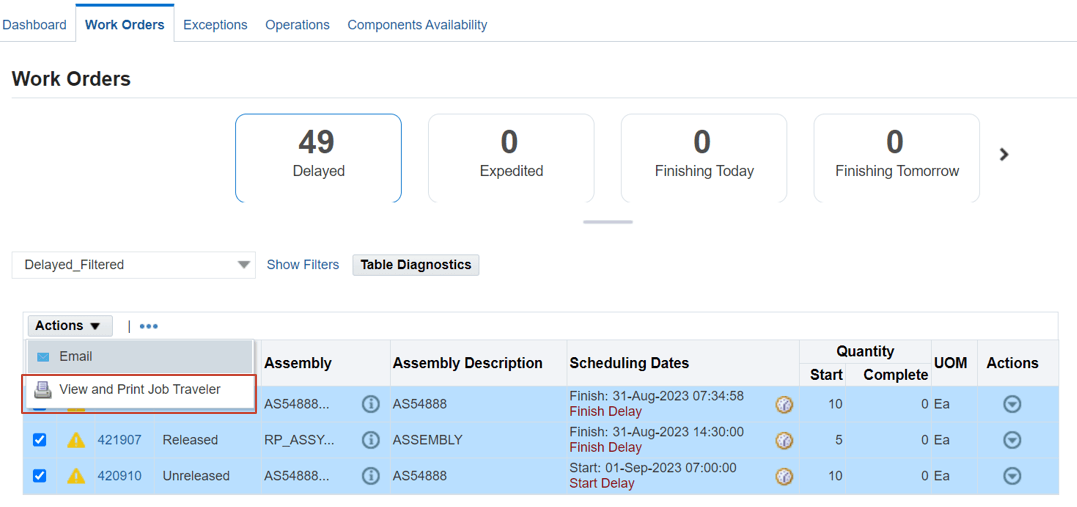
- You can then review the details for all the selected jobs in the Job Traveler report that opens per the Job Traveler template you have set.
Steps to enable and configure
Ensure that the Job Traveler Template Setup parameter is updated in the MES parameters. This parameter enables you to configure a template for job travelers at several different levels including item, category, or organization level. The setup also enables you to include separate PDF files as appendices to the traveler document. Note that the Job Traveler Template Setup parameter set at the site level only.
Tips and considerations
You can print the Job Traveler for a maximum of 15 work orders at a time.
Key resources
- Oracle Manufacturing Execution System for Discrete Manufacturing User's Guide:
- Chapter: MES Administrator
- Topic: MES Administrator > Job Traveler Template Setup
- Chapter: MES Supervisor
- Topic: Viewing and Printing Job Traveler for Multiple Jobs
- Chapter: MES Administrator
- R12.2.13 TOI: Implement and Use Discrete Manufacturing - WIP, MES and CTO Enhancements