Cost Returns for Internal Sales Orders (ISO) to Different Organizations
Return internal sales orders to organizations that did not originally ship the order, provided that the return organization is within the same operating unit and has the required shipping network setup. This ability gives businesses the flexibility to return goods to a centralized returns warehouse, a specialized handling facility, or another suitable organization while Oracle Cost Management handles the return accounting.
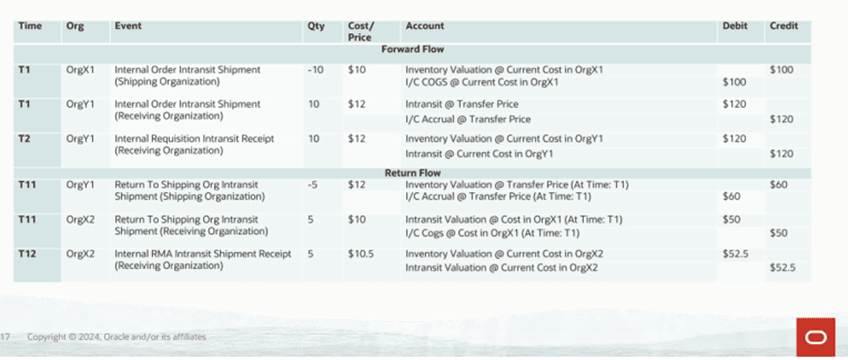
Accounting Example: Return Internal Sales Order to a Different Organization
Steps to enable and configure
- Set up the shipping network between the new return organization and the original buying organization.
- Define the return intransit account and FOB point on that shipping network.
- Initiate the internal order return and choose the organization where the returned items will be received.
- Receive the returned items in the selected organization.
- Run cost processing and review the intransit valuation and accounting output.
Tips and considerations
- Restrict shipping network setups to organizations that are valid return organizations so users do not choose unintended return locations.
- Validate return intransit accounts and FOB point setup before enabling the flow in production.
- If users cannot see the alternate return organization, confirm that the shipping network from the new return organization to the original buying organization is complete.
Key resources
- Oracle Cost Management User's Guide
- Oracle Inventory User's Guide
- Oracle Order Management User's Guide